Beginner's Guide to Network Devices
August 14, 2026


Master denial management in medical billing with proven strategies to reduce denials, boost appeals success, and protect revenue cycle performance.
September 25, 2026

Compare the best healthcare learning management platforms for providers with Next Level Technologies, serving Columbus, Ohio and Charleston, WV.
September 19, 2026

Compare cloud backup services with this guide to backup cloud database service architecture, security, and disaster recovery.
September 12, 2026
August 14, 2026
Network devices are the physical or virtual tools that connect computers, phones, servers, Wi-Fi, and internet services. They move data to the right place, connect separate networks, extend signals, and help protect business systems from unauthorized access.
Every email, cloud file, video call, and customer transaction depends on this hardware working reliably. A weak link can create slow performance, outages, security gaps, or Wi-Fi dead zones.
For mid-sized organizations, network hardware is more than a server-room concern. It is the foundation that keeps teams connected and critical services available. Next Level Technologies supports organizations from its main location in Columbus, Ohio and second location in Charleston, WV, with technical experience and extensive cybersecurity training to help make that foundation dependable.
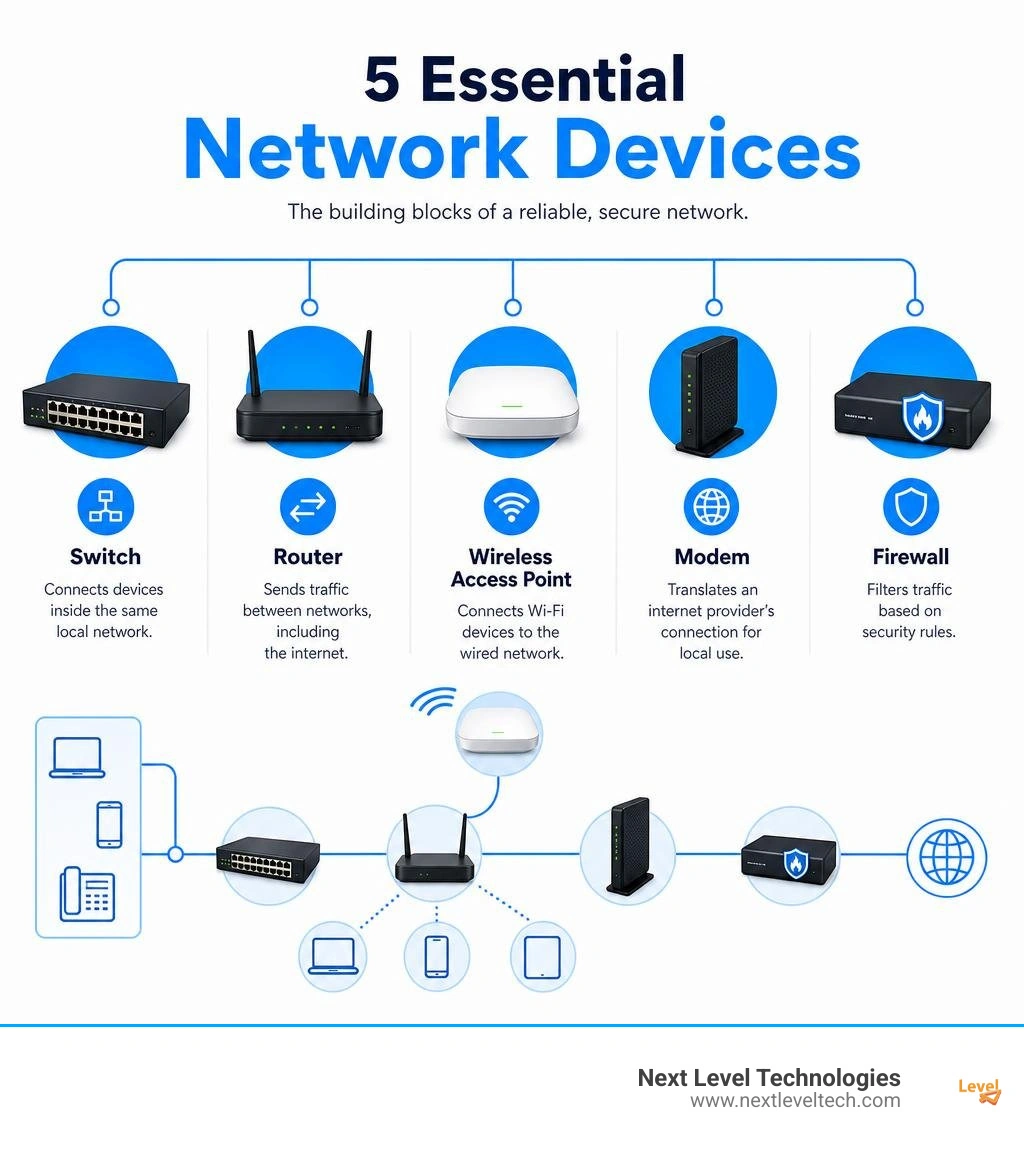
Quick network devices definitions:
At its core, a network device is a piece of hardware or software that enables communication between devices across a local or wide area network. Whenever your computer requests a web page, sends a file to a network printer, or connects to a cloud server, that request is broken down into small fragments known as data packets. These packets are transmitted through a chain of physical hardware appliances designed to ensure information arrives at its exact destination accurately and securely.
Network devices process these packets using three primary methods: packet forwarding, traffic routing, and protocol translation. Packet forwarding occurs when a device receives a data unit and inspects its header to determine which physical port or destination address it should be sent to next. Traffic routing takes this a step further by evaluating network topologies and real-time conditions to select the absolute best path across multiple interconnected networks. Protocol translation happens when two systems speak different languages—for example, converting local TCP/IP requests into analog signals suitable for telecom lines, or bridging local Ethernet frames to public internet standards.
To understand how these hardware appliances interact seamlessly, engineers rely on the Open Systems Interconnection (OSI) model. This seven-layer framework categorizes networking tasks from the raw physical layer up to software applications. Understanding these layers helps clarify why certain appliances exist and how they protect your data flow. For a foundational overview of these concepts, explore our guide on Network Hardware In Computer Networks.
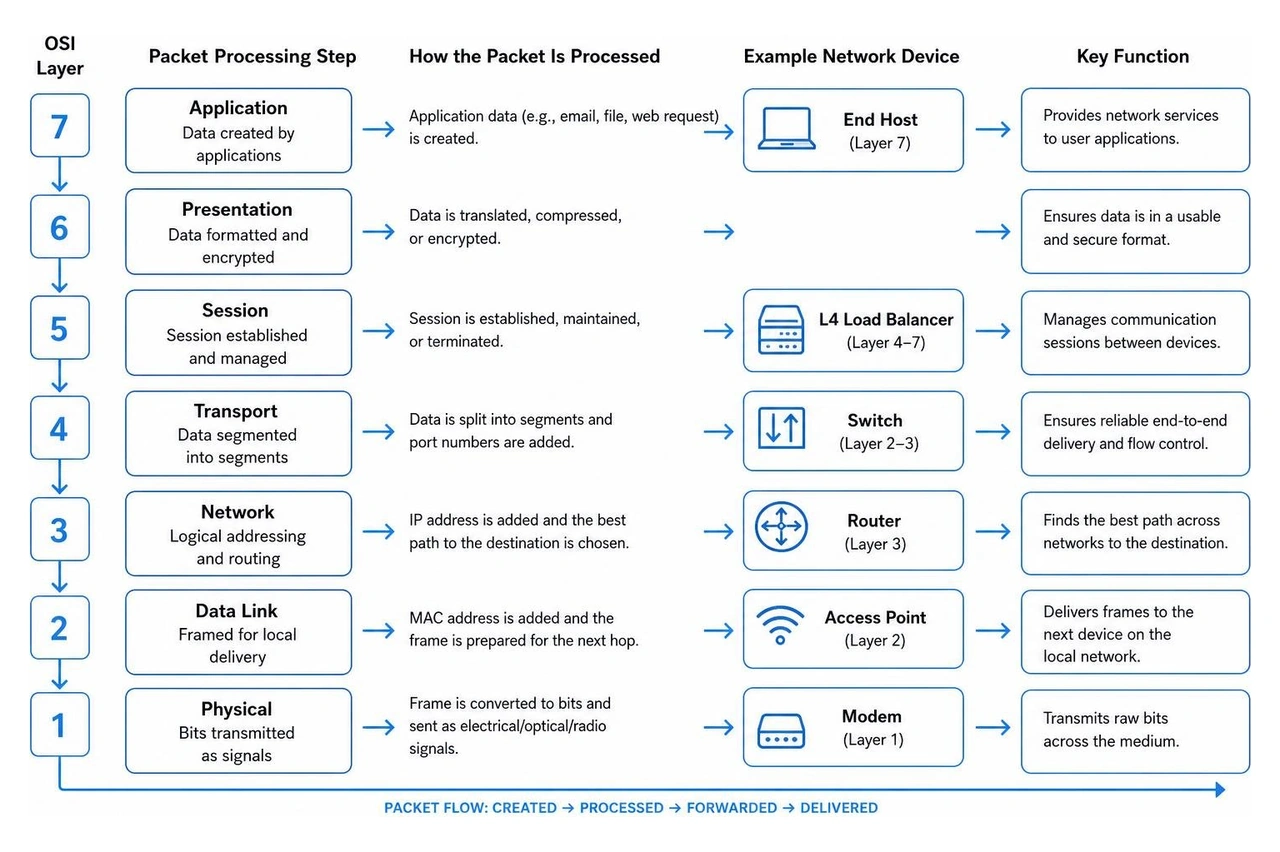
Modern network devices serve several critical roles that keep business operations running smoothly without digital gridlock:
Through our extensive cybersecurity training and decades of hands-on field experience, our team has seen how properly aligned network devices transform chaotic IT environments into secure, high-performing enterprise infrastructures.
The lowest levels of the OSI model handle physical signals and direct link-to-link communication. Layer 1 is the Physical Layer, responsible for transmitting raw bits over cables or radio waves. Devices operating here include legacy network hubs, physical repeaters, and basic modems. Because Layer 1 equipment cannot read logical addresses or manage data headers, it blindly repeats electrical signals to every connected port.
Layer 2 is the Data Link Layer, where devices begin using hardware intelligence. The most important Layer 2 appliance is the Ethernet switch. Switches utilize unique physical identifiers assigned to network cards, known as Media Access Control (MAC) addresses. When a packet arrives at a switch, the appliance reads its frame header, checks its internal MAC address table, and forwards the frame exclusively to the specific physical port where the target device resides.
Unlike broadcast-heavy legacy hardware, Layer 2 switches create dedicated pathways between endpoints. Modern enterprise switches deliver switching capacities exceeding 128 Gbps and forward tens of millions of packets per second. To dig deeper into choosing physical components, read our Hardware Networking Complete Guide.
As data moves beyond a single local sub-network, higher-layer appliances take control:
It is common for beginners to confuse hubs, switches, and routers, but they differ significantly in intelligence, efficiency, and security performance.
Network Hub (Layer 1): A hub is a simple broadcast device. When data enters one port, the hub copies and broadcasts that data to every single port on the device. This creates a single shared collision domain and a unified broadcast domain, leading to heavy network traffic congestion and significant data privacy risks.
Network Switch (Layer 2 / Layer 3): A switch maintains a MAC address table to direct traffic only to its intended recipient. By isolating traffic into individual collision domains per port, switches eliminate packet collisions, increase throughput, and restrict unauthorized eavesdropping within local area networks (LANs).
Network Router (Layer 3): A router connects entirely distinct networks together—such as joining an office LAN to the public internet or bridging two geographically separated branch offices. Routers examine destination IP addresses, evaluate routing tables, break up broadcast domains, and select optimal traffic paths.
Knowing when to deploy specific hardware prevents bandwidth bottlenecks and avoids security exposure:
As modern security threats expand, network devices must act as intelligent defensive barriers rather than simple data conduits. Combining robust perimeter defenses with microsegmentation keeps corporate networks resilient.
Next-Generation Firewalls (NGFW) inspect traffic at Layers 3 through 7. They evaluate data against strict access control rules, block malicious traffic, filter malware, and control unauthorized application usage. Intrusion Detection Systems (IDS) continuously monitor network traffic for suspicious anomalies and alert administrators. Intrusion Prevention Systems (IPS) take this protection further by actively terminating malicious connections and dropping dropped threat packets in real time.
Protocol Gateways act as intelligent translators when connecting networks built on vastly different architecture standards—such as linking legacy building systems to modern cloud IP infrastructure. Meanwhile, zero trust hardware architectures bring strict security rules directly down to the physical switch port level, ensuring no device is granted access without verified identity authentication. To discover how hardware-based security integrates with managed protection, check out our Network Security It Services Complete Guide.
Physical environment limitations often require specialized signal-extending appliances:
For broader hardware recommendations, read our detailed Computer Hardware Networking Complete Guide.
Managing modern hardware infrastructure comes with operational challenges that require proactive oversight. Without continuous maintenance, physical appliances can slow down or create unpatched cybersecurity vulnerabilities.
One common operational challenge is capacity overutilization. When hardware switches or edge routers experience high throughput demands beyond their processing limits, users experience buffering, high latency, and dropped VoIP calls. Environmental factors like poor rack ventilation, fluctuating server room temperatures, and unconditioned electrical power also degrade internal components rapidly.
To maintain network stability and protect hardware investments, organizations should follow these established management best practices:
For an extensive review of infrastructure management frameworks, explore our It Infrastructure Management Complete Guide. If your business is ready to refresh out-of-date assets, you can review options to Sell Used Networking Equipment in Columbus, OH.
Upgrading enterprise and campus environments requires supporting high-bandwidth demands and simplifying hardware installation. Modern upgrades rely heavily on Power over Ethernet (PoE) switching and 10G SFP+ fiber uplinks.
PoE switches deliver both data connectivity and direct electrical power through standard Ethernet cabling. Standard IEEE 802.3at (PoE+) provides up to 30W per port, while advanced IEEE 802.3bt (PoE++) delivers up to 90W per port. With overall switch power budgets reaching 400W to 500W, businesses can easily power pan-tilt-zoom (PTZ) security cameras, smart building controls, and multi-radio Wi-Fi 7 access points without running dedicated electrical outlets to every device.
Simultaneously, 10G SFP+ optical uplink ports prevent core bandwidth bottlenecks. By connecting access switches to central core routers or local storage arrays via 10Gbps channels, businesses keep multi-gigabit user traffic moving cleanly across modern campus buildings.
A modem translates incoming signals from your Internet Service Provider into a digital format your network components can read. A router takes that digital internet connection and distributes it to multiple local computers, phones, and smart devices, assigning private IP addresses and routing internal traffic securely.
Network hubs were officially deprecated by the IEEE 802.3 standard in 2011 because they broadcast incoming packets to every connected port indiscriminately. This creates a single shared collision domain, causes extreme bandwidth congestion, and exposes unencrypted data frames to every endpoint connected to the physical hub.
Power over Ethernet (PoE) switches pass electrical power alongside network data over standard Cat5e or Cat6 cables. This eliminates the need to hire electricians or install separate electrical outlets near ceiling-mounted wireless access points, IP surveillance cameras, or desktop VoIP phones, reducing installation costs and deployment timelines.
Building a secure IT infrastructure requires choosing the right network devices, configuring them for optimal performance, and maintaining consistent security practices. From basic Layer 2 switches to advanced Layer 3 dynamic routers and Next-Generation Firewalls, every physical component plays a crucial role in maintaining productivity and keeping corporate data safe.
Proactively managing hardware lifecycles, maintaining firm patch routines, and configuring proper network microsegmentation protects mid-sized businesses from downtime and security breaches. Next Level Technologies brings more than two decades of technical experience and extensive cybersecurity training to help mid-sized organizations build resilient technology systems. Operating from our main location in Columbus, Ohio and our second location in Charleston, WV, our local teams deliver reliable, enterprise-grade technology designed to scale alongside your business.
To optimize your network hardware, eliminate connectivity bottlenecks, and secure your company's critical systems, learn more about our comprehensive Managed IT Services and IT Support today.
Master denial management in medical billing with proven strategies to reduce denials, boost appeals success, and protect revenue cycle performance.
September 25, 2026
Compare the best healthcare learning management platforms for providers with Next Level Technologies, serving Columbus, Ohio and Charleston, WV.
September 19, 2026
