Why Computer Hardware Networking is the Foundation of Every Modern Business
Computer Hardware Networking refers to the physical devices and equipment that enable communication, data exchange, and resource sharing between interconnected computers and systems. At its core, it's the tangible infrastructure—routers, switches, servers, cables, and access points—that allows devices to connect, communicate, and work together as a unified network.
Quick Answer: The Essential Components of Computer Hardware Networking
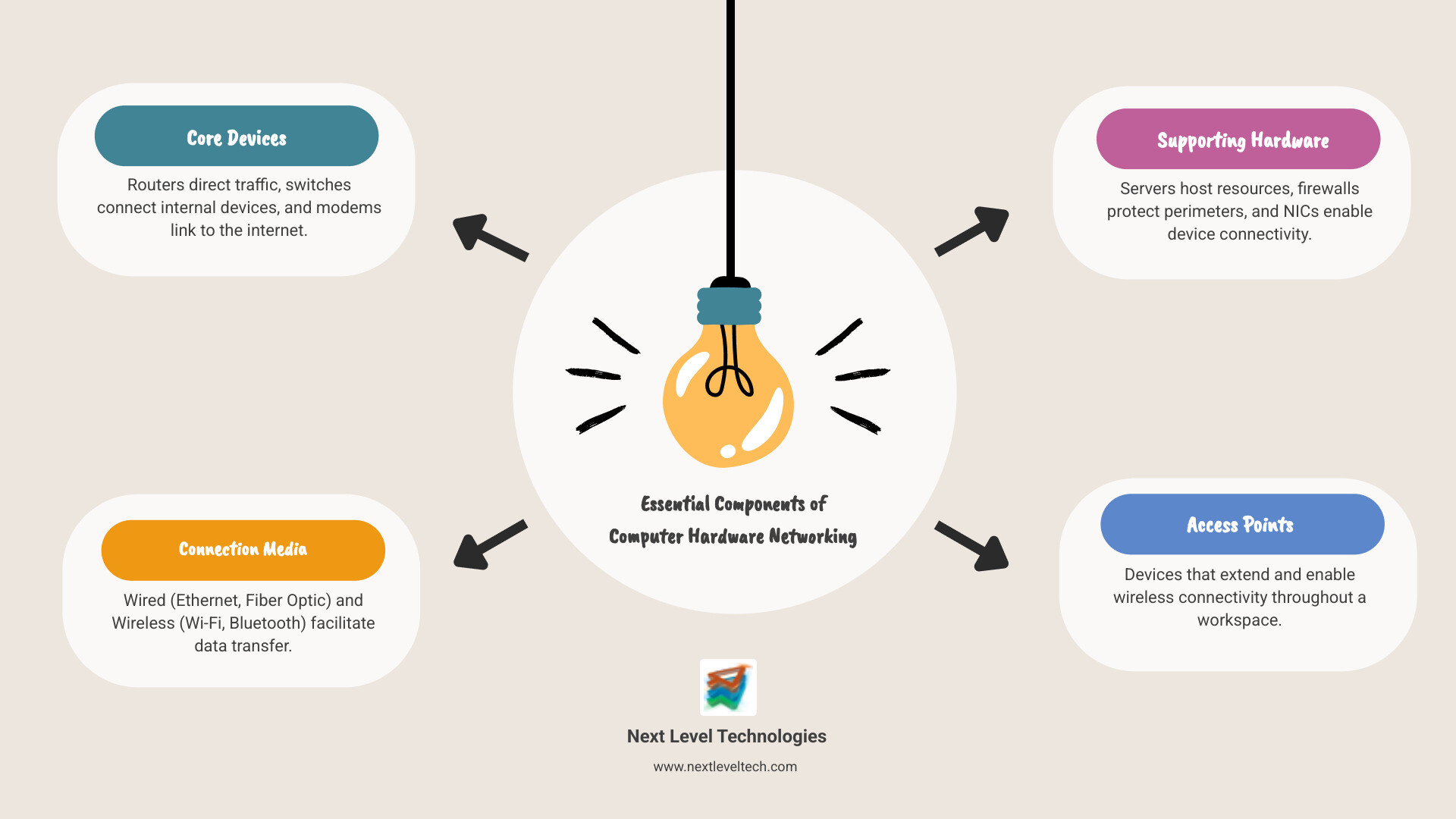
- Core Devices: Routers direct traffic between networks, switches connect devices within a network, and modems connect your network to the internet
- Connection Media: Ethernet cables and fiber optics for wired connections, Wi-Fi and Bluetooth for wireless
- Supporting Hardware: Servers that host resources, firewalls that protect against threats, and network interface cards (NICs) that enable device connectivity
- Access Points: Devices that extend wireless connectivity throughout your workspace
Without proper computer hardware networking, your business simply can't function in today's connected world. It's how your employees access email, share files, connect to cloud applications, and communicate with customers. Yet many businesses take a piecemeal approach—adding devices as needed without considering how they work together—which creates vulnerabilities, bottlenecks, and frustrating downtime.
The stakes are high. Hardware failures account for 38% of network downtime, according to industry surveys. When your network goes down, productivity stops. Employees can't work. Customers can't be served. Revenue is lost.
A well-designed network infrastructure isn't just about connectivity—it's about reliability, security, and scalability. It needs to handle your current workload while being flexible enough to grow with your business. It must protect sensitive data from increasingly sophisticated threats. And it should work seamlessly in the background, so your team can focus on what they do best.
I'm Steve Payerle, President of Next Level Technologies, and I've spent over 15 years helping businesses in Columbus, Ohio and Charleston, WV build robust, secure Computer Hardware Networking infrastructures that support their growth and protect their operations. Our team brings extensive cybersecurity training and hands-on experience to ensure your network hardware works as a cohesive, secure system—not just a collection of disconnected devices.
Relevant articles related to Computer Hardware Networking:
The Building Blocks: Fundamental Network Hardware Components
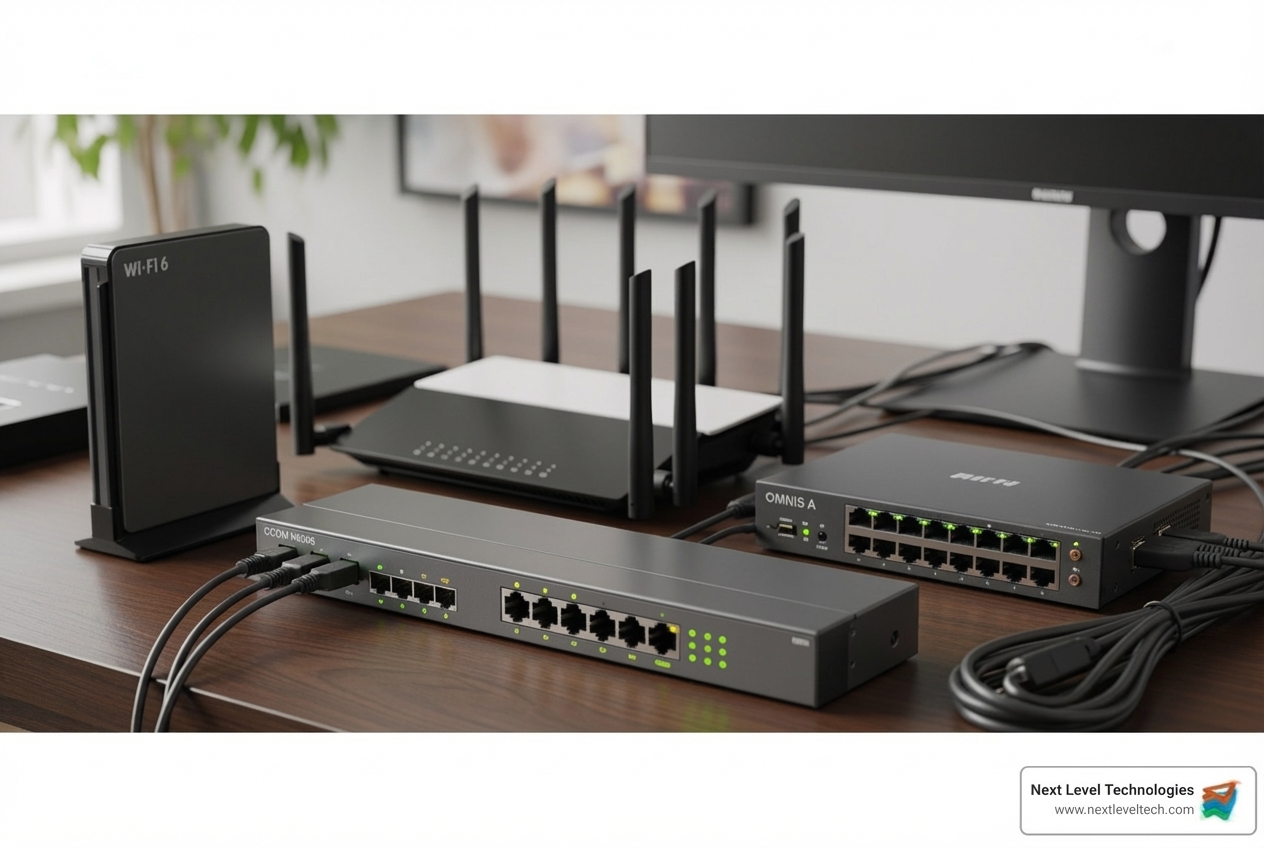
Imagine your network hardware as the physical foundation of your business's communication. These devices—laptops, desktops, servers, and printers—are the building blocks that allow your team to interact and connect to the outside world. At the most basic level, every device is an "endpoint," while "servers" are powerful computers that store data and manage resources for the network.
Without these fundamental components, there's simply no network to speak of.
Core Interconnection Devices
These are the unsung heroes of your network, tirelessly directing traffic and ensuring data gets where it needs to go.
- Routers: A router is like a traffic cop for your data. It connects multiple networks (e.g., your office network to the internet) and uses routing tables to determine the best path for data packets to reach their destination. Routers are crucial for internet connectivity and for segmenting larger networks.
- Switches: A switch connects multiple devices within the same local area network (LAN). It learns the unique Media Access Control (MAC) address of each device, allowing it to send data packets only to the intended recipient. This dramatically improves network efficiency and reduces unnecessary traffic.
- Hubs: Hubs are obsolete devices that broadcast data to all connected devices, rather than a specific recipient. This creates unnecessary traffic and data collisions that slow the network. They have been replaced by far more efficient switches.
- Bridges: A bridge connects two separate network segments and filters traffic between them to reduce congestion. This function is now typically handled by more advanced switches and routers.
- Gateways: A gateway acts as an entrance to another network, translating data between two networks that use different protocols. For example, your router serves as a gateway between your local network and the internet.
Here's a quick comparison of some of these core devices:
| Feature | Hub | Switch | Router |
|---|
| Function | Connects devices; broadcasts data | Connects devices; directs data to specific MAC | Connects networks; directs data to specific IP |
| Intelligence | Low (Layer 1 OSI) | High (Layer 2 OSI, some Layer 3) | High (Layer 3 OSI) |
| Collision Domain | All devices in one collision domain | Each port is its own collision domain | Each interface is its own broadcast domain |
| Data Flow | Broadcasts to all ports | Directs to specific port | Forwards between networks |
| Use Case | Obsolete, very basic networks | Local Area Networks (LANs) | Connecting LANs to WANs (e.g., Internet) |
You can dig deeper into these devices with our article on Hubs, Switches, Bridges, and Routers.
Now that we have our traffic controllers, we need the actual roads for data to travel.
- Transmission Media: This refers to the physical pathways data travels on.
- Wired Media:
- Ethernet Cables: The most common wired connection (e.g., Cat5e, Cat6), offering reliable, fast, and secure connectivity within an office.
- Fiber Optic Cables: Transmit data using light signals, offering incredibly high speeds over long distances. Ideal for backbone networks and connecting buildings.
- Wireless Media:
- Wi-Fi: Uses radio waves to create a wireless local area network (WLAN), offering flexibility and convenience.
- Bluetooth: A short-range wireless technology for connecting peripherals like headphones and keyboards.
- Access Points (APs): A Wireless Access Point (WAP) creates a WLAN by connecting to a wired router or switch and projecting a Wi-Fi signal to a designated area.
- Modems: A modem (modulator-demodulator) is the bridge between your local network and your Internet Service Provider (ISP), converting signals for transmission over cable or fiber lines.
- Network Interface Cards (NICs): Every network-connected device needs a NIC. This hardware component, which can be wired or wireless, allows the device to connect to a network and has a unique MAC address for identification.
For more foundational knowledge, explore our Basic Computer Hardware Networking Guide.
The Difference Between Wired and Wireless Networking
The choice between wired and wireless isn't always clear-cut, and a hybrid approach often works best for businesses in Columbus, OH and Charleston, WV.
- Speed Comparison: Generally, wired connections (Ethernet and fiber optic) offer higher, more consistent speeds than wireless. While modern Wi-Fi is fast, wired is superior for large data transfers.
- Reliability: Wired connections are more reliable and less susceptible to interference from other devices or physical obstructions like concrete walls.
- Security Considerations: Wired networks are inherently more secure, requiring physical access. Wireless networks are more vulnerable and require strong encryption (like WPA3) to be secure.
- Convenience: Wireless networking offers best convenience and mobility, allowing devices to connect anywhere within signal range.
- Use Cases for Each:
- Wired: Ideal for stationary devices needing maximum speed and reliability, like servers, desktops, and security cameras.
- Wireless: Perfect for mobile devices like laptops and smartphones, and for guest networks or meeting rooms where cabling is impractical. Wi-Fi 6 and 6E are beneficial for businesses with a high density of wireless users. You can learn more about The Most Common Wi-Fi Standards and Types, Explained.
Network Blueprint: Architectures, Topologies, and Protocols
Understanding Computer Hardware Networking isn't just about knowing the pieces; it's about how they fit together. This is where network architectures, topologies, and protocols form the blueprint for your network's operation.
These elements dictate how devices are arranged, how data flows, and the rules governing their communication.
Understanding Computer Hardware Networking Architectures
Network architecture defines its operational structure.
- Client-Server Model: The most common business model. Dedicated servers provide resources (files, email) to client devices (desktops, laptops). This model offers centralized control, easier management, and strong security, but the server can be a single point of failure. It is highly scalable.
- Peer-to-Peer (P2P) Model: Each device ("peer") acts as both a client and a server, sharing resources directly. This decentralized model is simple for small networks but lacks central control and becomes difficult to manage and secure as it grows.
Physical Layouts: Network Topologies
Network topology describes the physical or logical arrangement of connections in a network.
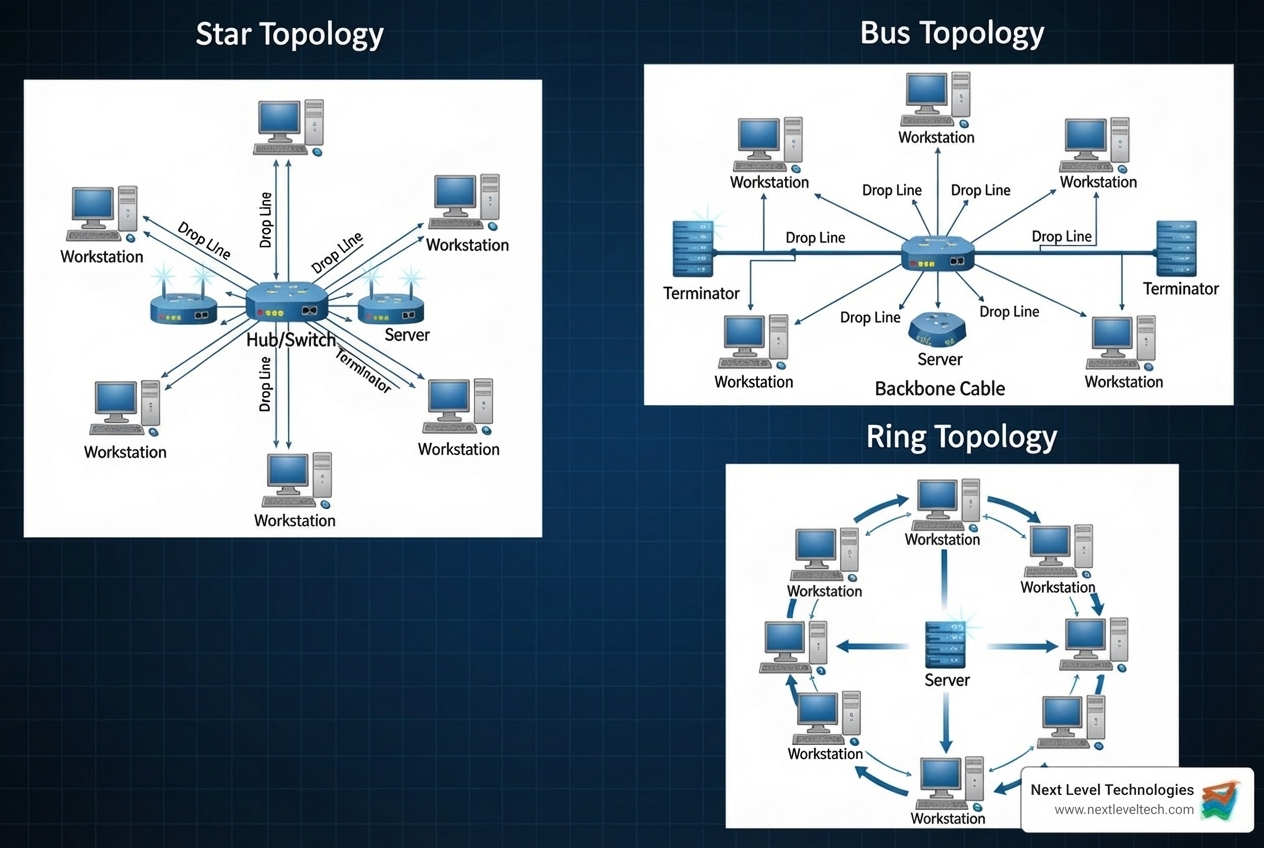
- Star Topology: All devices connect to a central hub or switch. This is very common in modern offices. If one device fails, only that device is affected. However, if the central device fails, the entire network goes down.
- Bus Topology: An outdated topology where all devices connect to a single main cable. A break in the cable can take down the entire network.
- Ring Topology: An outdated topology where devices are connected in a loop. A single failure can disrupt the whole network.
- Mesh Topology: Every device is connected to every other device, offering high redundancy. However, it's expensive and complex, typically used for critical backbone networks.
- Hybrid Topology: Most large networks use a hybrid approach, combining two or more topologies to leverage the strengths of each.
The choice of topology impacts network performance, reliability, and troubleshooting.
The Language of Networks: Protocols
For devices to communicate, they need a common language. These languages are called network protocols—sets of rules governing how data is formatted, transmitted, and interpreted.
- TCP/IP Suite: The foundational set of protocols for the internet and most modern networks.
- TCP (Transmission Control Protocol): Ensures reliable, ordered, and error-checked delivery of data.
- IP (Internet Protocol): Handles addressing and routing of data packets to the correct destination.
- HTTP/HTTPS:
- HTTP (Hypertext Transfer Protocol): The protocol for transmitting web pages.
- HTTPS (Hypertext Transfer Protocol Secure): The secure, encrypted version of HTTP, crucial for protecting sensitive information like login credentials.
- FTP (File Transfer Protocol): A protocol used for transferring files between a server and a client.
Protocols are the rules that ensure devices can understand each other, regardless of their manufacturer. Without them, network communication would be impossible.
For more on how hardware and software work together, check out our article on Computer Hardware Software and Networking.
Management and Security in Computer Hardware Networking
A network is only as good as its management and security. Neglecting these aspects can turn a powerful tool into a significant liability. A well-functioning network is a necessity for business continuity and growth.
Our team at Next Level Technologies understands that in Columbus, OH and Charleston, WV, businesses rely on a network that boasts three key characteristics:
- Reliability: The network must be consistently available and perform as expected.
- Scalability: It needs to grow and adapt to increasing demands without a complete overhaul.
- Security: The network must protect sensitive data and systems from unauthorized access and cyber threats.
Common Challenges in Network Hardware
Even with the best planning, managing network hardware comes with its share of headaches.
- Hardware Failures: As mentioned, hardware failures are responsible for 38% of network downtime. A failed router, switch, or cable can bring operations to a grinding halt.
- Performance Bottlenecks: Improperly configured or outdated hardware can become a choke point, slowing down the entire network.
- Security Vulnerabilities: Outdated firmware on a router or firewall can leave gaping holes in your defenses, making your network an easy target.
- Configuration Errors: A single incorrect setting on a network device can lead to connectivity issues, poor performance, or security breaches.
- Environmental Factors: Overheating, poor ventilation, or power fluctuations can cause premature hardware failure.
Many of these challenges can be mitigated with proactive management. For more insights into troubleshooting, refer to our article on Computer Hardware Problems and Solutions.
Best Practices for Computer Hardware Networking Management
Effective management is about preventing problems before they start.
- Proactive Monitoring: Use 24/7 network monitoring tools to track performance and traffic, allowing you to identify and address problems before they cause downtime.
- Regular Maintenance: This includes routine firmware updates, cleaning equipment to ensure proper airflow, and inspecting cables for wear and tear.
- IT Asset Management: Keep a detailed inventory of all network hardware for lifecycle management and replacement planning. Our IT Asset Management services can help with this.
- Capacity Planning: Plan for growth in users, applications, and data volume to avoid future performance bottlenecks.
- Selecting Hardware for Specific Needs: Choose quality, business-grade hardware that is appropriate for your business size, traffic volume, and security requirements.
- Importance of Staff with Extensive Cybersecurity Training: This is where Next Level Technologies excels. Our teams in Columbus, OH and Charleston, WV have extensive cybersecurity training and experience. We don't just set up your network; we secure it from the ground up, implementing best practices based on a deep understanding of the evolving threat landscape.
The Role of Hardware in Network Security
Network security isn't just a software concern; hardware plays a critical role.
- Firewall Configuration: Hardware firewalls are your first line of defense, monitoring and controlling network traffic based on security rules. A properly configured firewall blocks unauthorized access and prevents malware from entering your network.
- Secure Router Setup: Your router is the gateway to your network. Secure configuration—changing default passwords, disabling unused services, and using strong Wi-Fi encryption—is paramount. Advanced routers may also offer Intrusion Detection/Prevention Systems (IDS/IPS).
- Access Control Lists (ACLs): Implemented on switches and routers, ACLs are rules that filter traffic, determining which users or devices can access specific network resources.
- Physical Security of Devices: Don't overlook the basics. Physically securing server racks and access points prevents tampering or theft.
- How Hardware Contributes to a Layered Defense: Hardware forms the foundation of a layered security approach. From the physical security of devices to the intelligent filtering of firewalls, it creates multiple barriers an attacker must overcome.
For a deeper dive into protecting your business's digital assets, explore our guide on IT Infrastructure and Security.
Frequently Asked Questions about Computer Hardware Networking
We often get questions from businesses in Columbus, OH and Charleston, WV about their Computer Hardware Networking needs. Here are some of the most common ones:
What are the most critical network hardware components for a small business?
For a small business, a solid foundation is key. The most critical components are:
- Router: Connects your business to the internet and directs traffic. It often provides basic firewall and Wi-Fi capabilities.
- Switch: Connects your wired devices (computers, printers, servers) within the office. A dedicated switch offers better performance than a combined router/switch.
- Firewall: A dedicated firewall provides a more robust layer of security than the basic protection offered by most routers.
- Wireless Access Point (WAP): If you need Wi-Fi, a WAP is crucial. Ensure it supports modern standards (like Wi-Fi 6) for better performance and security.
These components work together to provide reliable, secure connectivity. For more on this, check out our IT Infrastructure for Small Business article.
How do I choose the right hardware for my network?
Choosing the right hardware involves assessing your needs and future plans:
- Assess Needs: How many users and what types of traffic (e.g., video conferencing, large file transfers) will the network support? This determines bandwidth requirements.
- Plan for Scalability: Choose hardware that can grow with your business to avoid replacing the entire infrastructure later.
- Consider Budget: Balance cost with performance. Invest in quality for critical components without overspending on unneeded features.
- Prioritize Security: Look for devices with robust security capabilities like advanced firewall features, VPN support, and strong encryption.
- Compatibility: Ensure new hardware is compatible with your existing infrastructure.
Our IT Consulting for Small Businesses can help you make informed choices.
How often should network hardware be updated or replaced?
Several factors influence when to update or replace hardware:
- Lifecycle Management: Replace hardware that reaches its vendor-specified "end-of-life" (EOL) date, as it will no longer receive security updates or support, posing a significant risk.
- Firmware Updates: Hardware that no longer receives firmware updates is vulnerable and should be replaced.
- Performance Degradation: Consistent slowness, frequent dropouts, or an inability to handle your workload are strong signals that your hardware is outdated.
- Technological Advancements: Upgrade to leverage new standards (like Wi-Fi 6E) that offer significant efficiency or competitive advantages.
Generally, business-grade network hardware should be reviewed for replacement every 3-5 years. Proactive IT Asset Life Cycle management is essential for planning these transitions.
Conclusion: Partnering for a Robust and Secure Network
As we've explored, Computer Hardware Networking is far more than just plugging in a few cables. It's the intricate, physical backbone that determines the speed, reliability, and security of your entire business operation. From the routers directing your digital traffic to the cables carrying your data, every component plays a vital role. Neglecting this foundation can lead to costly downtime, security breaches, and a stifled ability to grow.
The future of networking continues to evolve rapidly, with trends like automation, software-defined networking, and cloud integration reshaping how we build and manage our digital infrastructure. Staying ahead requires not just an understanding of current technology but also a keen eye on what's next.
This is where the value of expert management becomes indispensable. At Next Level Technologies, we don't just provide IT services; we become your trusted partner in navigating this complex landscape. Our highly trained staff in Columbus, OH and Charleston, WV bring extensive technical experience and specialized cybersecurity training to ensure your Computer Hardware Networking is not only robust and efficient but also fortified against the ever-present threats of the digital world. We believe your IT infrastructure should empower your business, not hold it back.
Ready to take your network to the next level? Find how our comprehensive Managed IT Services and IT Support can build and maintain a secure, high-performing network that supports your business goals.