A Quick Start Guide to Network Hardware in Computer Networks
June 20, 2026


Compare cloud backup services with this guide to backup cloud database service architecture, security, and disaster recovery.
September 12, 2026

Compare cloud based backup services with our ultimate checklist covering encryption, recovery, and compliance for your business.
September 5, 2026

Protect your business with expert Phishing protection Columbus services from Next Level Technologies, based in Columbus, Ohio and Charleston, WV.
August 27, 2026
June 20, 2026
Network hardware in computer networks refers to the physical devices that allow computers and other devices to connect, communicate, and share data with each other.
Here are the most common types you'll encounter:
Most people never think about their routers, switches, or firewalls — until something stops working. Then suddenly, everyone needs answers fast.
Whether you're building a network from scratch or trying to figure out why your current setup is slowing you down, understanding the physical equipment behind your network is the first step. The right hardware directly affects your internet speed, security posture, and ability to scale as your business grows.
For mid-sized businesses in Columbus, OH and Charleston, WV, getting this foundation right matters even more. A weak hardware layer creates the exact vulnerabilities that cybercriminals look for — and the downtime that kills productivity.
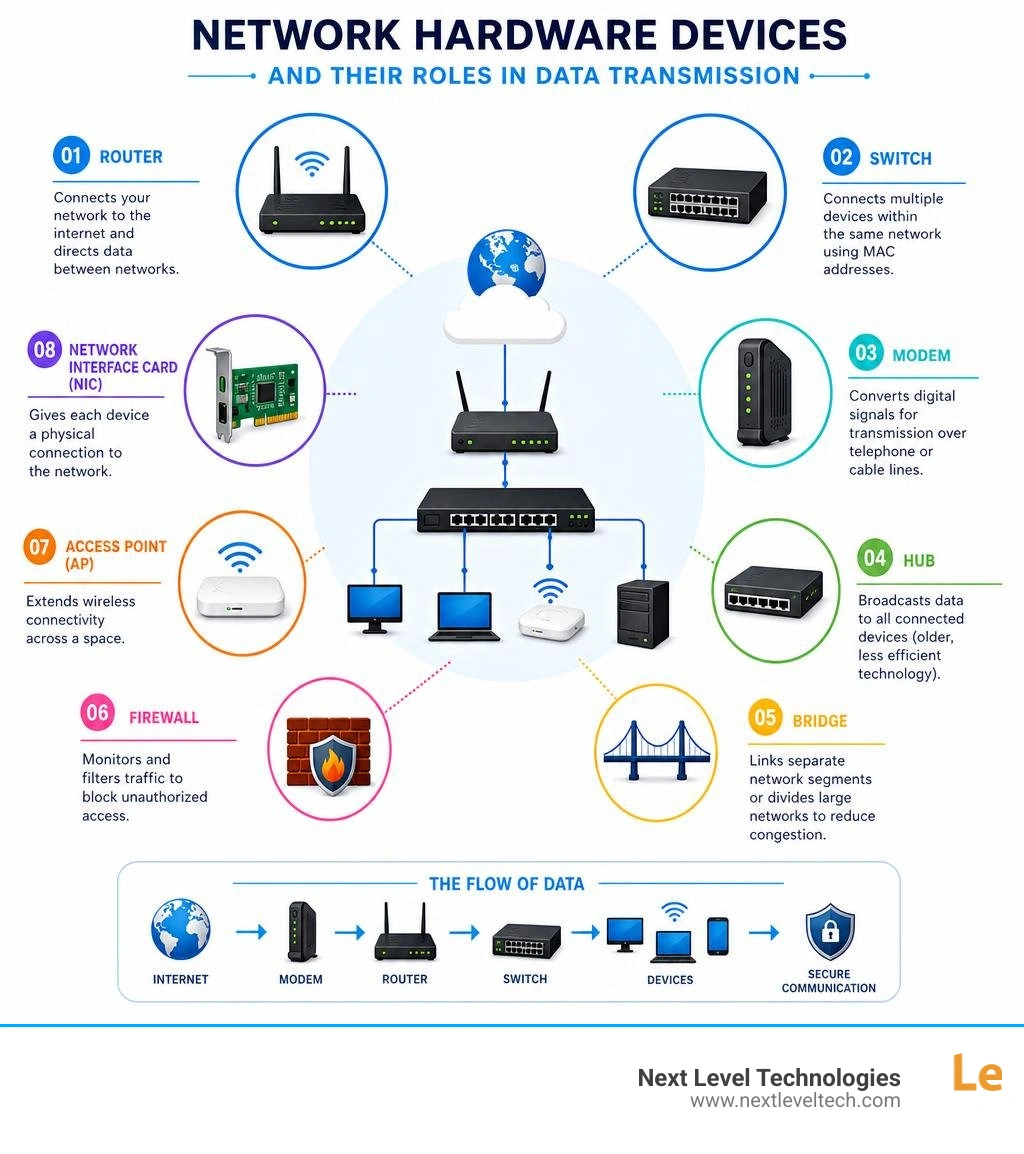
Network hardware in computer networks terms simplified:
At its core, network hardware in computer networks forms the physical skeleton of your digital environment. Without these physical devices, your software, cloud applications, and databases would be completely stranded. Network hardware includes everything from the heavy-duty enterprise routers humming in your server room to the copper and fiber-optic cables running through your office walls.
The primary job of network hardware is to facilitate fast, secure, and reliable communication. When a team member in your Columbus office clicks "Print" or accesses a database hosted in your Charleston headquarters, physical equipment is responsible for packaging that request, choosing the fastest path across the internet, checking it for malicious code, and delivering it to its destination.
Investing in high-quality network hardware directly impacts your bottom line in three major ways:
If you are just getting started or need a refresher on the absolute basics, check out our More info about basic hardware to build a solid foundation.
To understand how data flows through your business, you need to know the core components that make up a standard network. While many modern home routers combine several of these components into a single plastic box, enterprise environments use dedicated physical appliances to maximize efficiency, redundancy, and security.
The five most common components of network hardware are:

For a deeper dive into how these devices interact and compare, take a look at our Guide to hubs, switches, and routers.
To truly understand how network hardware operates, engineers look at the Open Systems Interconnection (OSI) model, which divides network communication into seven distinct layers.
Layer 1 is the Physical Layer. This layer deals with the actual physical transmission of raw unstructured data bits over a physical medium (like copper wires, fiber-optic glass, or radio waves). Layer 1 devices do not understand IP addresses, MAC addresses, or data packets; they only care about electrical voltages, light pulses, and radio frequencies.
Key Layer 1 devices include:
As we move up the OSI model, network devices become significantly more intelligent.
Layer 2 (The Data Link Layer) is where data is organized into frames and sent across physical links. Layer 2 devices use physical MAC addresses to identify devices on the exact same network segment.
Layer 3 (The Network Layer) is where routing happens. This layer handles logical addressing (IP addresses) and is responsible for path determination and forwarding packets across completely different networks.
For enterprise environments requiring top-tier performance, devices like the TP-Link Omada S6500 series showcase what modern Layer 3 hardware can do. For instance, the S6500-48G6XF switch offers a massive 216 Gbps switching capacity per unit, featuring 48 Gigabit RJ45 ports and 6 high-speed 10 Gbps SFP+ slots for stacking and uplinks. You can explore the full capabilities of this enterprise-grade hardware in the High-performance switch specs.
As business operations grow more complex, standard routing and switching are no longer enough. Modern business networks require dedicated, specialized hardware to protect data integrity, balance heavy traffic loads, and support remote workforces.
Key advanced network hardware components include:
To make sure your organization is fully protected, check out our Complete guide to network security for actionable strategies on aligning your physical hardware with robust digital defense protocols.
At the highest tier of networking — such as cloud data centers, internet exchange points, and massive enterprise backbones — standard processors simply cannot keep up with the sheer volume of global data. This has driven massive innovations in custom silicon architectures and high-density routing platforms.
Modern networking giants have developed specialized Application-Specific Integrated Circuits (ASICs) and Network Processing Units (NPUs) designed solely for packet processing. For example, the Cisco Silicon One architecture represents a major breakthrough, offering a unified silicon footprint that spans from enterprise campus switches to massive service provider routers.
The Cisco Silicon One G202 processor delivers up to 25.6 Tbps of full-duplex switching throughput, allowing network architectures to simplify their designs and reduce operational costs. You can read more about how this next-generation architecture is changing the industry in the Cisco Silicon One G202 Data Sheet.
On the high-performance routing front, hardware manufacturers are pushing the limits of physical space and power efficiency:
While your local Columbus or Charleston office might not need 28 Terabits of throughput today, these high-end technologies eventually trickle down into the business-class hardware we install and manage for our clients every day.
Managing your network hardware shouldn't be a reactive chore. Many businesses wait until a router fails or a switch burns out before they think about their physical infrastructure. By then, you are already dealing with lost revenue, frustrated employees, and emergency replacement costs.
To keep your network running smoothly, implement these industry best practices:
For more hands-on advice on keeping your systems running at peak performance, read our Tips for hardware networking services.
While they might look similar from the outside, these three devices operate at entirely different layers of the network and handle data in completely different ways:
Generally, enterprise network hardware should be upgraded or refreshed every 3 to 7 years.
While a high-quality switch or router might physically keep running past the 7-year mark, keeping outdated hardware poses severe risks. Older hardware eventually loses manufacturer support, meaning no more security updates or patches for newly discovered vulnerabilities. Furthermore, legacy hardware cannot support modern high-speed standards like Wi-Fi 6/6E, multi-gigabit wired speeds, or advanced SD-WAN routing protocols that keep remote teams connected.
Your physical network hardware is the foundation of your entire cybersecurity strategy. Modern hardware firewalls inspect incoming traffic in real-time, blocking malicious payloads before they ever reach your local computers.
For businesses supporting hybrid and remote workforces, hardware plays an indispensable role. Hardware-based VPN gateways and secure routers establish encrypted tunnels directly to your remote employees' home offices. This allows them to access local files and servers with the exact same security protocols they would have sitting in the physical office, keeping your data secure no matter where your team is working.
Building and maintaining a reliable network is about far more than just buying the most expensive boxes off the shelf. It requires an in-depth understanding of how physical devices interact, how data flows across different OSI layers, and how to protect those connections from ever-evolving security threats.
At Next Level Technologies, we bring over 20 years of technical experience and extensive cybersecurity training to businesses throughout Columbus, Ohio and Charleston, West Virginia. Whether you run a healthcare clinic requiring strict HIPAA compliance, a professional services firm, or a growing non-profit, we specialize in designing, installing, and proactively managing your physical network infrastructure.
With our local teams on the ground in Ohio and West Virginia, we deliver enterprise-grade technology, predictable monthly costs, and rapid response times to eliminate downtime and keep your business moving forward.
Ready to take your network to the next level? Contact us today to request a consultation for Managed IT Services and IT Support.
Compare cloud backup services with this guide to backup cloud database service architecture, security, and disaster recovery.
September 12, 2026
Compare cloud based backup services with our ultimate checklist covering encryption, recovery, and compliance for your business.
September 5, 2026

