Ultimate Checklist for Comparing IT Managed Services for Small Business
July 30, 2026


Explore health service administration careers, leadership skills, degrees, salaries, and job outlook for modern healthcare executives.
October 24, 2026

Learn how Healthcare Management Administrators Inc optimizes self-funded plans, provider networks, and clinical quality for employers.
October 17, 2026

Upgrade your healthcare claims management for maximum accuracy with Next Level Technologies, serving Columbus, Ohio and Charleston, WV.
October 10, 2026
July 30, 2026
IT managed services for small business is the practice of outsourcing your company's technology management to a specialized provider — so your systems stay secure, monitored, and running without you having to think about it.
Here's what that means in plain terms:
Running a small business is hard enough without worrying about whether your network is secure, your backups are working, or your systems are about to fail.
Most small business owners aren't IT experts — and they shouldn't have to be. But outdated or reactive IT support leaves businesses exposed to downtime, cyberattacks, and compliance risks that can be genuinely business-ending.
The numbers tell a stark story. The global managed services market is on track to reach $354.8 billion by 2026, and 70% of small businesses now rely on an MSP for cybersecurity and network monitoring — nearly double the share from five years ago. That shift isn't a coincidence. Businesses are learning, often the hard way, that break-fix IT support isn't enough anymore.
This guide from Next Level Technologies — serving businesses in Columbus, OH and Charleston, WV — gives you a complete, practical checklist for comparing MSPs and choosing the right IT partner for your business.
Handy it managed services for small business terms:
To understand how it managed services for small business can transform your daily operations, it helps to look at what a modern managed service it provider actually does.
In the simplest terms, what is a managed it service provider? It is an external team of technology professionals who take complete responsibility for your business's IT environment. Instead of waiting for a server to crash or a computer to get infected with malware before taking action, a managed provider works behind the scenes to keep your systems running smoothly.
This model relies heavily on proactive monitoring and continuous network management. By installing specialized software on your systems, we can identify hardware vulnerabilities, patch outdated software, and isolate security threats before they ever disrupt your workflow. The primary goal is dramatic downtime reduction, ensuring your team stays productive and your clients remain happy.
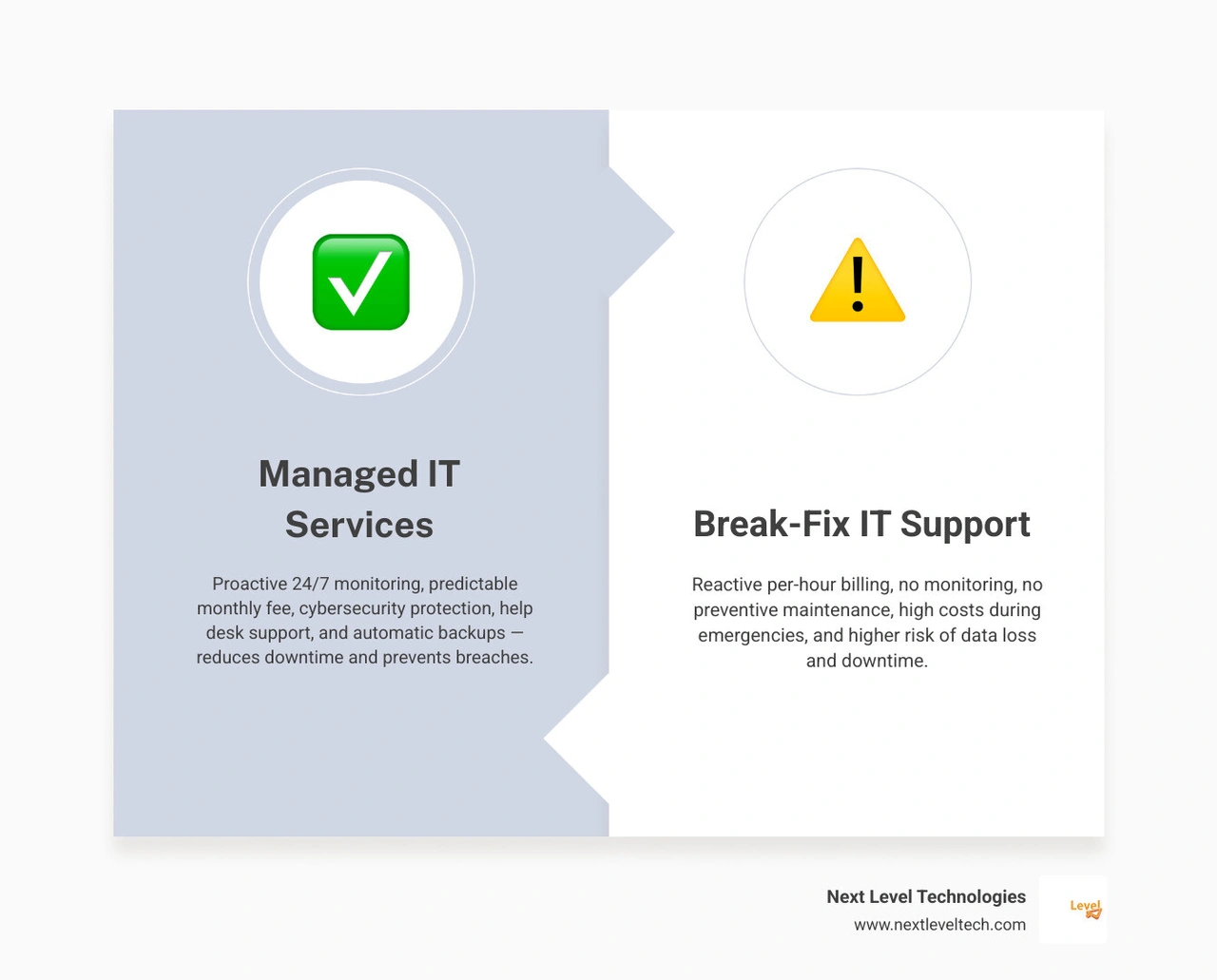
To truly appreciate the value of managed IT, we must compare it to the traditional "break-fix" model.
The break-fix approach is entirely reactive. When a computer stops working or your network goes down, you call an IT guy, wait for them to show up, and pay a premium hourly rate to fix the specific issue.
In contrast, managed IT services operate on a subscription-based, proactive model. Here is how the two approaches stack up:
For a deeper dive into how these models impact your daily operations, check out our comprehensive small business it support guide.
For years, local businesses relied on basic IT support to get by. However, relying on outdated it support for small businesses in the modern threat landscape is a major gamble.
First, traditional break-fix support results in massive system downtime. Because nobody is monitoring your systems, a failing hard drive goes unnoticed until it completely dies, grinding your business to a halt. You then lose hours—or even days—waiting for a technician to diagnose and repair the issue.
Second, the high hourly rates of emergency support can quickly drain a small business's cash reserves. When you are billed by the hour, complex troubleshooting sessions become financial nightmares.
Finally, traditional IT support lacks the strategic depth required to protect modern businesses. A break-fix technician might remove a virus from a laptop, but they won't analyze your overall security posture, implement multi-factor authentication, or train your staff to recognize phishing attempts.
Outsourcing your technology management to an experienced partner unlocks several competitive advantages that can help your business grow.
When you partner with a specialized provider, you instantly gain access to enterprise-grade technology and expertise without the enterprise-grade price tag. This transition leads to significant cost savings, as you no longer have to pay for expensive recruitment, employee benefits, or ongoing training for internal tech staff.
Furthermore, outsourcing accelerates your digital transformation goals. Small businesses that partner with an MSP are 3.5 times more likely to achieve their digital transformation goals within their first year. For a closer look at these advantages, read our guide on 5 reasons why your business needs professional it services and learn more about what can managed it services do for your business.
Many growing businesses eventually face a critical question: should we hire an in-house IT employee or outsource to a managed provider?
For most small businesses, the math heavily favors outsourcing. Hiring a single, qualified internal IT professional requires a substantial salary, benefits, payroll taxes, and ongoing training. Even then, that single employee only has a limited set of skills, works 40 hours a week, takes vacations, and gets sick. If a critical system fails at 2:00 AM or while they are on leave, your business is left stranded.
By contrast, when you outsource your small business it, you gain access to an entire team of professionals with diverse technical experience and extensive cybersecurity training. You receive 24/7 coverage, advanced monitoring tools, and strategic guidance for a fraction of the cost of a single full-time hire. In fact, companies using managed IT services save an average of 30% to 40% on annual IT costs compared to maintaining in-house IT staff.
Technology shouldn't just be a cost center; it should be an engine for growth. A professional MSP doesn't just fix broken computers—we help you leverage modern tools to work faster and smarter.
This includes guiding your business through seamless cloud migrations, automating repetitive manual processes, and ensuring your remote employees can collaborate securely from anywhere. By aligning your technology with your business objectives, we turn IT into a strategic asset.
To make sure your technology investments actually pay off, we work with you to develop a long-term roadmap based on the 6 components of a good it strategy. This proactive planning prevents you from wasting money on redundant software or outdated hardware, maximizing your return on investment.
Not all managed service providers are created equal. When evaluating potential partners, you need to look beyond basic help desk support and ensure they offer a comprehensive suite of services.
A truly reliable partner will provide a complete, multi-layered approach to your technology. This includes robust cybersecurity, automated data backups, reliable disaster recovery plans, and proactive maintenance. If you want to understand the full scope of what your business should expect, refer to our it solutions for smbs complete guide.
In today's digital landscape, cybersecurity cannot be an afterthought. Cybercriminals actively target small businesses because they know smaller organizations often have weaker defenses.
Your MSP must provide advanced threat detection, including endpoint protection, firewall management, and email security. Additionally, they must help you navigate complex regulatory environments. For example, if you handle patient records, your provider must implement HIPAA-compliant cybersecurity and data protection measures.
We highly recommend that small businesses review the CISA Small Business Resources to understand the baseline security standards expected of modern organizations. A qualified MSP will align your infrastructure with these federal guidelines to keep your data safe.
When a technical issue does arise, your employees need help immediately. A high-quality MSP provides a dedicated, local help desk that answers calls quickly and resolves issues without delay.
However, the real magic happens behind the scenes. Through proactive 24/7 monitoring, your provider should identify and resolve potential issues before your staff even notices a problem. For instance, if a server hard drive is beginning to show signs of physical wear, we can detect it, back up the data, and replace the drive overnight—completely eliminating what would have been a catastrophic daytime crash.
To keep your business running smoothly, your provider should follow the industry-standard business it support best practices 2025.
Choosing an MSP is a major decision that will impact your business for years to come. To make an informed choice, you need a structured evaluation process.

Before signing any contracts, you must carefully review their Service Level Agreements (SLAs) to understand their guaranteed response times, and closely examine their pricing models to ensure there are no hidden fees. For a complete blueprint on how to navigate this process, read our it support for business ultimate guide and learn how it consulting for small businesses can help you set the right expectations.
When interviewing a potential managed it services provider near me, don't hesitate to ask hard questions. Here are several critical questions to include in your interviews:
For more tips on what to look for during these conversations, review our small business tech support tips.
As you evaluate different providers, keep an eye out for these common warning signs of a low-quality MSP:
While specific pricing varies based on the size and complexity of your business, managed IT services are typically structured around two common models: per-user or per-device pricing.
In a per-user model, you pay a flat monthly fee for each employee, which covers all of their devices (such as their desktop, laptop, and phone). In a per-device model, you pay a set fee for each individual piece of hardware connected to your network.
This flat-rate structure makes budget planning incredibly simple, allowing you to scale your IT expenses predictably as your business grows. For guidance on budgeting for technology and security, you can consult the SBA Cybersecurity Guide.
Most small businesses see a return on their investment almost immediately. Within the first 30 to 90 days of onboarding, you should notice a dramatic reduction in IT-related downtime, which translates directly into higher employee productivity.
Additionally, by preventing costly data breaches, avoiding regulatory compliance fines, and eliminating unpredictable emergency repair bills, the cost savings quickly offset the monthly service fee. Over time, the strategic guidance of an experienced MSP helps you make smarter technology investments, further driving your business's growth.
Small businesses are prime targets for cybercriminals. The most common threats include:
Unprotected businesses face devastating consequences; 60% of small businesses that experience a data breach are forced to close their doors within six months of the attack. Managed IT services address these threats through continuous monitoring, advanced firewalls, email filtering, and regular employee security awareness training.
Choosing the right IT partner is one of the most important decisions you will make for your business's security, efficiency, and growth.
At Next Level Technologies, we bring over 20 years of technical experience and extensive cybersecurity training to businesses throughout Columbus, OH and Charleston, WV. We specialize in providing proactive managed IT, HIPAA-compliant security, and predictable monthly support that eliminates downtime and protects your bottom line.
If you are ready to stop worrying about your technology and start scaling with confidence, explore our Next Level Technologies Managed IT Services today to partner with a local team that puts your business first.
Explore health service administration careers, leadership skills, degrees, salaries, and job outlook for modern healthcare executives.
October 24, 2026
Learn how Healthcare Management Administrators Inc optimizes self-funded plans, provider networks, and clinical quality for employers.
October 17, 2026
