The Core Components of Small Business IT
Small business IT includes all the technology that keeps your business running securely and efficiently, from cybersecurity and data backup to network management and cloud solutions.
Key Components of Small Business IT:
- Cybersecurity Protection - Firewalls, antivirus, employee training, and threat monitoring.
- Data Backup & Recovery - Cloud and local backup solutions to protect critical information.
- IT Infrastructure - Servers, workstations, networking equipment, and collaboration tools.
- IT Support Services - Help desk, proactive monitoring, and system maintenance.
- Cloud Solutions - Scalable software and storage accessible from anywhere.
- Strategic IT Planning - Virtual CIO services and technology roadmapping.
Small businesses are vital, producing 46% of the nation's private-sector output, but many are vulnerable. Only 14% are prepared for cyberattacks, even though they are the target in 43% of all cases. The good news is that a robust IT foundation is achievable without a massive budget.
This guide will walk you through the essentials of a small business IT survival kit, from core components and pricing to choosing the right support and proving ROI.
I'm Steve Payerle, President of Next Level Technologies. For over 15 years, I've helped small businesses in Columbus, Ohio, and Charleston, WV, transform their IT. Our team delivers managed IT services backed by extensive cybersecurity training, letting you focus on growth instead of technical headaches.
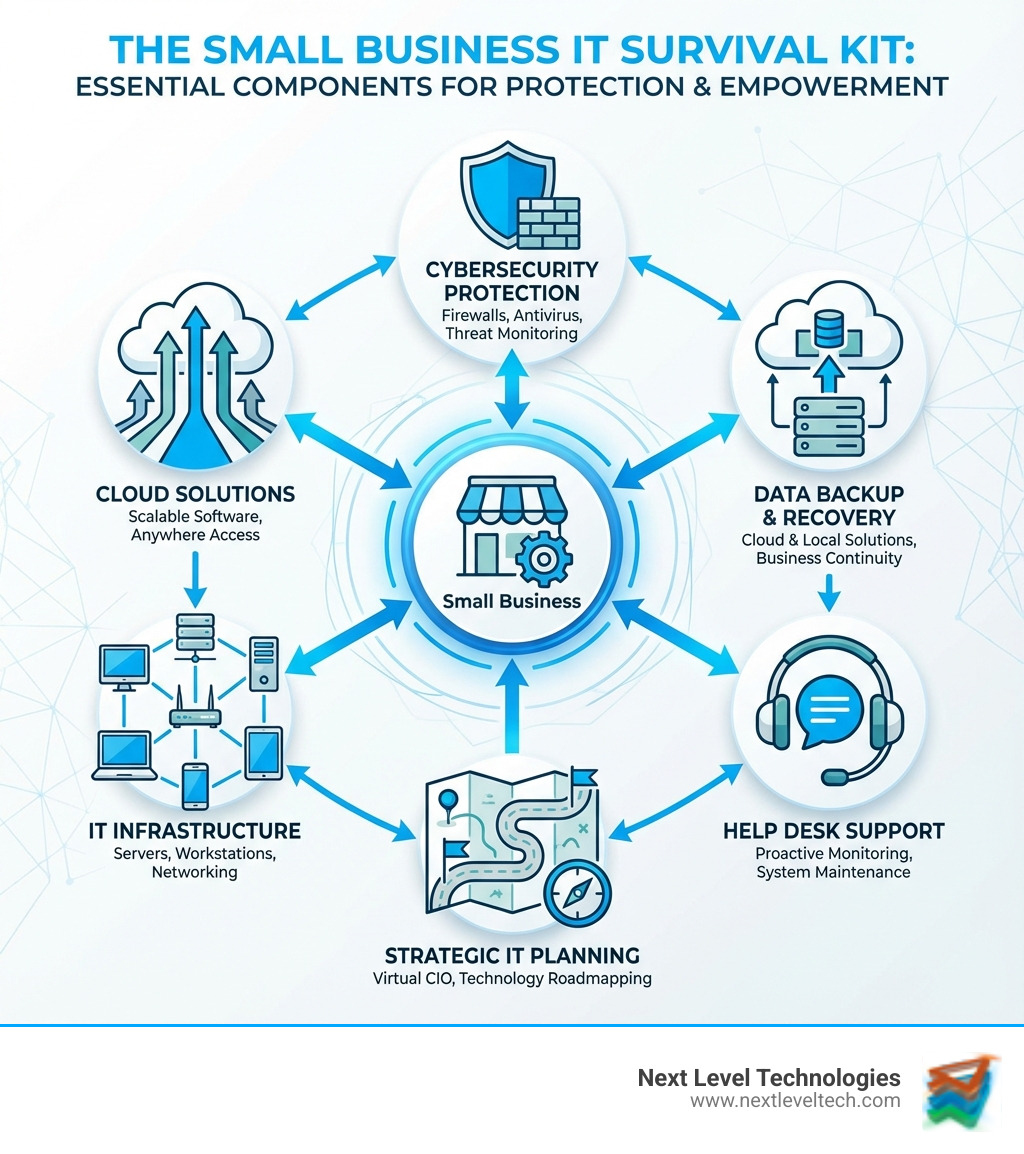
Every thriving small business relies on a solid technological backbone. Think of your small business IT as the nervous system of your operation—it needs to be robust, responsive, and protected. Our goal at Next Level Technologies is to ensure your foundational technology is not just functional, but proactive, contributing to your business continuity.
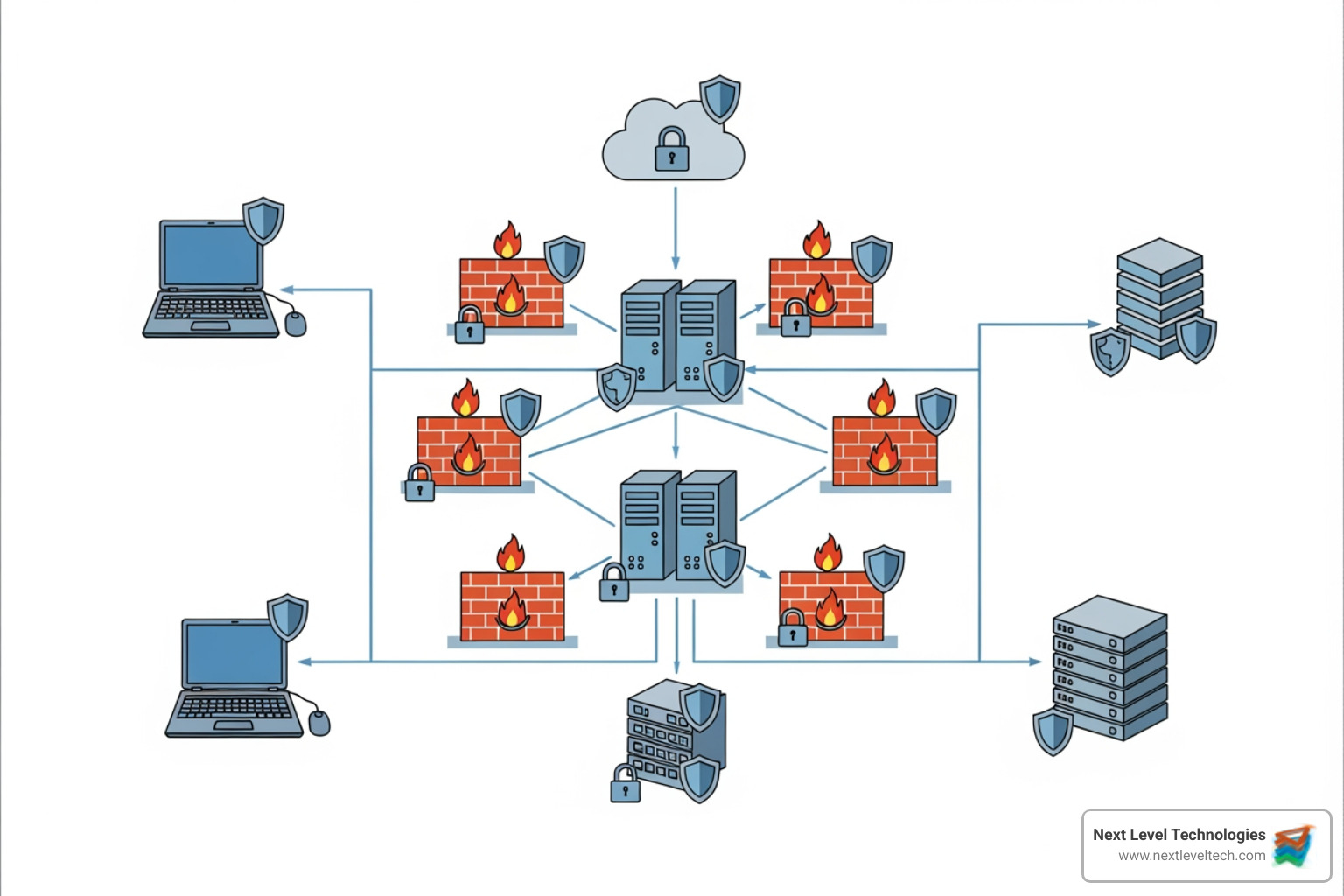
Cybersecurity: Your Digital Fortress
With 43% of cyberattacks targeting small businesses and only 14% prepared, building a strong digital fortress is essential. Key threats include:
- Phishing: Deceptive emails designed to trick employees into revealing sensitive information.
- Ransomware: Malicious software that locks your systems or encrypts data until a ransom is paid.
- Malware: Intrusive software like viruses or spyware designed to damage or access your systems.
Mitigating these threats requires a multi-layered approach. Here's how we help businesses in Columbus, OH and Charleston, WV:
- Proactive Monitoring & Protection: We use firewall management, next-gen endpoint protection (EDR), and network monitoring to stop threats before they cause damage.
- Employee Training: Your team is your first line of defense. We provide regular, engaging training on identifying current threats like phishing.
- Multi-Factor Authentication (MFA): This simple step adds a crucial layer of security beyond a password, like a code sent to your phone, to prevent unauthorized access.
- Secure Network & Systems: We implement DNS filtering to block malicious sites, configure secure networks, and harden devices. We also help establish a foundational security program based on NIST guidelines, which includes access controls, strong password policies, regular software patching, and secure wireless networks.
At Next Level Technologies, our technical experience and extensive cybersecurity training for staff mean we're proactively safeguarding your business. For more guidance, explore our 10 Cybersecurity Tips for Small Businesses and learn about our Managed Cybersecurity Services. You can also refer to the external resource, Small Business Information Security: The Fundamentals .
Data Backup & Disaster Recovery: Your Business Safety Net
Losing your data can be catastrophic. Data backup and disaster recovery are your ultimate safety net in your small business IT strategy.
Our approach focuses on data loss prevention and recovery planning:
- Comprehensive Backup Strategies: We recommend multiple data copies on different media and in different locations, including local and cloud backups. A strategy of monthly full backups and weekly incremental ones, stored off-site, is a strong starting point.
- Cloud Backup: This provides flexibility and security, ensuring data is accessible even if your physical office is compromised.
- Recovery Planning (RPO & RTO): We help define your Recovery Point Objective (RPO—how much data you can afford to lose) and Recovery Time Objective (RTO—how quickly you need to be operational). These are vital for your business continuity plan.
- Regular Testing: We regularly test backups to ensure they can be restored, preventing failures during a real crisis.
Without rigorous backup practices, you risk disrupted productivity and lost revenue. Learn more about our Data Backup Solutions for Small Business and ensure you have a solid Disaster Recovery Plan Checklist in place.
Your small business IT infrastructure is the foundation for all operations, from physical hardware to the software that enables teamwork.
- Hardware: This includes servers, workstations, and networking gear. We help with purchasing, setup, and deployment, ensuring all systems are secure and up-to-date.
- Software: We ensure all your applications, from operating systems to specialized business software, are regularly updated to protect against vulnerabilities.
- Network Management: A secure, well-maintained network is your IT backbone. We manage your WiFi, servers, and firewalls for safe file sharing and smooth communication.
- Collaboration Tools: We help businesses leverage tools like Microsoft Teams for integrated email, chat, and video conferencing. Cloud file sharing and calendar apps also improve teamwork, whether in-office or remote.
A well-managed IT infrastructure ensures your team has the right tools to be effective. For a deeper dive, check out our guide on IT Infrastructure for Small Business and read about The Digital Business Tools That Have Transformed Remote Work.
Choosing Your Support Model: In-House vs. Outsourced IT
Deciding how to manage your small business IT is a critical choice. For many small businesses in Columbus, OH and Charleston, WV, partnering with an outsourced IT service provider offers a compelling blend of expertise, cost-effectiveness, and proactive support.

Understanding IT Support Pricing Models
The cost of IT support depends on your needs and the pricing model. It's about finding the best value, not just the cheapest option.
Break-Fix Model:
- Typical Cost: $125 to $250 per hour.
- Best For: Businesses with minimal IT needs and high tolerance for downtime.
- Pros: Pay only when something breaks.
- Cons: Unpredictable costs, reactive service, and potential for significant downtime.
Per-User Pricing:
- Typical Cost: $75 to $150 per user/month (basic), up to $200–$300 for advanced services.
- Best For: Businesses where IT needs scale with staff size.
- Pros: Predictable monthly costs, covers all devices for a user.
- Cons: Can be costly for teams with many users but few devices.
Per-Device Pricing:
- Typical Cost: $25 to $100 per device/month (basic), $150 to $200 for complex devices like servers.
- Best For: Businesses with many devices but fewer users.
- Pros: Predictable costs based on hardware.
- Cons: Can be expensive if employees use multiple devices.
All-Inclusive Fixed Fee (Managed IT Services):
- Typical Cost: $1,200 to $3,500 per month (or $100-$300 per user/month).
- Best For: Businesses seeking comprehensive, proactive IT management.
- Pros: Highly predictable costs, proactive maintenance, and strategic guidance.
- Cons: Higher upfront cost than break-fix.
| Model | Typical Cost | Best For | Pros | Cons |
|---|
| Break-Fix | $125 - $250/hour | Very occasional issues, high downtime tolerance | Pay only when needed | Unpredictable costs, reactive, significant downtime risk |
| Per-User Pricing | $75 - $150/user/month (basic) | Consistent employee count, IT needs scale with staff | Predictable, covers all user devices | Costly for many users with few devices |
| Per-Device Pricing | $25 - $100/device/month (basic) | Many devices, specialized equipment | Predictable, based on hardware | Costly for few devices with many users |
| All-Inclusive Fixed Fee | $1,200 - $3,500/month (or $100-$300/user/month) | Comprehensive, proactive IT management, true partnership | Highly predictable, proactive, strategic | Higher upfront cost, requires commitment |
Understanding these models is key to optimizing your IT budget. For more strategies, visit our IT Cost Optimization Strategies page.
The Benefits of Outsourcing Your Small Business IT
For many small businesses, outsourcing IT provides a competitive edge. Here at Next Level Technologies, serving businesses in Columbus, OH and Charleston, WV, we see its transformative power daily.
Key benefits include:
- Cost Savings: Access a full team of experts (IT Director, Help Desk, Engineer) for a predictable monthly fee, avoiding the high cost of internal salaries and benefits.
- Access to Specialized Expertise: Gain immediate access to certified cybersecurity specialists, network engineers, and cloud architects. Our team's technical experience and extensive cybersecurity training provide top-tier protection.
- Proactive Problem Solving: We focus on proactive monitoring to resolve issues before they disrupt your business, significantly reducing downtime.
- Scalability: Easily adjust your IT services up or down as your business grows, without the hassle of hiring or firing.
- Focus on Core Business Functions: Offload IT management to us so your team can concentrate on growing your business.
- 24/7 Support: Many providers offer round-the-clock support, ensuring your systems are always protected and issues are addressed promptly.
We act as an extension of your team. To learn more, explore our Outsourced IT Services for Small Business and find What Can Managed IT Services Do For Your Business.
How to Choose the Right IT Service Provider
Selecting the right IT provider is like hiring a key team member. Here’s what we advise our clients in Columbus, OH and Charleston, WV to look for:
- Experience with Small Businesses: Choose a provider with a proven track record with businesses of your size and industry.
- Comprehensive Services: Ensure they offer a full suite of services, from cybersecurity to cloud solutions, to avoid gaps in protection.
- Proactive Approach: Prioritize providers offering managed services with proactive monitoring over a reactive "break-fix" model.
- Scalability: Select a partner whose services can grow with your business.
- Response Times and Availability: Check their Service Level Agreements (SLAs) for guaranteed response times and ask about 24/7 support options.
- Security Credentials: This is non-negotiable. Look for strong security protocols and certifications. Our team's technical experience and extensive cybersecurity training are key differentiators.
- Contract Flexibility and Communication: Understand the contract terms and ensure they communicate clearly, without excessive jargon.
- Strong Customer Reviews: Check reviews and ask for references from similar businesses.
Choosing wisely means peace of mind. For more advice, refer to our 7 Factors to Consider When Choosing an IT Support Company. If you're in the Columbus area, our IT Service Providers Columbus Ohio Guide offers local insights.
Building a Strategic IT Plan and Proving ROI
Treating small business IT as a cost center is a mistake. It's a strategic asset for growth. Building a long-term IT plan is crucial for open uping its full potential.
How to Assess Your IT Needs and Build an ROI Case
Before investing in IT, you need to understand your current state and future goals.
Assess Your IT Needs:
- Document Current Systems: Inventory your current hardware, software, and services.
- Identify Pain Points: Note daily tech frustrations like downtime, slow networks, or security gaps.
- Define Goals: Clarify what you want IT to achieve, such as better security, remote work enablement, or faster operations.
- Inventory & Value Assets: Identify your critical business information and the technology that supports it.
- Understand Threats: Review potential risks specific to your business.
Build an ROI Case for IT Investment:
- Calculate Downtime Costs: Determine the cost of an hour of outage in lost productivity and sales.
- Analyze Data Breach Costs: Consider the financial and reputational damage of a data breach.
- Quantify Inefficiency: Measure time lost to outdated software or manual processes.
- Align with Business Goals: Frame IT investments as enablers for strategic objectives.
- Prioritize Efforts: Focus investments on the most impactful and likely risks.
Our IT Consulting for Small Businesses services can help you conduct these assessments and develop a clear roadmap. We also provide insights into IT Cost Reduction Strategies to ensure your investments are optimized.
The Power of Cloud Solutions for Small Business IT
The cloud is a game-changer for small business IT, offering flexibility, efficiency, and security for businesses in Columbus, OH and Charleston, WV. It's a model where data and applications are stored on remote servers accessed via the internet.
Benefits of leveraging cloud solutions include:
- Scalability: Easily scale services up or down to meet demand without large hardware investments. You pay only for what you use.
- Accessibility: Access data and applications from anywhere, on any device, which is ideal for remote and mobile teams.
- Cost-Effectiveness: Reduce capital spending on hardware and maintenance. Cloud providers manage the infrastructure, updates, and security.
- Improved Security: Benefit from the advanced security measures of reputable cloud providers, which often exceed what a small business can afford.
- Cloud Applications: Use powerful cloud-based software (like Microsoft 365, CRMs) to streamline operations and improve collaboration.
Explore our Cloud Services for Businesses and learn about secure Cloud Backup for Small Business options.
A robust information security program is a critical framework for protecting your assets. We use the NIST (National Institute of Standards and Technology) framework to structure cybersecurity risk management.
Here are the fundamental steps we help clients implement:
- Identify: Understand your business assets, risks, and data. This involves creating security policies, requiring individual user accounts with strong passwords and MFA, and implementing access controls.
- Protect: Implement safeguards to secure your critical services. This includes limiting employee access to only what's necessary, using firewalls, securing wireless networks, encrypting sensitive data, and regularly patching systems. Crucially, it also involves training employees on security best practices.
- Detect: Develop capabilities to identify security events quickly. This is achieved through installing and updating malware protection (like next-gen EDR) and monitoring system logs for unusual activity.
- Respond: Create a plan to act when a security incident is detected. This plan should outline roles, responsibilities, and communication strategies.
- Recover: Implement a plan to restore any services that were impaired. This relies on having reliable, regularly tested backups (both full and incremental) stored securely off-site. Considering cyber insurance is also a key part of recovery planning.
Our staff's expertise and ongoing cybersecurity training mean we are well-equipped to guide your small business through establishing and maintaining a robust information security program. For a comprehensive overview, refer to our Demystifying IT Compliance: Beginner's Guide for Small Business Success and IT Security Policy Compliance resources.
Frequently Asked Questions About Small Business IT
What is the first step in setting up IT for a new small business?
The first step is to assess your needs. Think about what technology your business requires to function, communicate, and serve customers. From there:
- Set a Budget: Determine what you can realistically allocate to IT.
- Prioritize Security: Implement strong passwords, MFA, and malware protection from day one.
- Plan for Data Backup: Decide how you will back up critical business data.
- Choose Essential Tools: Select reliable email, communication, and productivity software.
Starting strong sets the foundation for future growth. For custom advice, check out our IT Solutions for Startups.
How much should a small business budget for IT services?
While there's no single answer, a common benchmark is 3-6% of annual revenue for IT. This varies based on:
- Business Size: More users and devices increase costs.
- IT Complexity: Specialized software or on-premise servers require more support.
- Industry Regulations: Fields like healthcare or finance have higher security and compliance costs.
- Support Needs: 24/7 support costs more than standard business hours.
As mentioned, an all-inclusive managed IT package can range from $100-$300 per user/month, offering predictable costs. Focusing on IT cost optimization is key. Visit our IT Cost Optimization Strategies for more insights.
What are the most critical cybersecurity threats for small businesses?
The most critical threats for small business IT often exploit human error or outdated systems. We consistently see:
- Phishing Attacks: Deceptive emails that trick employees into revealing credentials or installing malware.
- Ransomware: Malicious software that encrypts your data and demands a ransom, which can be business-ending.
- Data Breaches: Unauthorized access to sensitive data, leading to financial penalties and reputational damage.
- Insider Threats: Can be accidental (clicking a bad link) or malicious (data theft).
- Lack of Employee Training: Untrained employees are the weakest link in your security.
Since 43% of cyberattacks target small businesses, proactive measures and continuous training are your best defense. For a deeper dive, read our guide on 5 Common Cybersecurity Threats to Small Businesses and How Managed IT Services Can Help.
Conclusion: Secure Your Business and Fuel Your Growth
In today's business environment, robust small business IT is no longer a luxury—it's a necessity for survival and growth. From protecting your valuable data with comprehensive cybersecurity and disaster recovery plans to empowering your team with efficient collaboration tools, technology underpins every aspect of your operation.
By adopting a proactive approach to IT management, you're not just fixing problems; you're investing in a strategic asset that drives efficiency, reduces risk, and fuels innovation. Prioritizing cybersecurity, in particular, is paramount, given the constant threat landscape targeting small businesses.
At Next Level Technologies, we understand the unique challenges faced by small businesses in Columbus, OH, and Charleston, WV. Our team's extensive technical experience and ongoing, rigorous cybersecurity training ensure that we provide not just solutions, but true partnership. We empower you to focus on your core business, knowing your IT is in expert hands.
Don't let IT complexities hold your business back. It's time to lift your technology and secure your future.
Ready to take your small business IT to the next level? Get professional Managed IT Services and IT Support from Next Level Technologies.