Why Your Coffee Maker Shouldn't Be Your Most Complicated Tech Problem
Small business tech support is professional IT assistance that helps businesses manage, maintain, and troubleshoot their technology systems. Here's what you need to know:
Core IT Support Services:
- Help Desk Support - Phone, email, and remote assistance for daily tech issues
- Network Management - Monitoring and maintaining your business network
- Cybersecurity Protection - Firewalls, threat monitoring, and ransomware defense
- Data Backup & Recovery - Automated backups and disaster recovery planning
- Cloud Services - Microsoft 365, Google Workspace, and cloud migrations
Two Main Support Models:
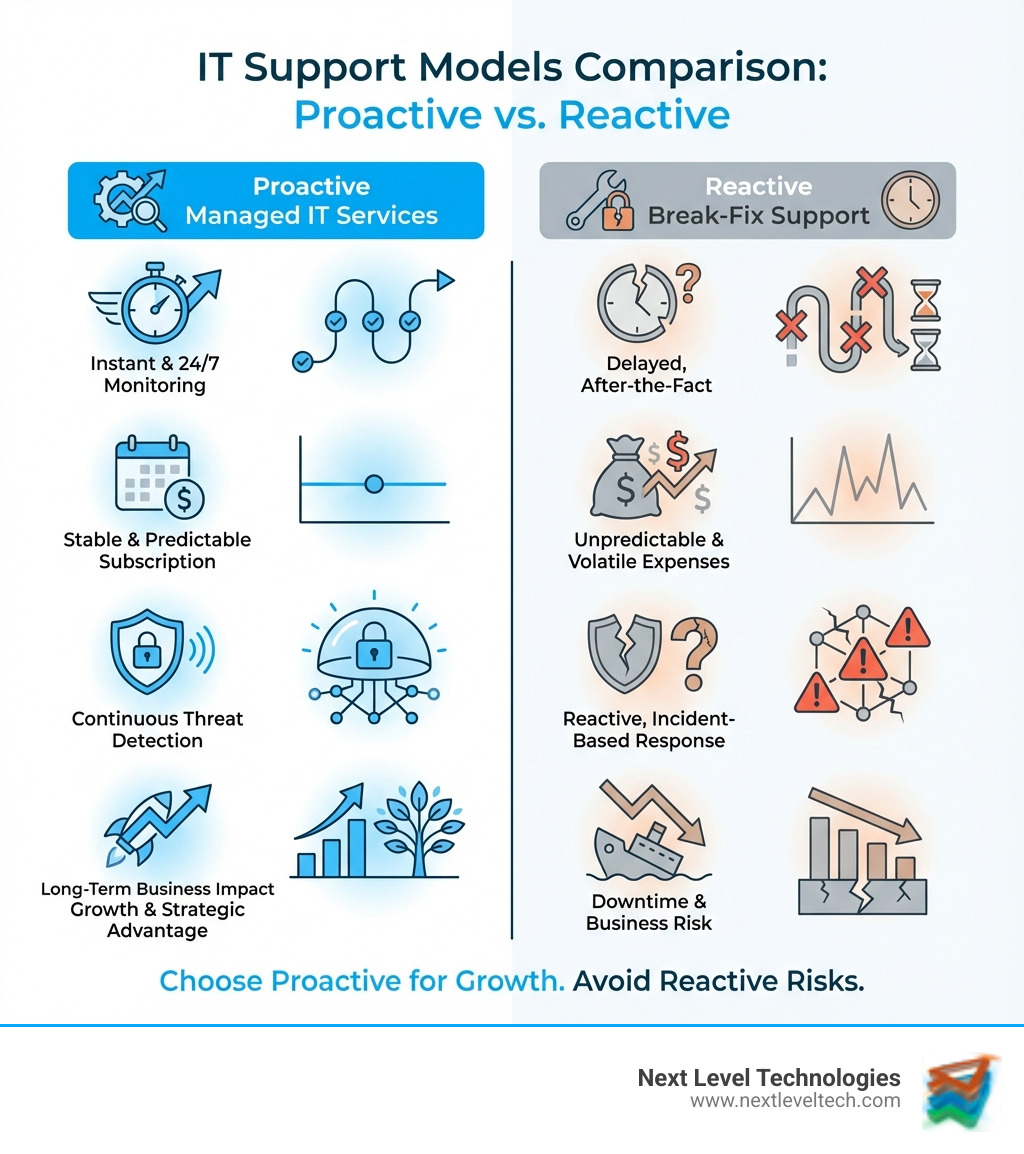
- Managed IT Services - Proactive, subscription-based support with 24/7 monitoring ($100-$200 per user/month)
- Break-Fix Support - Reactive, pay-per-incident repairs ($125-$250 per hour)
Remember when the coffee maker was the most complicated piece of office technology? Those days vanished faster than that last batch of dark roast. Today's small businesses face a harsh reality: technology runs the show, and when it fails, productivity plummets, revenue stops, and your best employees become accidental IT support staff instead of doing their actual jobs.
The truth is simple but critical—downtime costs money. Every hour your systems are down translates directly to lost revenue, frustrated customers, and employees who can't do their work. Many small businesses don't realize the type of risks they face by taking a piecemeal approach to IT. Whether you're a team of 5 or 500, the right tech support transforms technology from a daily headache into a competitive advantage.
The stakes are higher than ever. Small businesses are prime targets for cyberattacks due to limited security resources. More than 50% of internet traffic comes from mobile devices, your team needs secure remote access, and compliance requirements continue to tighten. The question isn't whether you need professional IT support—it's what kind of support best fits your business.
As Steve Payerle, President of Next Level Technologies, I've spent over 15 years helping small to medium-sized businesses across Columbus, Ohio and Charleston, WV transform their approach to small business tech support through proactive managed services. Our team's extensive technical experience and cybersecurity training has helped hundreds of businesses eliminate IT headaches and focus on growth instead of tech problems.
The Core Services: What Does Small Business Tech Support Actually Include?
When we talk about small business tech support, we're not just referring to someone who fixes your printer when it decides to go on strike (though we do that too!). We're talking about a comprehensive ecosystem of services designed to keep your business running smoothly, securely, and efficiently. It’s about changing your technology from a burden into an asset.

At its heart, effective IT support for small businesses balances proactive prevention with reactive solutions. Foundational services ensure your daily operations aren't disrupted, while strategic services help you leverage technology for growth and competitive advantage. Cybersecurity, as we'll explore, isn't just a service—it’s a necessity. And in today's world, seamless cloud integration is no longer a luxury but a core component of modern business.
If you want a deeper background on how cybersecurity threats have evolved for small businesses, resources like the Cybersecurity overview on Wikipedia can be helpful context alongside guidance from a skilled managed IT partner.
Essential IT Services for Growth
So, what are the must-have services that every small business needs? Think of these as the building blocks of a robust and reliable IT infrastructure:
- Help Desk Support: This is your first line of defense against tech woes. Whether it's a forgotten password, a software glitch, or a connectivity issue, a responsive help desk is crucial. The average call is answered within 30 seconds, and the average handle time for an issue is just 45 minutes, ensuring your team gets back to work fast.
- On-site & Remote Troubleshooting: Many issues can be resolved remotely, saving time and money. However, sometimes you just need a technician physically present—whether it's for complex hardware installations in Columbus, Ohio, or network diagnostics in Charleston, WV. A good provider offers both.
- Network Management: Your network is the backbone of your operations. This service ensures your Wi-Fi, servers, routers, and switches are all running optimally. It includes regular monitoring, maintenance, and updates to prevent slowdowns and outages.
- Data Backup & Disaster Recovery: What happens if your systems crash or you suffer a cyberattack? Reliable data backup and a clear disaster recovery plan are non-negotiable. This ensures your critical data is safe and that you can quickly restore operations, minimizing costly downtime.
- Cloud Services (Microsoft 365, Google Workspace, etc.): Moving to the cloud offers flexibility, scalability, and cost savings. This includes managing your email (like Microsoft 365 or Google Workspace), file storage, and other cloud-based applications.
- VoIP Phone Systems: Voice over Internet Protocol (VoIP) offers advanced communication features at a lower cost than traditional phone lines, improving connectivity for your team, whether they're in the office or working remotely.
For a new business, we often recommend focusing on these top 5 must-have IT services:
- Managed Cybersecurity Solutions
- Proactive Data Backup & Disaster Recovery
- Reliable Help Desk Support
- Cloud Services Management (e.g., Microsoft 365)
- Network Infrastructure Monitoring & Maintenance
The Digital Fortress: Critical Cybersecurity Considerations
Unfortunately, cybersecurity risks are growing, and small businesses are often the most vulnerable targets. According to cybersecurity research, small businesses are prime targets due to limited security resources, making proactive cybersecurity measures essential. This is where our team's extensive technical experience and cybersecurity training really shines.
Cybersecurity for small businesses isn't just about antivirus software anymore. It's about building a digital fortress:
- Ransomware Protection: Ransomware attacks can cripple a business, with more than half of victims paying the ransom. We help implement robust defenses and recovery plans to protect your data and systems.
- Endpoint Security: This protects all devices connected to your network—laptops, desktops, servers, and mobile devices—from malware and other threats.
- 24/7 Threat Monitoring: Cyber threats don't sleep, so your security shouldn't either. Continuous monitoring helps detect and respond to suspicious activity immediately.
- Employee Security Training: Your employees are often the first line of defense. Training them on best practices, like identifying phishing emails, is critical.
- Compliance Assistance: Depending on your industry, you might have specific regulatory requirements (e.g., HIPAA, PCI DSS). Our team can help ensure your IT infrastructure meets these standards.
Small businesses are often the most vulnerable targets—making robust cybersecurity and a team with extensive technical experience and cybersecurity training essential.
The Power of Managed IT Services
Imagine having an entire IT department at your disposal, without the cost of hiring a full team. That's the power of managed IT services. Instead of waiting for something to break, we proactively monitor, maintain, and secure your systems. This model transforms technology from a daily headache into a secret weapon for success.
Key benefits of managed IT services include:
- Proactive Maintenance: We identify and fix issues before they cause downtime, often without you even knowing there was a problem. This includes regular system checks, software updates, and performance optimizations.
- Predictable Monthly Costs: Say goodbye to unpredictable IT bills. Managed services typically come with a fixed monthly fee, making budgeting a breeze.
- Vendor Management: We handle the headaches of dealing with multiple tech vendors (internet providers, software companies, hardware suppliers), so you don't have to.
- Strategic IT Planning: Beyond just fixing things, we act as your technology partner, helping you develop a technology roadmap that aligns with your business goals and supports future growth.
- Scalability: As your business in Columbus, OH or Charleston, WV grows, your IT needs will change. Managed services scale with you, allowing you to easily add users, devices, or new services without major overhauls.
- Access to a Team of Experts: You get access to a diverse pool of IT professionals with extensive technical experience and advanced cybersecurity training, covering a wide range of technologies and specialties. This is far more comprehensive than what a single in-house hire could offer.
In-House vs. Outsourced: Building Your IT Dream Team
Deciding how to handle your small business tech support is a big decision. Do you bring someone in-house, or do you partner with an external provider? Both have their merits, and the right choice often depends on your business's size, budget, and specific needs.
| Feature | In-House IT | Outsourced IT Support |
|---|
| Cost | High fixed salary, benefits, training | Predictable monthly fee, lower overhead |
| Expertise | Limited to individual's skills | Diverse team of specialists, broad knowledge base |
| Scalability | Difficult to scale up/down quickly | Easily scales with business growth |
| Availability | Standard business hours, vacation/sick days | 24/7/365 support, no single point of failure |
| Business Focus | Can get pulled into non-IT tasks | Dedicated to IT, focused on strategic solutions |
The threshold for a business to justify hiring an in-house IT professional typically falls between having 25 to 50 employees. For many small businesses, especially those just starting out or with fewer than 25 employees, outsourcing is often the more strategic and cost-effective choice. However, even larger small businesses can benefit from a hybrid approach known as co-managed IT, where an external provider supplements an existing internal IT team.
The Pros and Cons of Hiring an In-House IT Team
Bringing IT support in-house can feel like a natural step as your business grows. There are certainly advantages:
Pros:
- On-site Presence: An in-house IT professional is physically there, making it easier for quick fixes and direct interaction. They can become deeply familiar with your specific office setup in Columbus, Ohio, or Charleston, WV.
- Deep Business Familiarity: An internal hire lives and breathes your business, understanding your unique workflows, priorities, and culture. This can lead to highly custom solutions and faster problem-solving for recurring issues.
Cons:
- High Salary Costs: Salaries for entry-level in-house IT roles range from $55,000 to $100,000, with higher wages for specialized technicians. This doesn't include benefits, training, or equipment.
- Limited Expertise: A single IT person, no matter how talented, can't be an expert in everything. They might lack specialized knowledge in areas like advanced cybersecurity, cloud architecture, or specific compliance regulations.
- Single Point of Failure: What happens when your in-house IT person is sick, on vacation, or decides to leave? Your business could be left vulnerable with no immediate backup.
- Vacation/Sick Day Gaps: Even the most dedicated employee needs time off, leaving you without dedicated support during those periods.
Why Outsourcing Your Small Business Tech Support is a Game-Changer
For many small businesses, outsourcing small business tech support isn't just about saving money—it's about gaining a strategic advantage. The IT outsourcing market size grew from $1250 billion in 2022 to $1364 billion in 2023, a clear indicator of how effective it is for businesses worldwide.
- Access to Specialized Expertise: When you outsource, you're not hiring one person; you're gaining access to an entire team of certified experts. This means you have specialists in networking, cybersecurity, cloud services, data recovery, and more, all with extensive technical experience and advanced cybersecurity training.
- Significant Cost Savings: By outsourcing, you avoid the high costs associated with salaries, benefits, training, and recruitment for an in-house team. You pay a predictable monthly fee for comprehensive coverage.
- 24/7/365 Availability: Technology problems don't adhere to business hours. Outsourced providers offer round-the-clock monitoring and support, ensuring that issues are addressed promptly, minimizing downtime.
- Improved Scalability: Whether you're expanding your team in Columbus, Ohio, or opening a new branch in Charleston, WV, an outsourced provider can quickly scale your IT resources up or down to match your needs.
- Improved Cybersecurity: Small businesses are prime targets. Outsourced IT providers bring enterprise-grade security tools and expertise, implementing robust defenses that most small businesses couldn't afford or manage on their own.
The IT outsourcing market is growing rapidly, as more businesses recognize the value of partnering with a team that brings extensive technical experience and cybersecurity training.
The Price of Peace of Mind: Explaining IT Support Costs
One of the first questions small business owners ask is, "How much does small business tech support cost?" It's a fair question, and the answer, like many things in life, is "it depends." However, the goal is always to provide peace of mind through predictable, transparent pricing, eliminating the dreaded "surprise billing" that often comes with reactive IT services.

The cost of IT support varies significantly based on several factors:
- Business Size & Complexity: A coffee shop with 15 employees has different needs than a financial services firm with sensitive client data, even if they're both small businesses. The number of users, devices, and the complexity of your existing infrastructure all play a role.
- Industry-Specific Requirements: Some industries have stringent compliance regulations (e.g., healthcare, finance) that require more robust security and data management, impacting costs.
- Location: While we serve businesses in Columbus, OH, and Charleston, WV, the general cost of living and labor in a region can influence pricing.
- Response Time Needs: Do you need 24/7 emergency support, or are standard business hours sufficient? Faster response times typically come at a higher premium.
Common Pricing Models Explained
Understanding the different pricing models helps you choose the best fit for your budget and needs:
- Break-Fix Model: This is the "pay-as-you-go" approach. You only pay when something breaks. Costs typically range from $125 to $250 per hour for one-time services. While simple to understand, it's unpredictable for budgeting and doesn't encourage proactive maintenance.
- Per-User Pricing: A flat monthly fee for each employee needing support. This model typically ranges from $75 to $150 per user per month for basic services. For more advanced services, such as cybersecurity or cloud management, the cost can go up to $200–300 per user/month.
- Per-Device Pricing: Charges based on the number of supported devices (desktops, laptops, servers, network equipment). This usually costs $25 to $100 per device/month for basic device support or $150 to $200 per device/month for more complex devices like servers or network equipment.
- All-Inclusive Fixed Fee (Managed IT): This is the most comprehensive model, offering predictable monthly costs, typically from $1,200 to $3,500, regardless of how much support you need. It covers proactive maintenance, monitoring, help desk, and often many cybersecurity services.
Average Costs for Key Services
Here's a breakdown of typical monthly costs for various IT support services, giving you a clearer picture of what to expect:
- Basic Help Desk Support: $50–100 per user/month
- Network Management: $100–500 monthly
- Data Backup Solutions: $50–150 per server/month, or $200–300 per server/month if using advanced cloud-based backup solutions.
- Security Monitoring: $100–500 monthly for basic monitoring, or $500–1,000 monthly if requiring 24/7 advanced threat detection and compliance-related security.
- Complete Managed IT for Small Businesses: $100–200 per user/month, or $250–300 per user/month if requiring extensive services (e.g., compliance management, advanced cybersecurity).
How to Choose and Implement the Right IT Support Partner
Choosing the right small business tech support partner is like finding a trusted advisor—it's about building a partnership, not just hiring a vendor. This is especially true for businesses in our local areas like Columbus, OH, and Charleston, WV, where understanding local business needs is key. We pride ourselves on having a team with extensive technical experience and cybersecurity training, ready to support your unique challenges.
Step 1: Assess Your Needs and Define Your Goals
Before you even start looking for a provider, take a step back and assess your current situation.
- Document Current Systems: What hardware and software do you currently use? What are your critical applications?
- Identify Recurring Problems and Pain Points: Are there constant Wi-Fi issues? Slow computers? Frequent software crashes? These are clear indicators that professional IT solutions are needed.
- Calculating the True Cost of Downtime: How much does an hour of downtime cost your business in lost productivity and revenue? Understanding this helps you justify the investment in proactive IT support.
- Setting Clear Technology Goals for Growth: Where do you want your business to be in 1, 3, or 5 years? Your IT support should help you get there, not hold you back.
Step 2: Evaluate Potential Providers
Once you know what you need, it's time to find the right partner.
- Industry Experience & Track Record: Look for providers with a proven track record and experience in your industry. Don't hesitate to ask for references.
- Technical Certifications (Microsoft, Cisco): Certifications like Microsoft Certified Professional (MCP) or Cisco Certified Internetwork Expert (CCIE) indicate a high level of technical proficiency. Our team holds numerous certifications, demonstrating our commitment to expertise across a wide range of technologies.
- Responsiveness & Communication (SLAs): How quickly do they respond to issues? Do they offer Service Level Agreements (SLAs) that guarantee response times? Clear communication is paramount.
- Checking Reviews on Trusted Platforms: Don't just rely on testimonials on their website. Check independent review platforms for unbiased reviews.
Step 3: Plan for a Smooth Onboarding
A successful partnership starts with a smooth transition.
- Defining Service Expectations: Clearly outline what services will be provided, what's included, and what's out of scope.
- Reviewing the Service Level Agreement (SLA): This document legally binds the provider to specific performance metrics, like response times and uptime guarantees. Make sure you understand it.
- Planning for Knowledge Transfer: Ensure there's a process for documenting your existing systems and transferring critical information to the new IT team.
- Establishing a Primary Point of Contact: Designate a go-to person on both sides to streamline communication and ensure accountability.
Frequently Asked Questions about Small Business Tech Support
How can IT support help my business minimize downtime?
Minimizing downtime is one of the most critical benefits of professional small business tech support. We achieve this through:
- Proactive Monitoring: We monitor your systems 24/7, identifying potential issues (like a failing hard drive or an overloaded server) before they become critical problems.
- 24/7 Support: If an issue does arise, our team is available around the clock to provide rapid assistance. The average call is answered within 30 seconds, and the average handle time for an issue is just 45 minutes, ensuring minimal disruption.
- Rapid Response Times: Through remote access and, when necessary, on-site visits in areas like Columbus, OH, and Charleston, WV, we can quickly diagnose and resolve problems.
- Disaster Recovery Planning: We help you prepare for the worst, with robust backup solutions and strategies to get your business back online swiftly after a major incident.
- Regular Maintenance: Just like your car, your IT systems need regular tune-ups. Routine updates, patches, and system optimizations prevent issues before they start, ensuring operational efficiency.
What is the difference between managed IT services and break-fix support?
This is a fundamental distinction in small business tech support:
- Managed IT Services: This is a proactive, subscription-based partnership. We act as your outsourced IT department, providing continuous monitoring, maintenance, security, and help desk support for a predictable monthly fee. The focus is on preventing problems and optimizing your systems. It's like having a preventative health plan for your technology.
- Break-Fix Support: This is a reactive, pay-as-you-go model. You only call us when something is broken, and you pay an hourly rate for the repair. While it might seem cheaper upfront, it often leads to unpredictable costs, extended downtime, and no strategic IT planning. It's like only going to the doctor when you're critically ill.
How can IT support help my business scale?
Small business tech support is not just about solving today's problems; it's about building a foundation for tomorrow's growth.
- Scalable Solutions: As your business expands, you'll need to add users, devices, and potentially new locations. We implement scalable solutions—from cloud services that grow with your data needs to network infrastructures that can handle increased traffic—ensuring your technology can support your expansion without major overhauls.
- Strategic IT Planning: We partner with you to develop a technology roadmap that aligns with your business goals. This means planning for future software needs, hardware upgrades, and cybersecurity improvements, so your IT infrastructure is always a step ahead, ready to support your next big move. We ensure your technology is an enabler, not a bottleneck, to your growth.
Conclusion: Turn Your Technology into a Competitive Advantage
In today's digital world, small business tech support is no longer a luxury—it's a strategic imperative. We've seen how professional IT support can transform your operations by delivering improved efficiency, robust security, and scalable growth. It's an investment in your business's future, ensuring that your technology is always working for you, not against you.
At Next Level Technologies, we believe that you should be focusing on what you do best—running and growing your business. Let our team of experts, with their extensive technical and cybersecurity training, handle the complex world of IT. Whether you're in Columbus, Ohio, or Charleston, WV, we're here to provide the peace of mind that comes with reliable, proactive managed IT services.
Explore how professional managed IT services can elevate your business.