Eliminate Regulatory Compliance Risks Across Your Clinical Inbox
November 7, 2026


Discover HIPAA compliant email solutions to eliminate regulatory risks in your clinical inbox. Next Level Technologies serves Columbus, OH & Charleston, WV.
November 7, 2026

Discover how hardware and software components of computer network systems work together for seamless data flow and security.
November 2, 2026

Learn how to choose HIPAA compliant IT support for your healthcare organization, with guidance on safeguards, vendor verification, and breach response.
October 30, 2026
November 7, 2026
When comparing hipaa compliant email solutions, start with a signed Business Associate Agreement (BAA), access controls, audit logs, and safeguards for protected health information (PHI). Then compare how each option handles everyday work: Does it protect messages automatically? Can patients open them easily? Will it work with your current email and clinical systems?
The right choice should reduce the chance of staff sending PHI without protection, not add steps they are likely to skip. Next Level Technologies helps healthcare teams assess those risks through its main location in Columbus, Ohio, and second location in Charleston, West Virginia.
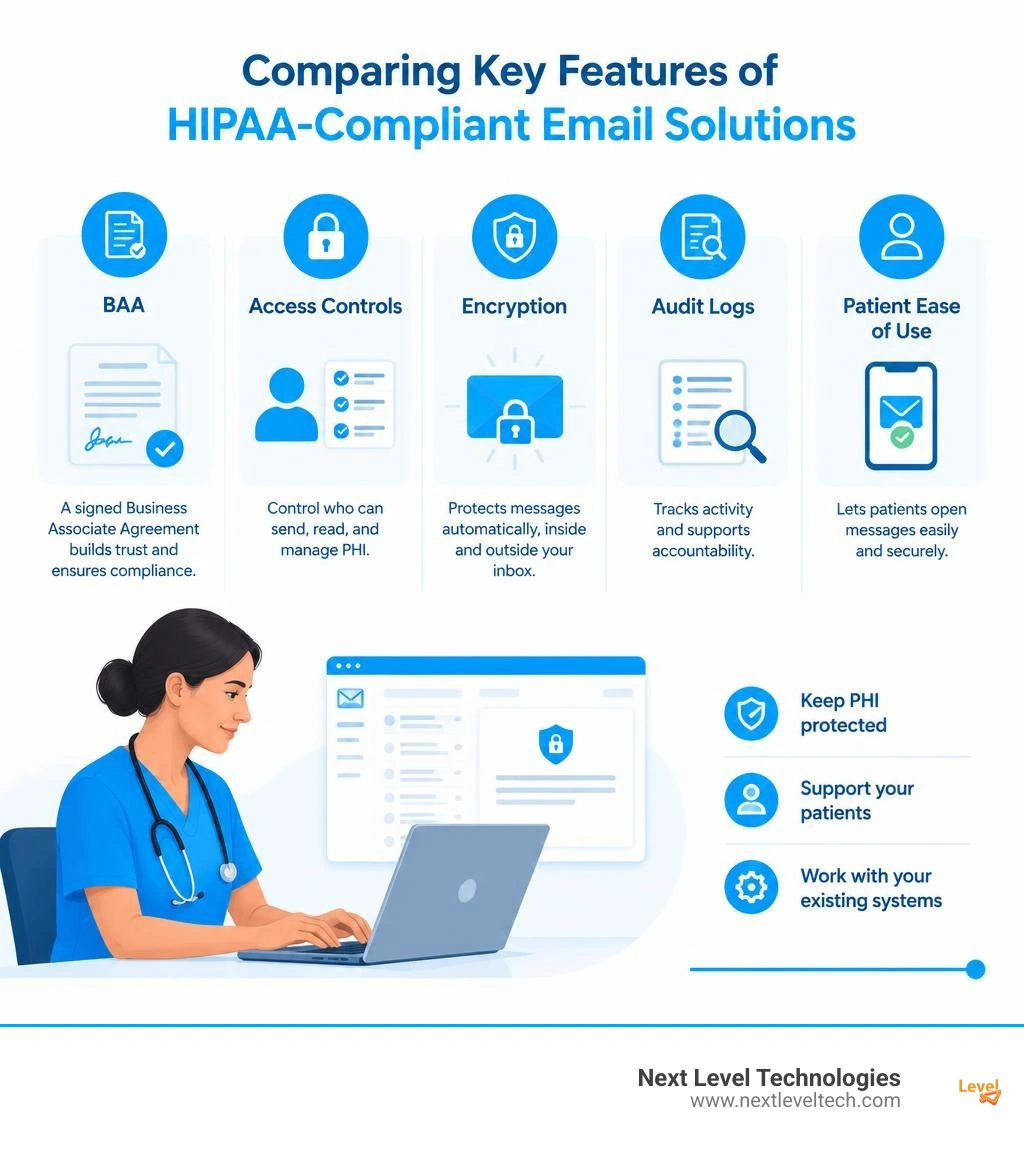
Must-know hipaa compliant email solutions terms:
Deploying secure messaging in a modern medical practice requires meeting the strict administrative, physical, and technical safeguard requirements outlined by the Health Insurance Portability and Accountability Act. Because electronic protected health information (ePHI) is constantly sent between clinics, imaging centers, labs, and patients, your messaging systems must guarantee confidentiality, data integrity, and constant availability.
The core technical safeguards for healthcare communication center on three distinct areas:
Our certified engineers possess decades of combined technical experience and extensive cybersecurity training to help healthcare organizations architect these safeguards without disrupting daily care. Proper compliance requires combining rock-solid messaging tools with complete data protection and security policies across all endpoints and servers.
When your team relies on dedicated HIPAA Compliant IT Support, you ensure that your clinical inbox stays protected against evolving attack vectors, ransomware campaigns, and malicious phishing attempts.
A Business Associate Agreement (BAA) is a legally binding contract mandated by federal regulations between a HIPAA-covered entity and any vendor handling, transmitting, or storing ePHI. Under the law, email service providers act as business associates because their mail servers process electronic protected health information.
Without an executed BAA, even the most heavily encrypted messaging platform is non-compliant. The BAA legally binds the service vendor to maintain proper administrative safeguards, report security incidents or data breaches within specified timeframes, and permit regular compliance auditing.
Working with trusted advisors to implement comprehensive Compliance IT Solutions ensures that every vendor contract, cloud repository, and communication pipeline satisfies federal requirements before clinical records are sent.
Selecting the right encryption mechanism is essential for safeguarding patient data without creating operational bottlenecks for busy providers.
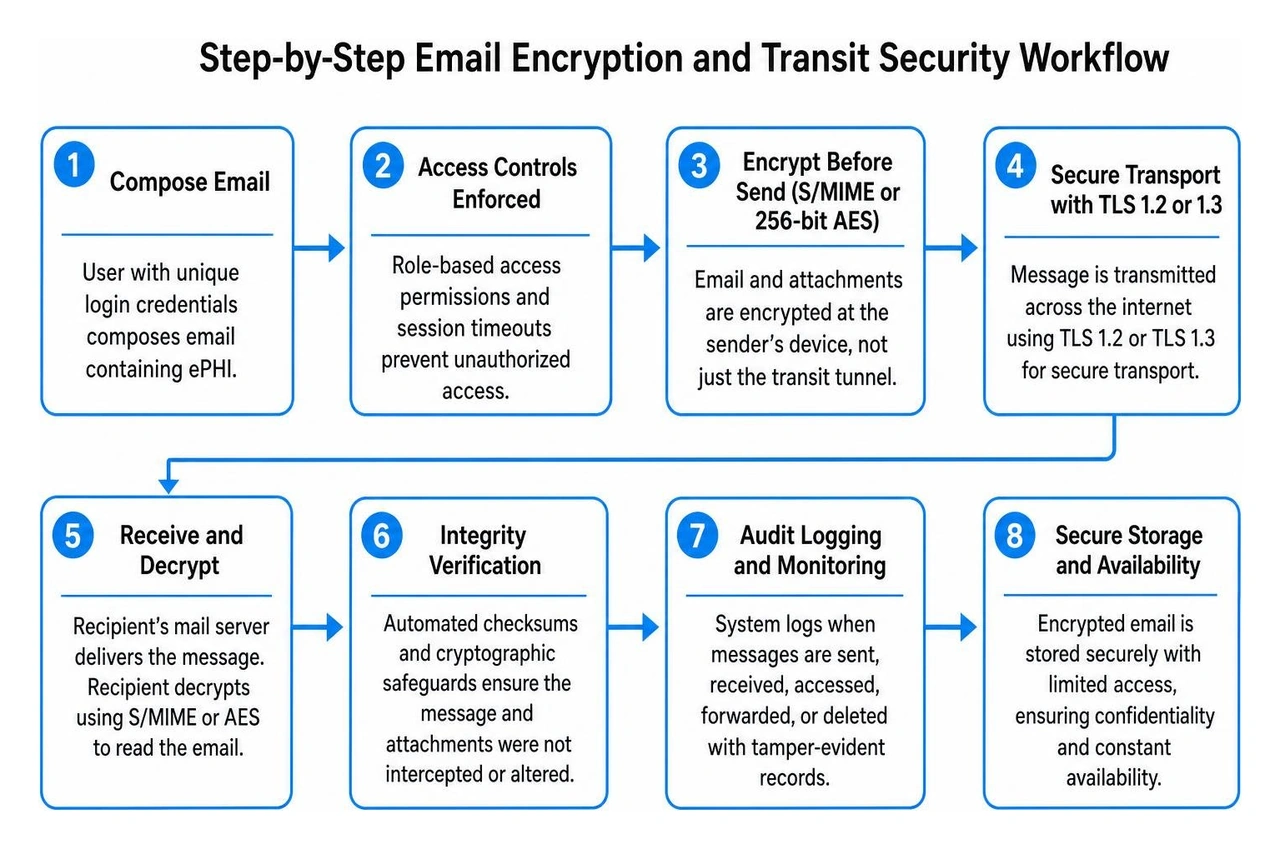
Healthcare practices typically choose between two main infrastructure paths: customizing enterprise productivity suites like Microsoft 365 or Google Workspace, or deploying dedicated healthcare email gateways.

Mainstream platforms like Microsoft 365 Enterprise and Google Workspace can be configured to comply with federal healthcare privacy laws. Both major tech vendors will sign a standard BAA with enterprise account holders.
However, neither suite is fully compliant straight out of the box. Healthcare organizations must manually configure complex administrative policies, including:
A common issue with standard suites is the need for manual user tagging—such as typing [SECURE] into the subject line—which introduces human error when busy clinicians forget to tag sensitive messages. For medical practices needing robust protection, integrating advanced healthcare network security services ensures that these productivity tools are properly hardened against accidental data leaks.
Dedicated healthcare platforms remove the guesswork by automating the security process. These purpose-built platforms eliminate human error through zero-click background encryption, specialized gateways, and secure web portals.
Several specialized providers stand out in the healthcare ecosystem:
Beyond basic encryption, modern clinical messaging solutions incorporate specialized security layers designed to streamline administrative workflows and defend against cyberattacks.
Comprehensive healthcare managed IT services combine multiple technical defenses to safeguard clinical communications:
Healthcare communication often extends beyond casual provider-to-patient emails. When transferring comprehensive patient histories, referral summaries, and continuity-of-care documents between different health systems, standard encrypted webmail is often replaced by Direct Secure Messaging.
Built on the national DirectTrust framework, Direct Secure Messaging for healthcare functions like a secure, authenticated health information highway. Direct messaging operates within a closed network of verified healthcare participants, using specialized Direct addresses to route structured Health Level Seven (HL7) Continuity of Care Architecture (C-CDA) and Fast Healthcare Interoperability Resources (FHIR) records directly into a provider's EHR system.
This interoperability eliminates legacy fax machines, shortens patient referral cycles, and helps healthcare practices meet Meaningful Use and CMS data exchange mandates.
When evaluating secure messaging platforms for your clinical staff, prioritize tools that balance rigorous security with day-to-day usability:
No. Free consumer versions of Gmail and Outlook are not HIPAA-compliant. They do not include a signed Business Associate Agreement, lack the required access and audit controls, and do not encrypt message bodies end-to-end across third-party mail servers. To use Microsoft 365 or Google Workspace compliantly, organizations must subscribe to paid business or enterprise tiers, execute a formal BAA, and properly configure specialized DLP and encryption policies.
Patients are not covered entities under federal law and have the legal right to send their personal health information through standard, unencrypted email if they choose. However, once a healthcare provider receives that email, all subsequent replies containing ePHI must be protected using compliant encryption methods. Providers should also inform patients about the security risks of unencrypted email and document their communication preferences.
Standard encrypted email is designed for general, point-to-point text and file delivery between arbitrary email addresses. In contrast, Direct Secure Messaging is a specialized, federated protocol used exclusively by identity-verified healthcare providers and systems. Direct messaging uses DirectTrust digital certificates to safely ingest structured clinical data (like C-CDA files and FHIR payloads) straight into an electronic health record system, supporting automated clinical workflows without manual data entry.
Securing your clinical inbox requires finding the right balance between strict regulatory compliance and smooth day-to-day workflows. Implementing the right tools protects patient privacy, prevents expensive data breaches, and ensures uninterrupted communication across your entire care network.
The team at Next Level Technologies brings extensive technical experience and specialized cybersecurity training to every deployment. We help healthcare organizations choose, configure, and maintain secure messaging environments that satisfy all federal requirements.
Operating from our main location in Columbus, Ohio, and our second location in Charleston, West Virginia, our local IT specialists deliver responsive, reliable technology management for modern medical practices. Explore our dedicated healthcare management services today to schedule a comprehensive email security audit and protect your clinical communication channels.
Discover how hardware and software components of computer network systems work together for seamless data flow and security.
November 2, 2026
Learn how to choose HIPAA compliant IT support for your healthcare organization, with guidance on safeguards, vendor verification, and breach response.
October 30, 2026

