Why Your Computer Hardware Solutions Matter Now More Than Ever
Computer Hardware Solutions are the physical components and strategic approaches that keep your business running smoothly—from the CPU and RAM inside your desktop to the servers managing your network. When hardware fails or underperforms, your entire operation grinds to a halt.
Quick Hardware Problem-Solving Guide:
| Problem | Quick Solution |
|---|
| Overheating/Shutdowns | Clean dust from vents, ensure proper ventilation |
| Slow Performance | Upgrade RAM or switch to SSD storage |
| Wi-Fi/USB Issues | Update drivers, check power management settings |
| System Crashes (BSOD) | Run memory diagnostics, boot in Safe Mode |
| Hard Drive Failure | Back up data immediately, run diagnostic tools |
The stakes are high. The global computer hardware market reached $315.5 billion in 2023 and continues growing at 3.6% annually. Yet many businesses still take a piecemeal approach to hardware—only addressing problems when something breaks. This reactive strategy leads to costly downtime, security vulnerabilities, and frustrated employees.
Your hardware is more than just machines. It's the foundation of every email sent, every sale processed, and every customer served. When components like your CPU, RAM, or storage drives fail, productivity disappears. When networking equipment malfunctions, communication stops.
As Steve Payerle, President of Next Level Technologies, I've spent over 15 years helping businesses in Columbus, Ohio, and Charleston, WV, transform their approach to Computer Hardware Solutions—moving from reactive firefighting to proactive optimization. My team's extensive cybersecurity training and technical expertise have shown us that reliable hardware paired with strategic maintenance prevents most IT emergencies before they start.
Handy Computer Hardware Solutions terms:
The Building Blocks: Understanding Key Hardware Components
To truly optimize your Computer Hardware Solutions, we first need to understand the individual players on the team. Think of your computer system as a finely tuned orchestra, where each instrument plays a vital role. If one instrument is out of tune or missing, the whole performance suffers. Understanding these components is the foundation for optimizing your IT infrastructure. Each part plays a vital role in ensuring your system runs smoothly and efficiently.

The Central Nervous System: Motherboard and CPU
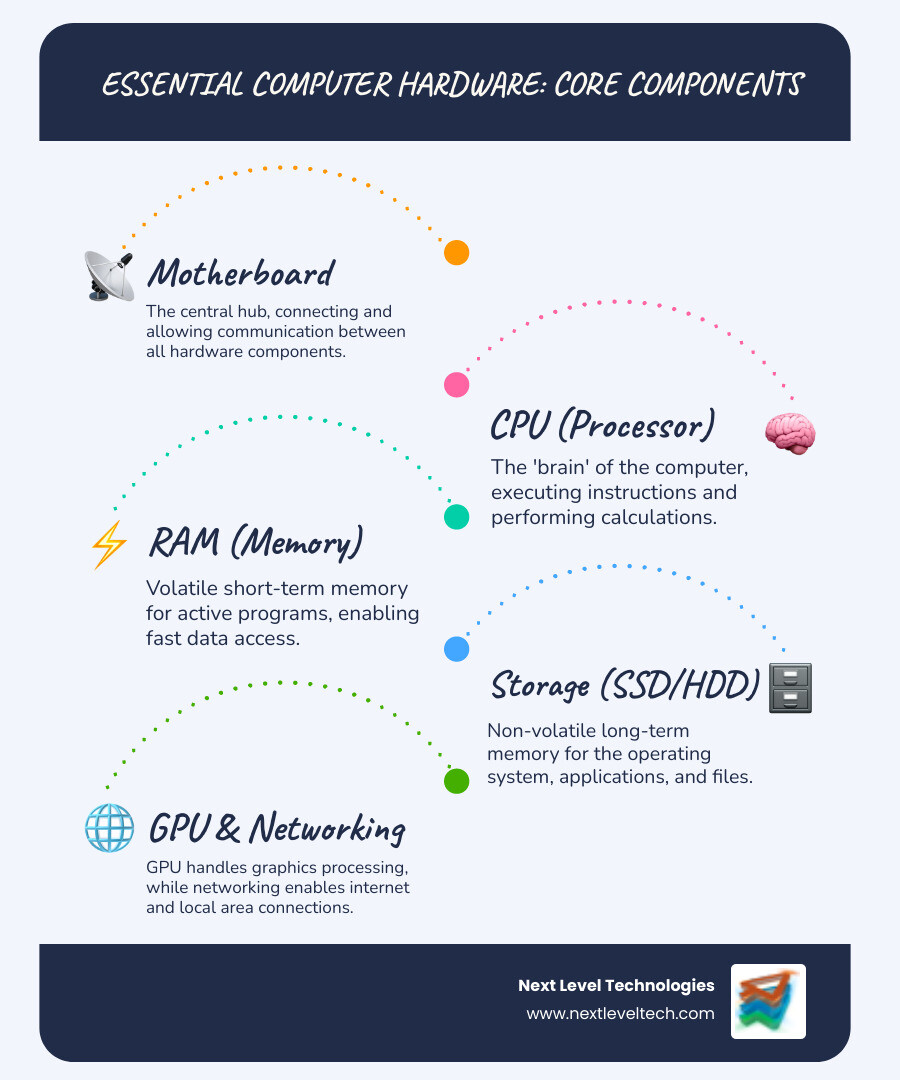
At the heart of every computer lies the motherboard, often called the "central nervous system." This large circuit board connects every single piece of hardware, allowing them to communicate and work in harmony. It's the backbone that holds everything together.
Perched on the motherboard is the Central Processing Unit (CPU), the "brain" of your computer. This tiny chip is responsible for executing instructions, performing calculations, and managing the flow of information. The CPU's performance is measured by its:
- Clock speed: How many instructions it can process per second (measured in GHz).
- Cores: The number of independent processing units. More cores mean better multitasking.
- Threads: Virtual cores that allow a single physical core to handle multiple tasks simultaneously.
A powerful CPU means faster application loading, smoother multitasking, and quicker data processing—all crucial for business efficiency.
Memory and Storage: RAM, SSDs, and HDDs
Next up is memory and storage, which are often confused but serve distinct purposes.
RAM (Random Access Memory): This is your computer's short-term memory. When you open an application or a document, it's loaded into RAM for quick access. RAM is "volatile" memory, meaning its contents are lost when the computer is turned off. The more RAM you have, the more applications you can run smoothly at once without slowdowns. For businesses, insufficient RAM can be a major productivity killer.
Storage (SSDs and HDDs): This is your computer's long-term memory, where your operating system, applications, and files are permanently stored.
- HDD (Hard Disk Drive): Traditional storage that uses spinning platters to read and write data. HDDs offer large storage capacities at a lower cost, but they are significantly slower and more prone to mechanical failure.
- SSD (Solid State Drive): A newer, faster storage technology that uses flash memory. SSDs have no moving parts, making them incredibly fast, durable, and energy-efficient. Upgrading to an SSD is one of the most impactful Computer Hardware Solutions for improving overall system responsiveness. The market has certainly recognized this, with SSD shipments expected to exceed 500 million units annually by 2025. This shows a clear trend towards faster, more reliable storage, which directly translates to improved business performance.We cover more of these basics in our Basic Computer Hardware Networking Guide.
Graphics, Networking, and Peripherals
Beyond the core components, several other pieces of hardware are essential for a complete and functional system:
GPU (Graphics Processing Unit): While some CPUs have integrated graphics, a dedicated GPU is crucial for tasks involving complex visuals, such as graphic design, video editing, CAD software, or even detailed spreadsheets. It handles all the image and video rendering, freeing up the CPU for other tasks.
Network Interface Card (NIC): This component allows your computer to connect to a network, either via an Ethernet cable or wirelessly (Wi-Fi). A reliable NIC is fundamental for seamless communication and access to shared resources.
Peripherals: These are the input and output devices that allow us to interact with our computers.
- Input devices: Keyboards, mice, webcams, microphones, scanners.
- Output devices: Monitors, printers, speakers.These are all vital parts of your overall Computer Hardware Solutions, enabling employees to perform their daily tasks effectively. You can learn more about these components and their roles in our hardware definition article.
Common Hardware Problems and Their Solutions
Even the most robust Computer Hardware Solutions can encounter issues. Knowing how to diagnose and address common problems can save you valuable time and prevent minor glitches from escalating into major headaches. Here, we'll explore some frequent hardware woes and their practical solutions.

Issue #1: The Overheating PC
Is your computer suddenly shutting down, making a lot of noise, or feeling unusually hot to the touch? These are classic symptoms of overheating. When internal components get too hot, they can suffer damage or cause system instability.
Solutions:
- Clean Vents and Fans: Dust is the enemy! Over time, dust accumulates in fans and vents, blocking airflow. Use a can of compressed air to gently clear out dust from cooling vents and fan blades. Always hold the fan in place to prevent over-spinning.
- Ensure Proper Ventilation: Make sure your computer isn't crammed into a tight space. Allow for adequate airflow around the machine. For laptops, consider a cooling pad if you're frequently doing demanding tasks.
- Monitor Temperatures: Software tools can help you monitor CPU and GPU temperatures. If temperatures consistently run high, it might indicate a more serious cooling system failure.For more details on keeping your systems running smoothly, check out our insights on Computer Hardware Problems and Solutions.
Issue #2: The System Slowdown
A slow computer can be incredibly frustrating. If your boot-up times are dragging, applications are lagging, or multitasking feels like a chore, your hardware might be the bottleneck.
Solutions:
- RAM Upgrade: If you're constantly running out of memory (Task Manager is your friend here!), adding more RAM is often a cost-effective solution to boost multitasking performance.
- SSD Upgrade: As we mentioned earlier, upgrading from an old HDD to a Solid State Drive is perhaps the single most impactful upgrade for overall system speed. It drastically reduces load times for the operating system and applications.
- Manage Startup Programs: Many applications automatically launch when your computer starts, consuming valuable resources. Use Task Manager (Windows) or System Preferences (macOS) to disable unnecessary startup programs.
- Optimize Software: Regularly remove unnecessary files, uninstall unused programs, and run antivirus software.Managing your IT assets, including strategic upgrades, is key to preventing slowdowns. Learn more about effective IT Asset Management.
Issue #3: Connectivity Catastrophes
In today's interconnected business world, losing internet access or having non-functional USB ports can bring operations to a standstill.
Solutions for Wi-Fi Issues:
- Check for Interference: Other electronic devices, physical obstructions, or even neighboring Wi-Fi networks can cause interference. Try moving your computer closer to the router or changing the Wi-Fi channel.
- Update Drivers: Outdated or corrupted Wi-Fi adapter drivers are a common culprit. Update them through Device Manager (Windows) or your manufacturer's website.
- Power Management Settings: Sometimes, your operating system might power down the Wi-Fi adapter to save energy. Check power management settings to ensure it remains active.
Solutions for USB Port Issues:
- Restart Your Computer: A simple restart can often resolve minor glitches.
- Test Different Devices/Ports: Try connecting a different USB device to the same port, or the same device to a different port, to isolate whether the issue is with the device or the port itself.
- Update/Reinstall Drivers: USB controller drivers can become corrupted. Update or reinstall them via Device Manager.
- Physical Inspection: Carefully check the USB port for any bent pins or debris.We dig deeper into connectivity in our Basic Computer Hardware Networking Guide.
Issue #4: The Blue Screen of Death (BSOD)
The infamous Blue Screen of Death, or BSOD, is a clear sign that something is seriously wrong with your system. It indicates a critical system error that forces your computer to shut down to prevent further damage.
Symptoms:
- Sudden system crashes with a blue screen displaying white text and an error code.
- Frequent, unexpected restarts.
Common Causes:
- Faulty RAM: Bad memory modules are a frequent cause.
- Driver Issues: Incompatible, outdated, or corrupted drivers for hardware components.
- Hard Drive Failure: Problems with your storage drive can lead to data corruption and system instability.
- Overheating: As mentioned, extreme temperatures can trigger a BSOD.
Solutions:
- Memory Diagnostics: Run built-in memory diagnostic tools (like Windows Memory Diagnostic) to check your RAM for errors.
- Boot in Safe Mode: If your computer can boot into Safe Mode, it indicates that the issue might be related to a driver or startup program. From Safe Mode, you can try updating or rolling back drivers.
- Update Drivers: Ensure all your hardware drivers are up-to-date, especially for your graphics card, chipset, and storage controllers.
- Check Hard Drive Health: Use tools like CHKDSK (Windows) to check for disk errors.
- Professional Help: For persistent BSODs, especially those with cryptic error codes, it's often best to seek professional assistance. Server hardware, in particular, requires expert attention to avoid costly downtime, as detailed in this Server hardware guide.
Proactive Care: Hardware Maintenance and Strategic Upgrades
Addressing problems as they arise is good, but preventing them altogether is even better. Proactive maintenance and strategic upgrades are key to extending hardware life, preventing downtime, and maximizing your IT investment. This is where we at Next Level Technologies truly shine, helping businesses in Columbus, Ohio, and Charleston, WV, build resilient and efficient IT foundations.
Essential Maintenance for Your Computer Hardware Solutions
Regular maintenance is not just about cleaning; it's about optimizing your entire IT ecosystem.
- Regular Cleaning: Dust, as we've noted, is a major culprit for overheating and component degradation. Regularly clean internal components, fans, and vents with compressed air.
- Cable Management: Disorganized cables can impede airflow, make troubleshooting difficult, and even pose safety hazards. Proper cable management improves system longevity and simplifies maintenance.
- Updating Drivers and Firmware: Manufacturers constantly release updates to improve performance, fix bugs, and improve security. Keeping your drivers and firmware (software embedded in hardware) up-to-date ensures your hardware runs optimally and securely.
- Implementing Regular Data Backups: This is non-negotiable. Hardware can fail, but your data is priceless. Implement a robust backup strategy to protect against data loss due to hardware failure, cyberattacks, or accidental deletion. This practice is crucial for managing your IT Asset Life Cycle effectively.
When to Upgrade vs. Replace
The "upgrade or replace" dilemma is a common one for businesses. The answer often lies in a careful cost-benefit analysis.
- Identifying Performance Bottlenecks: Is a single component (like an old HDD or insufficient RAM) holding back an otherwise capable system? An upgrade might be cost-effective.
- End-of-Life (EOL) Hardware: When hardware reaches its end-of-life, it no longer receives security updates or manufacturer support, posing significant risks. In such cases, replacement is usually the wiser choice.
- Future-Proofing Your Infrastructure: Consider the demands of future software and workloads. Sometimes, a full replacement is necessary to ensure your infrastructure can scale with your business needs.
- Cost-Effectiveness: Evaluate whether upgrading existing components is more economical than purchasing entirely new equipment. Sometimes, the cumulative cost of upgrades can approach that of a new, more efficient system. For businesses looking for flexible options, Computer Hardware Leasing can be a smart strategy.
The Rise of Dedicated Hardware
How does dedicated hardware differ from general-purpose hardware, and when is it beneficial? The key distinction lies in optimization.
- Dedicated Hardware: Designed and optimized for specific tasks. A server in a data center, for example, is dedicated hardware optimized to manage, store, and process large amounts of data, unlike a general-purpose desktop PC. Similarly, a high-end CAD workstation is built with specific components (like powerful GPUs and abundant RAM) to handle complex engineering designs.
- General-Purpose Hardware: Designed for a wide range of tasks, offering flexibility but not peak performance in any single area.
When is it beneficial? When your business has specialized needs that demand maximum efficiency and reliability. Examples include:
- Servers: For hosting websites, managing databases, or providing network services.
- CAD Workstations: For architects, engineers, and designers.
- High-Performance Computing (HPC): For scientific research, complex simulations, or big data analytics. The demand for HPC hardware is increasing rapidly, with the HPC market expected to reach $54.1 billion by 2027. This growth underscores the increasing need for specialized Computer Hardware Solutions to tackle demanding computational tasks.
Modern Computer Hardware Solutions for Today's Business
The landscape of Computer Hardware Solutions is constantly evolving, bringing exciting advancements that can dramatically improve your business operations. Modern hardware isn't just faster; it's smarter, more secure, and more integrated than ever before.
Enhancing Security and Data Integrity
In an era of increasing cyber threats, your hardware plays a crucial role in safeguarding your business.
- Built-in Security Features: Modern hardware often comes with integrated security chips like the Trusted Platform Module (TPM), which provides hardware-level encryption and secure boot capabilities. These features create a more robust defense against malware and unauthorized access.
- Firmware-Level Protection: Newer systems offer advanced firmware (BIOS/UEFI) protections that prevent tampering and ensure the integrity of your boot process.
- Hardware-Based Encryption: Many modern SSDs support hardware-based encryption, offering a faster and more secure way to protect your data compared to software-only solutions.
- Automated Backup Solutions: Modern hardware and integrated software solutions support automated backups, preventing data loss in case of hardware failure. Our team's extensive cybersecurity training ensures we leverage these features to build robust IT Infrastructure and Security for our clients, creating comprehensive Computer Security Hardware Solutions.
Modern Computer Hardware Solutions are engineered for speed and efficiency, translating directly into increased productivity and reduced operational costs.
- Faster Processing: The latest CPUs offer significant performance gains, allowing employees to complete tasks more quickly. Paired with SSDs, this means dramatically reduced load times and smoother application performance.
- Improved Software Compatibility: New hardware is designed to support the latest operating systems and software applications, ensuring compatibility and access to the newest features and security patches.
- Noise Reduction: Advanced cooling systems and solid-state components in modern devices contribute to significantly quieter operation. This creates a more professional and pleasant work environment, especially in open-plan offices.
- Energy Efficiency: Newer hardware consumes less power, leading to lower electricity bills and a smaller carbon footprint. This is a win-win for both your budget and the environment.These advancements are critical for building a high-performing IT Infrastructure for Small Business.
Choosing the Right Computer Hardware Solutions for Your Needs
Selecting the right Computer Hardware Solutions is not a one-size-fits-all endeavor. It requires a thoughtful approach custom to your specific business.
- Conducting a Needs Assessment: What are your business's current and future technology requirements? What applications do your employees use daily? What are their performance expectations?
- Analyzing Business Workflows: Understanding how your teams operate helps identify where hardware can improve efficiency or where existing hardware creates bottlenecks. For example, a video editing firm will have vastly different hardware needs than an accounting firm.
- Planning for Scalability: Your hardware infrastructure should be able to grow with your business. Investing in scalable solutions now can save significant costs and headaches down the line.
- Calculating Total Cost of Ownership (TCO): Look beyond the initial purchase price. Consider maintenance, energy consumption, potential downtime, and end-of-life costs. A cheaper upfront option might be more expensive in the long run.This strategic approach is a cornerstone of our IT Consulting for Small Businesses.
Frequently Asked Questions about Computer Hardware
We often encounter similar questions from businesses in Columbus, Ohio, and Charleston, WV, about their Computer Hardware Solutions. Let's tackle some of the most common ones.
What are the main components of business computer hardware?
The core components that make up the backbone of any business computer include the Central Processing Unit (CPU), Random Access Memory (RAM), storage drives (either Solid State Drives or Hard Disk Drives), and the motherboard that connects them all. Essential peripherals for user interaction include monitors, keyboards, and mice. For a complete business network, critical hardware also extends to routers, switches, and servers, which manage data flow, storage, and network services.
How do you troubleshoot a hardware failure?
Troubleshooting a hardware failure typically involves a systematic approach:
- Check Physical Connections: Ensure all cables (power, data, video) are securely connected. A loose cable is a surprisingly common culprit!
- Update Drivers: Outdated or corrupted drivers can cause hardware malfunctions. Update them via your operating system's device manager or the manufacturer's website.
- Run Diagnostic Tools: Most operating systems and hardware manufacturers provide built-in diagnostic tools (e.g., Windows Memory Diagnostic, hard drive health checks) to identify issues.
- Isolate the Faulty Part: If possible, test components individually. For example, if you suspect RAM, try running the system with one stick at a time.
- Consult a Professional: For complex or persistent issues, or if you're uncomfortable performing these steps, it's always best to consult with IT professionals. Our team at Next Level Technologies has the extensive technical experience to diagnose and resolve even the trickiest hardware problems.
How often should a business upgrade its computer hardware?
There's no fixed rule, but a typical refresh cycle for business computer hardware is generally every 3 to 5 years. However, several factors influence this:
- Performance Degradation: If your systems are consistently slowing down, taking too long to process tasks, or causing employee frustration, it's a clear sign.
- Software Requirements: New business-critical software often demands more powerful hardware. If your current machines can't run essential applications efficiently, an upgrade is warranted.
- End-of-Life (EOL): When hardware reaches its EOL, it often stops receiving security updates, leaving your business vulnerable. This is a critical point for replacement.
- Cost-Effectiveness: Sometimes, the cost of maintaining older, less efficient hardware (e.g., higher energy consumption, frequent repairs, lost productivity) outweighs the investment in new equipment.
The Role of Professional IT Support in Hardware Optimization
For businesses, navigating the complexities of Computer Hardware Solutions can be overwhelming. This is where professional IT support, especially from a managed IT service provider like Next Level Technologies, becomes invaluable.
Why Partner with a Managed IT Service Provider?
Partnering with us means you gain a dedicated IT department without the overhead. We offer:
- Proactive Maintenance: We don't wait for things to break. Our managed services include regular maintenance, monitoring, and updates to prevent hardware failures before they impact your business.
- Expert Troubleshooting: When issues do arise, our team of experts is ready to diagnose and resolve them efficiently, minimizing downtime.
- Strategic Procurement and Vendor Management: We help you choose the right hardware, negotiate with vendors, and manage your IT assets throughout their lifecycle, ensuring you get the best value and performance.
- Cybersecurity Expertise: With extensive cybersecurity training, our staff implements and manages hardware-level security features, protecting your valuable data from evolving threats.
- Reduced Downtime: By taking a proactive approach to your Computer Hardware Solutions, we significantly reduce unexpected outages, keeping your business productive.This comprehensive support is why Managed IT Services are so critical for modern businesses.
Local Expertise for Your Business Needs
The value of local IT support cannot be overstated. As a company deeply rooted in Columbus, Ohio, and Charleston, WV, we understand the specific challenges and opportunities facing businesses in our communities.
- Understanding Regional Business Challenges: We're not a faceless national provider. We understand the local economic landscape, regulatory environments, and common industry needs in our service areas.
- Staff with Extensive Technical and Cybersecurity Training: Our technicians are not only highly skilled in hardware and networking but also undergo continuous training in the latest cybersecurity protocols. This ensures your Computer Hardware Solutions are not just functional, but also secure against modern threats.
- Personalized Service: We build relationships with our clients, offering custom Computer Hardware Solutions and support that fits your unique operational needs. This localized approach is a cornerstone of our IT Support Columbus services.
Optimizing Your Complete IT Infrastructure
Our approach goes beyond just fixing individual hardware components. We take a holistic view of your entire IT infrastructure.
- Integrating Hardware with Software and Networking: We ensure that your hardware works seamlessly with your software applications and network infrastructure. A powerful server means little if it's running outdated software or connected to a slow network.
- Ensuring Scalability and Robust Security: We design Computer Hardware Solutions that are not only secure today but can also scale to meet your future growth, all while maintaining robust cybersecurity measures.This integrated strategy provides comprehensive IT Solutions for SMBs Complete Guide, ensuring every part of your technology ecosystem supports your business goals.
Conclusion
Understanding, maintaining, and strategically upgrading your computer hardware is no longer just an IT task—it's a fundamental business strategy. By following these guidelines, you can prevent common problems and ensure your technology acts as a powerful asset. For businesses in Columbus, Ohio, and beyond, partnering with an expert like Next Level Technologies ensures your Computer Hardware Solutions are always optimized, secure, and ready to support your growth.Ready to lift your IT infrastructure? Learn how our managed IT services and support can build a resilient and high-performing hardware foundation for your business.