In Depth Guide to Network Interface Controller Basics and Functions
August 22, 2026


Discover how a healthcare management services organization boosts practice efficiency, cuts overhead, and protects clinical autonomy.
October 3, 2026

Master denial management in medical billing with proven strategies to reduce denials, boost appeals success, and protect revenue cycle performance.
September 25, 2026

Compare the best healthcare learning management platforms for providers with Next Level Technologies, serving Columbus, Ohio and Charleston, WV.
September 19, 2026
August 22, 2026
A network interface controller is an electronic circuit board or integrated chip that serves as the bridge between a computing device and a communication network. Whether you are using a desktop, an enterprise rack server, or an industrial workstation, your computer sees data as internal parallel signals moving across motherboard traces. The network, however, transmits data sequentially as electrical pulses over copper cables, light pulses through fiber optics, or radio frequencies over the air. The controller’s fundamental job is converting internal data streams into standard network signals and vice versa.
In the Open Systems Interconnection (OSI) theoretical framework, the controller functions across two critical boundaries:
Without this specialized hardware, your device's main processor (CPU) would have to manually format every individual bit passing over a cable, causing system performance to grinding halts. For an operational deep dive into how these devices integrate into overall network architecture, review our comprehensive guide to computer hardware networking.
To ensure data packets reach their intended destination on a local area network (LAN), every physical controller comes hardcoded from the factory with a globally unique identifier known as a Media Access Control address (MAC address). Stored in non-volatile on-board read-only memory (ROM), a MAC address consists of 12 hexadecimal digits typically displayed in pairs separated by colons or hyphens (for example, 00:1A:2B:3C:4D:5E).
When a host system prepares to send data over a local network, the operating system passes the network layer packet down to the controller driver. According to established standards explained in this Network interface controller technical overview, the hardware wraps this IP packet inside a Data Link Layer Ethernet frame. This structure includes:
When the receiving controller picks up an electrical or optical signal, it checks the destination MAC address. If the MAC address matches its own hardware address, a broad cast address, or a registered multicast group, the card accepts the frame, validates the FCS, strips off the frame header, and notifies the operating system.
Over the decades, network interface hardware has evolved from bulky standalone expansion boards to integrated motherboard silicon. Understanding the trade-offs between integrated and discrete physical interfaces is key when upgrading business infrastructure.
LAN on Motherboard (LOM): Most modern desktop computer motherboards and server systems integrate network connectivity directly into the system chipset or System-on-Chip (SoC). LOM implementations save physical space, lower system power consumption, and reduce manufacturing costs. For general web browsing, standard office productivity applications, and moderate file transfers, integrated Gigabit LOM offers plenty of performance.
Dedicated PCIe Expansion Cards: For enterprise servers, virtualization hosts, and high-performance computing clusters, built-in motherboards often lack port density, processing features, and extreme throughput capacity. Dedicated network interface cards plug directly into Peripheral Component Interconnect Express (PCIe) expansion slots on the motherboard. Dedicated cards feature independent processing chipsets (ASICs), onboard packet memory buffers, and enhanced cooling heatsinks. They offload processing tasks from host CPU cores and support high-speed enterprise interfaces like dual 10GbE RJ45 or quad 25GbE optical ports.
USB Network Adapters: Portable laptops and ultra-compact desktop units frequently omit built-in RJ45 Ethernet ports to maintain slim profiles. External USB-to-Ethernet adapters convert high-speed USB 3.0 or Thunderbolt bus signals into physical Ethernet connections, providing flexible field connectivity without needing internal card installation.
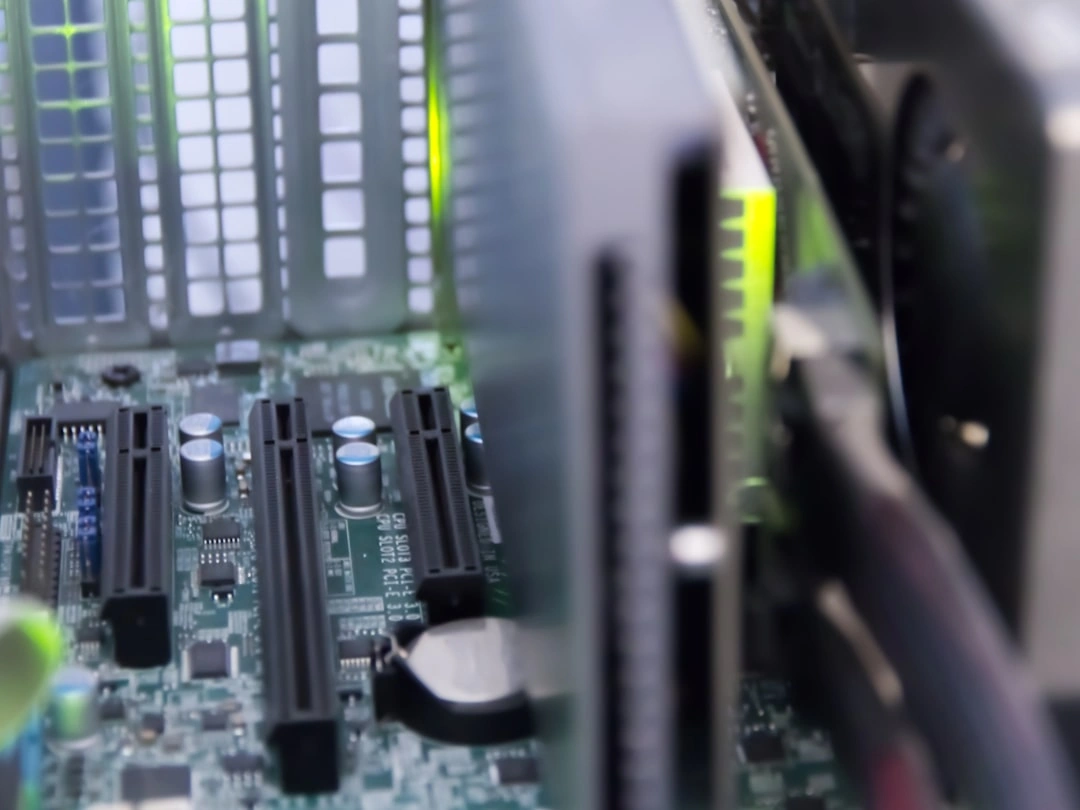
Network interface hardware varies widely depending on the physical deployment environment, physical media requirements, and required data transfer speeds. Choosing the appropriate hardware interface type ensures your network infrastructure scales efficiently while avoiding bottlenecks.
The physical connectivity type determines how a controller transmits bits across space:
Network transmission standards have grown exponentially over the past several decades. Modern network interfaces support full-duplex auto-negotiation, allowing devices to automatically establish the fastest shared operational speed and duplex mode supported by both ends of the cable link:
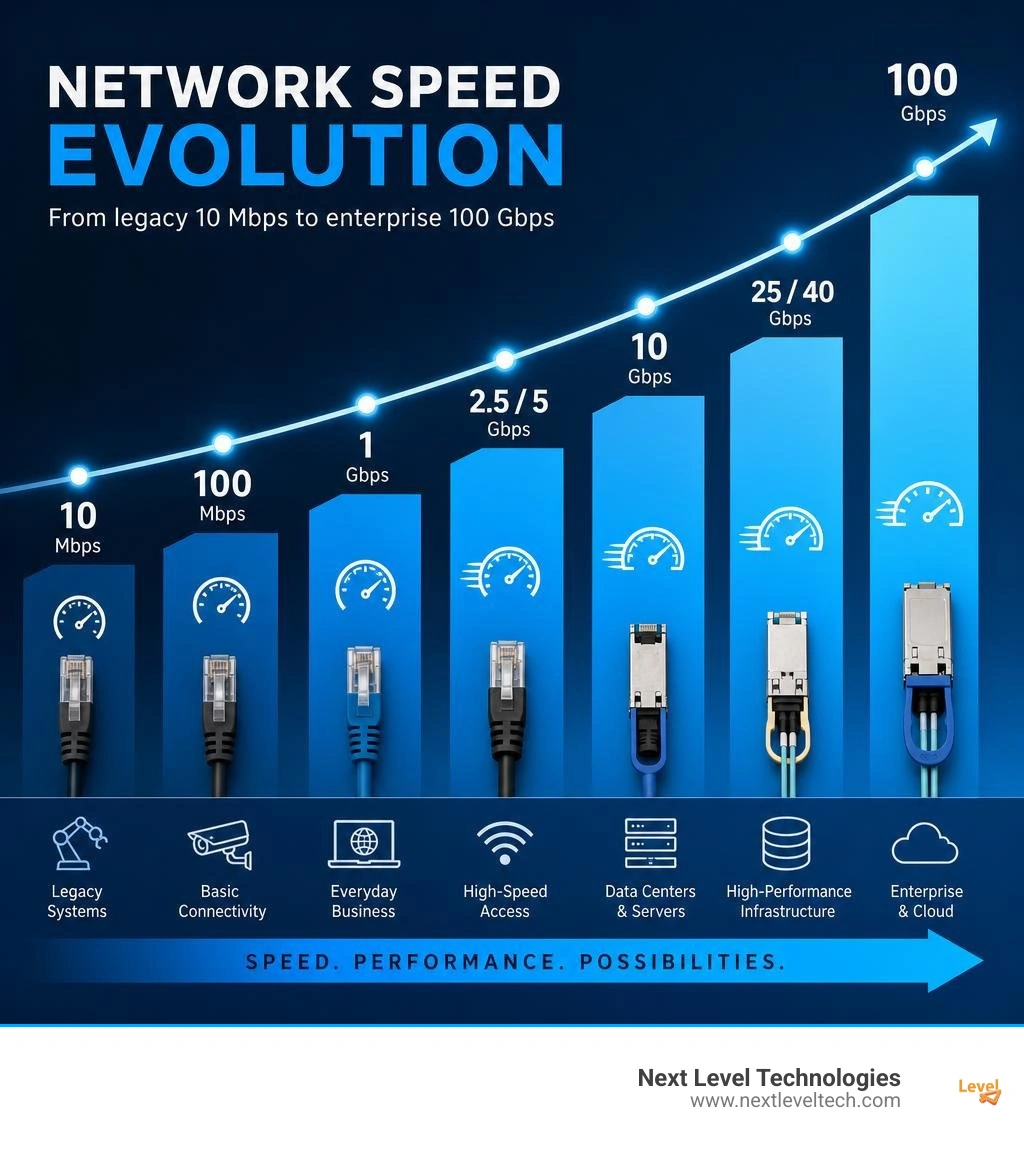
In high-speed networking environments, processing incoming and outgoing data frames creates significant operational overhead for host operating systems. When processing 10 Gbps or 100 Gbps traffic, the host system CPU can spend too much time handling interrupts, calculating frame checksums, and reassembling data packets. Modern high-performance network controllers use dedicated silicon hardware offloads to handle network processing directly on the card.
To free up CPU cores for business applications and hypervisor workloads, enterprise controller hardware incorporates several key offload capabilities:
Beyond basic offloading, modern enterprise network interface hardware utilizes specialized virtualization and memory management mechanisms:
ethtool, administrators can configure Dynamic Device Personalization (DDP), Accelerated Receive Flow Steering (aRFS), and set custom jumbo frame Maximum Transmission Units (MTU) up to 9000 bytes or higher to optimize bulk packet transfers.Keeping your business IT infrastructure healthy requires active management, driver maintenance, and methodical hardware diagnostics. System administrators must regularly inspect physical link parameters, verify hardware addresses, and troubleshoot network interface anomalies before they interrupt business operations.
Identifying physical hardware addresses is a fundamental troubleshooting step when configuring DHCP reservations, network security access controls, or port security on managed switches.
To check your physical controller details across different desktop and server operating systems:
ipconfig /all. Locate the active network adapter section to find the Physical Address (e.g., 00-15-5D-A1-02-B4).ip addr show or ip link. The hardware address appears following the link/ether designation for your physical device (e.g., eth0 or enp3s0).ifconfig or navigate to System Settings > Network > Advanced > Hardware to locate the MAC Address listed for Ethernet or Wi-Fi interfaces.Network Interface Controller Teaming (Link Aggregation): To maximize network availability and throughput in enterprise server setups, organizations utilize NIC Teaming (also known as Link Aggregation, bonding, or port trunking). By bundling two or more physical cards into a single logical interface, NIC teaming delivers two major benefits:
When physical connectivity drops or network speeds slow down unexpectedly, systematically working through basic physical and logical diagnostic steps resolves most issues:
dmesg | grep eth or lspci -nnk to verify driver modules loaded without errors.ping 127.0.0.1 for loopback interface checks, followed by pinging the local default gateway) to isolate physical link issues from broader DNS or internet routing problems. Review our helpful guide to computer hardware problems and solutions for further hardware diagnostics.Several major silicon manufacturers supply the network controllers powering consumer devices, corporate workstations, and enterprise data center servers worldwide:
An onboard controller (LAN on Motherboard) is built directly into the computer motherboard, sharing system resources to provide convenient, everyday network connectivity. A dedicated controller is a separate PCIe expansion card containing its own processing ASICs, onboard memory buffers, and specialized cooling. Dedicated cards deliver higher speeds (such as 10GbE to 100GbE), support fiber optic modular transceivers, and include advanced hardware offloading features required for server virtualization and heavy data center workloads.
NIC teaming combines multiple physical network interface cards into a single logical network connection. This configuration provides bandwidth aggregation by combining the throughput capacity of multiple physical cables to handle heavier network traffic. It also provides hardware failover redundancy—if one cable, physical card, or switch port fails, network traffic automatically shifts to the remaining active adapters in the team instantly, keeping critical servers online without interruption.
At multi-gigabit speeds (such as 10 Gbps and above), parsing TCP packet headers, reassembling data streams, computing checksums, and handling hardware interrupts consumes substantial host CPU processing power. By offloading these low-level network tasks directly to a TCP Offload Engine (TOE) on the network adapter chip, the host CPU is freed from packet processing overhead. This allows system RAM and CPU cores to focus entirely on running core business applications, virtual machines, and database queries.
The network interface controller is a critical piece of hardware that enables modern digital connectivity. From integrated desktop motherboards handling everyday office tasks to high-performance enterprise PCIe expansion cards routing 100 Gbps traffic through virtualized cloud servers, selecting the right controller hardware, cabling infrastructure, and offload settings directly shapes your organization's IT performance and operational uptime.
As businesses adopt higher bandwidth applications, multi-site cloud environments, and denser virtualization platforms, keeping your network hardware optimized is essential. Proper hardware selection, timely driver updates, physical redundancy planning, and robust cybersecurity protections ensure your infrastructure stays fast, reliable, and secure against unexpected downtime.
Next Level Technologies provides managed IT services, HIPAA-compliant cybersecurity, cloud infrastructure, and IT support to businesses throughout Ohio and West Virginia. Supported by our technically experienced staff with extensive cybersecurity training, Next Level Technologies operates from a main location in Columbus, Ohio and a second location in Charleston, WV. To evaluate your business network performance, hardware lifecycle, and infrastructure security, contact our local specialists today to explore our comprehensive managed IT services and support.
Discover how a healthcare management services organization boosts practice efficiency, cuts overhead, and protects clinical autonomy.
October 3, 2026
Master denial management in medical billing with proven strategies to reduce denials, boost appeals success, and protect revenue cycle performance.
September 25, 2026


