Don't Just Dream It, Plan It: A Guide to Your Small Business IT Strategy
March 5, 2026


Learn how Healthcare Management Administrators Inc optimizes self-funded plans, provider networks, and clinical quality for employers.
October 17, 2026

Upgrade your healthcare claims management for maximum accuracy with Next Level Technologies, serving Columbus, Ohio and Charleston, WV.
October 10, 2026

Discover how a healthcare management services organization boosts practice efficiency, cuts overhead, and protects clinical autonomy.
October 3, 2026
March 5, 2026
An it plan for small business is a strategic blueprint that details how technology will support your business goals, protect your data, and drive growth. Here's what it includes:
Core Components of a Small Business IT Plan:
If you're feeling overwhelmed by technology choices or worried about cyber threats, you're not alone. Research shows that 56% of small business owners aren't concerned about cyberattacks - a dangerous blind spot when digital information theft has become the most commonly reported fraud. Meanwhile, 44% of small businesses lack cloud infrastructure, limiting their scalability and efficiency.
The good news? Technology can be your competitive advantage, not your headache. When properly planned and managed, IT infrastructure becomes the backbone of business success. It streamlines operations, reduces manual errors, protects your reputation, and positions you for growth.
As Steve Payerle, President of Next Level Technologies, I've spent 15 years helping small and medium businesses transform their technology from a cost center into a strategic asset. I've seen how a well-crafted it plan for small business protects companies from costly disruptions while enabling them to compete with larger competitors.
It plan for small business further reading:
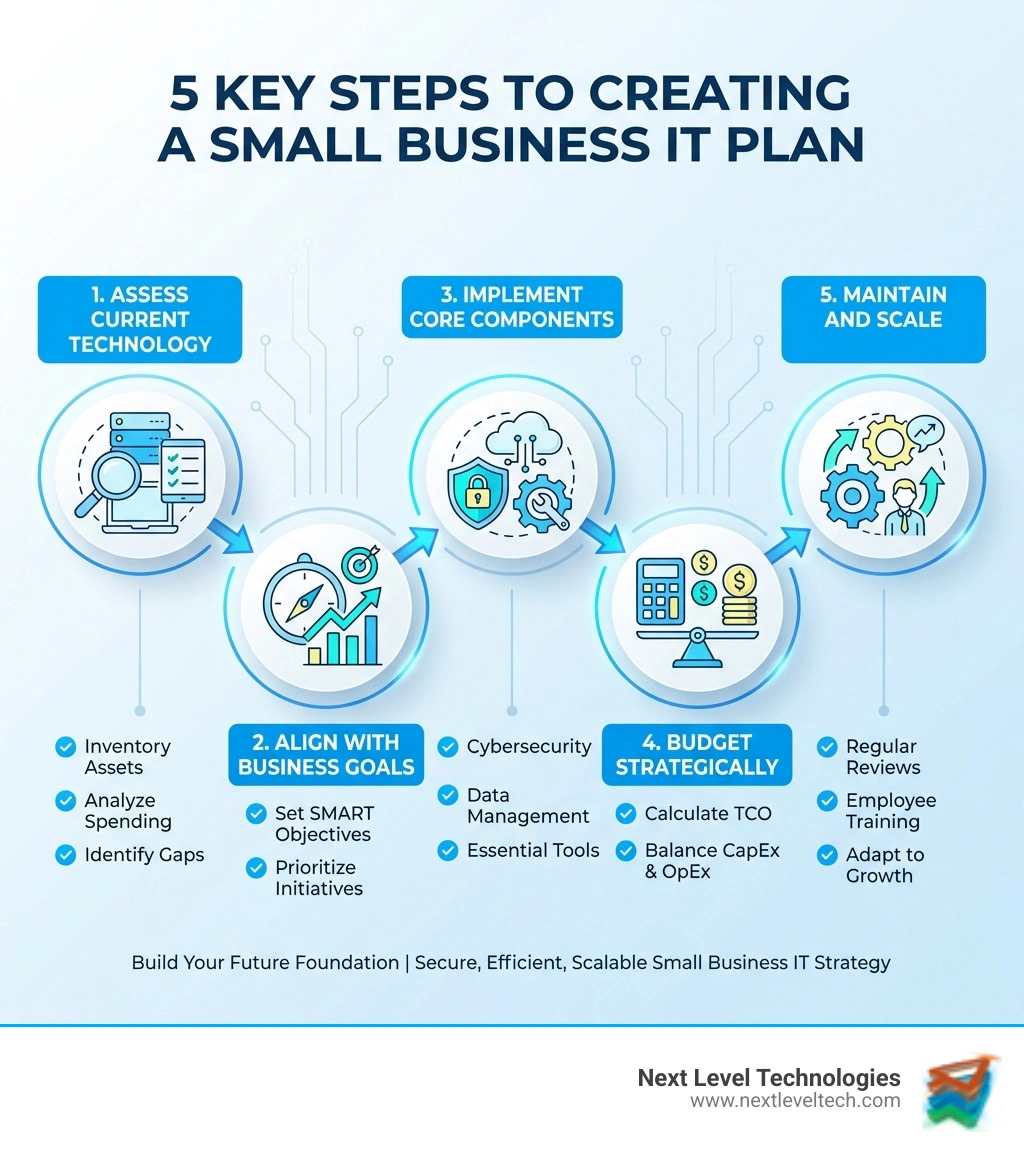
Creating an it plan for small business isn't merely about buying the latest gadgets; it's about strategically leveraging technology to achieve your business goals. Think of it as a living document that evolves with your company. A robust IT strategy is a continuous journey of assessment, alignment, and adaptation.

At Next Level Technologies, our process begins with a thorough assessment of your current technological landscape. We evaluate your existing IT infrastructure—hardware, software, network configurations, and spending—to identify what’s working, what’s causing pain points, and where security vulnerabilities lie. By gathering feedback from your team and ensuring compliance with industry standards, we establish a clear starting point for your strategic plan.
Next, we align your IT strategy with your business objectives. Whether your business in Columbus, OH, aims to expand or streamline customer service, your IT strategy must directly support these ambitions. We help you define specific, measurable, achievable, relevant, and time-bound (SMART) goals for your IT initiatives, such as "reduce website load time by 50% within six months." This ensures every technology investment contributes directly to your success.
This strategic alignment transforms IT from a support department into a critical driver for growth. It simplifies operations, minimizes downtime, and adds measurable value. Our IT Cost Reduction Strategies can help optimize your spending while ensuring you make the right investments to propel your business forward.
A comprehensive it plan for small business encompasses several crucial areas, each vital for a resilient and efficient operation. These building blocks ensure your technology supports your business effectively, both now and in the future.
Cybersecurity: In today's digital landscape, robust cybersecurity is non-negotiable. Your plan must include measures to protect your data, systems, and network from changing threats. This is where Next Level Technologies' extensive cybersecurity training and technical experience truly shine, especially for businesses in Columbus, OH, and Charleston, WV, facing unique regional and industry-specific threats.
Data Management: How you store, access, and protect your data is fundamental. This component addresses everything from cloud storage solutions to local servers and backup strategies.
Business Continuity and Disaster Recovery: Preparing for the unexpected is crucial. This involves plans to keep your business running during and after disruptions, ensuring your critical systems and data are recoverable.
Operational Efficiency Tools: Technology should make your business more productive. This includes identifying and implementing software and hardware that streamline workflows, automate tasks, and improve collaboration.
IT Infrastructure: This covers the physical and virtual components that support your entire IT ecosystem, including networks, servers, workstations, and mobile devices. Our IT Infrastructure for Small Business guide offers deeper insights into building a solid foundation.
Vendor Management: For many small businesses, external partners provide vital IT services. Managing these relationships, from software providers to internet service providers, is key to ensuring reliable service and cost-effectiveness. Our insights on IT Vendor Management can help you steer these complex relationships.
Each of these components is interconnected. A weakness in one area can undermine the strength of another. That's why a holistic, integrated it plan for small business is so vital.
Budgeting for IT can feel daunting, but it's crucial to see it as a strategic investment, not just an expense. A well-allocated IT budget drives growth, improves efficiency, and protects your assets, ultimately contributing to your bottom line.
When developing your IT budget, we encourage clients in Charleston, WV, and Columbus, OH, to consider the Total Cost of Ownership (TCO). TCO goes beyond the initial purchase price to include ongoing maintenance, support, training, and potential downtime. A "cheap" solution can be costly long-term due to frequent issues or poor support.
Distinguishing between Capital Expenditures (CapEx) and Operating Expenses (OpEx) is also important. CapEx involves large, one-time purchases like servers, while OpEx includes recurring costs like software subscriptions and cloud services. For many small businesses, shifting to an OpEx model through managed services offers greater financial predictability and flexibility.
Managed IT services from Next Level Technologies are a prime example of budget optimization. Instead of reacting to problems, our services provide proactive maintenance, monitoring, and support for a predictable monthly fee. This converts variable CapEx into manageable OpEx, gives you access to a team with diverse technical experience and extensive cybersecurity training, and prevents costly IT emergencies. Explore our IT Cost Optimization Strategies to make your budget work harder.
Securing and effectively managing your technology is paramount for any small business. It's not just about having computers and internet; it's about building a resilient ecosystem that protects your operations, data, and reputation. This is where the rubber meets the road in your it plan for small business.
At Next Level Technologies, we advocate for a layered security approach, recognizing that no single solution offers complete protection. This involves multiple, overlapping security measures to detect, prevent, and respond to threats. Proactive management, constant monitoring, and rapid response are key. Our team's deep technical experience and extensive cybersecurity training are dedicated to ensuring your business in Columbus, OH, or Charleston, WV, remains secure.
Cybersecurity is the most critical component of a modern it plan for small business. Small businesses are increasingly targets, yet a recent CNBC survey found most owners (net 56%) are not concerned about attacks. This is a dangerous blind spot, as digital information theft is now the most commonly reported fraud. With larger companies bolstering their defenses, less secure small businesses become easier targets. The threat is constant, with over 100,000 new malicious software samples seen daily.
Let's look at some of the most significant cybersecurity threats and how your IT strategy can address them:
Employee training is pivotal. Security is as much a human issue as a technology one. Teaching your staff to recognize risks and protect information online can prevent significant personal and organizational losses.
Strong password policies are fundamental. Encourage employees to use long, complex, unique passwords. More importantly, implement Multi-Factor Authentication Complete Guide (MFA), which requires a second form of verification and is far more secure than passwords alone.
For a deeper dive into protecting your business, consult our Cybersecurity for Business Complete Guide and resources like the NIST Small Business Cybersecurity Corner.
Your data is vital to your survival. Data loss from hardware failure, human error, or cyberattacks can cause major business disruption. This makes robust data management and a solid disaster recovery plan indispensable parts of your it plan for small business.
When it comes to data management, small businesses typically face a fundamental choice: on-premises solutions or cloud-based solutions. Some businesses opt for a hybrid approach, combining both.
On-premises data storage gives you full control over your hardware, software, and data. That can be useful if you have strict compliance needs or specialized systems. But it also means higher upfront costs, more maintenance, and more responsibility for security, upgrades, backups, and disaster recovery.
Cloud data storage usually has lower upfront costs because you pay through subscriptions instead of buying servers and infrastructure. It is easier to scale, accessible from anywhere with an internet connection, and often includes built-in redundancy and recovery features. The tradeoff is that some control is delegated to the cloud provider, so choosing the right vendor and security settings matters.
For many small businesses, the best choice is not purely one or the other. A hybrid approach can keep critical or sensitive systems on-premises while using the cloud for flexible storage, remote access, backup, and disaster recovery.
A recent report found 44% of small businesses lack cloud infrastructure. While on-premises solutions offer control, the cloud provides scalability, convenience, and affordability. When choosing, we help clients assess their business requirements and compliance needs. It's crucial to review cloud provider terms of service to ensure your data is protected to your standards.
A robust data backup strategy is essential regardless of your storage method. This involves identifying critical data, scheduling regular backups, and validating them. The frequency should be determined by your recovery point objective (RPO)—the maximum acceptable data loss. Our Data Backup and Recovery services ensure your critical information is always protected.
An IT Disaster Recovery Plan (IT DRP) must align with your business continuity plan. We help you define recovery time objectives (RTO)—the maximum acceptable downtime for critical systems. Recovery strategies should anticipate various failures and aim to restore services within the RTO. Periodically testing your plan is paramount; businesses with tested plans recover faster and with less damage. Our Disaster Recovery Plan Checklist can guide you through this vital process.
Once your core IT strategy and security foundations are in place, the next step in your it plan for small business involves selecting and implementing the right tools and services, and establishing a robust framework for ongoing maintenance and scalability. Technology is the backbone of business success, and the internet allows businesses of all sizes to reach new markets and operate more efficiently through computer-based tools.
Here's a list of essential technology tools and services every small business in Columbus, OH, or Charleston, WV, should consider:
For a more comprehensive look at how these technologies fit together, check out our IT Solutions for Small Businesses guide.
An it plan for small business is dynamic, not static. Technology is constantly changing, updating, and introducing new tools and digital solutions. It’s hard to keep up, but having a clear IT strategy will simplify things. Regular reviews and updates are crucial to ensure your IT infrastructure remains aligned with your evolving business needs and the latest technological advancements.
We recommend conducting thorough reviews of your IT strategy at least annually, with more frequent check-ins (quarterly or biannually) to address specific initiatives or emerging challenges. During these reviews, we assess key performance indicators (KPIs) to measure the success of your IT implementations. These could include metrics like system uptime, response times for support, or user satisfaction rates. This data-driven approach helps us understand the value IT is adding to your business.
Scalability planning is another vital aspect. How can a small business ensure its IT strategy is scalable and adaptable to future growth? Your IT plan should anticipate future needs, ensuring that your systems can grow seamlessly as your business expands. This might involve choosing cloud-based solutions that can easily scale up, or planning for infrastructure upgrades in phases. If expanding into new markets is a goal, consider how IT can support this – perhaps through better data analysis tools or a more robust e-commerce platform.
Regular maintenance is non-negotiable. All systems and software, including networking equipment, should be updated in a timely fashion as patches and firmware upgrades become available. Using automatic updating services whenever possible, especially for security systems, is a best practice. This proactive approach, coupled with effective IT Asset Management, minimizes vulnerabilities and keeps your operations running smoothly.
An it plan for small business should be a living document, not something you create once and forget. We recommend a formal, comprehensive review at least annually. However, more frequent check-ins are often beneficial.
Consider reviewing and updating your IT plan:
Regularly testing components of your plan, especially disaster recovery, is also crucial to ensure they work as intended.
While a very small business might attempt to create a basic it plan for small business on its own, leveraging external expertise often provides significant advantages.
For DIY efforts, resources like the FCC's Small Biz Cyber Planner 2.0 (an online tool designed for businesses lacking dedicated IT staff) can help create customized cybersecurity plans. However, these tools often provide general guidance.
For businesses with more sophisticated networks, or those seeking a truly strategic and comprehensive IT plan, consulting with IT professionals is highly recommended. You might not know whether you need endpoint security, for example, but an experienced IT team will. At Next Level Technologies, our technical experience and extensive cybersecurity training mean we can provide invaluable guidance. We help you:
For more insights into how professional guidance can benefit your company in Columbus, OH, or Charleston, WV, read our guide on IT Consulting for Small Businesses.
The biggest IT mistake small businesses make is being reactive, not proactive. Many businesses only think about their IT when something breaks, a system goes down, or a cyberattack occurs. This reactive approach is far more costly and disruptive than a proactive, planned strategy.
Specific manifestations of this mistake include:
A comprehensive it plan for small business addresses these issues head-on, turning potential weaknesses into strengths and ensuring your technology actively supports your success rather than hindering it.
Developing a comprehensive it plan for small business is no longer optional; it's a strategic imperative. In today's digital landscape, technology is the backbone of business success, offering unparalleled opportunities for growth, efficiency, and market reach. By proactively addressing areas like cybersecurity, data management, operational efficiency, and scalability, you're not just safeguarding your business – you're future-proofing it.
A well-crafted IT strategy transforms your technology from a mere cost center into a powerful competitive advantage. It ensures your business can adapt to change, withstand threats, and continue to innovate. Don't let your business become another statistic of cyber vulnerability or technological stagnation.
At Next Level Technologies, we specialize in helping businesses like yours in Columbus, OH, and Charleston, WV, steer the complexities of IT. Our team of experts, backed by deep technical experience and extensive cybersecurity training, is dedicated to crafting custom IT plans that align with your unique business goals. We provide the managed IT services and support you need to thrive, ensuring your technology works for you, not against you.
Ready to stop dreaming and start planning? Let us help you build a robust and future-ready it plan for small business.
Learn how Healthcare Management Administrators Inc optimizes self-funded plans, provider networks, and clinical quality for employers.
October 17, 2026
Upgrade your healthcare claims management for maximum accuracy with Next Level Technologies, serving Columbus, Ohio and Charleston, WV.
October 10, 2026

