Beginner's Guide to IT Server Management Services
June 1, 2026


Upgrade your healthcare claims management for maximum accuracy with Next Level Technologies, serving Columbus, Ohio and Charleston, WV.
October 10, 2026

Discover how a healthcare management services organization boosts practice efficiency, cuts overhead, and protects clinical autonomy.
October 3, 2026

Master denial management in medical billing with proven strategies to reduce denials, boost appeals success, and protect revenue cycle performance.
September 25, 2026
June 1, 2026
IT server management services are the foundation of a stable, secure, and efficient business technology environment.
Here's a quick summary of what they include and why they matter:
Servers are the backbone of modern business operations. They store customer data, run critical applications, process transactions, and keep teams connected. When a server fails — even for a single hour — the cost can range from thousands to millions of dollars depending on your industry.
Yet many businesses still treat server management as an afterthought, handled "on the side" by an overworked IT team or left largely unmonitored.
That's a serious risk.
Unpatched servers are among the leading causes of ransomware attacks and data breaches. Poorly managed hardware leads to performance bottlenecks, unexpected outages, and compliance failures — especially in regulated industries like healthcare.
For mid-sized businesses in Columbus, OH and Charleston, WV, the stakes are high. Whether you're running on-premise servers, a hybrid cloud setup, or a fully virtual environment, consistent and professional server management isn't optional — it's a business necessity.
Next Level Technologies' certified IT professionals bring extensive cybersecurity training and hands-on technical experience to server environments across Ohio and West Virginia, helping businesses eliminate downtime and stay ahead of threats before they become disasters.
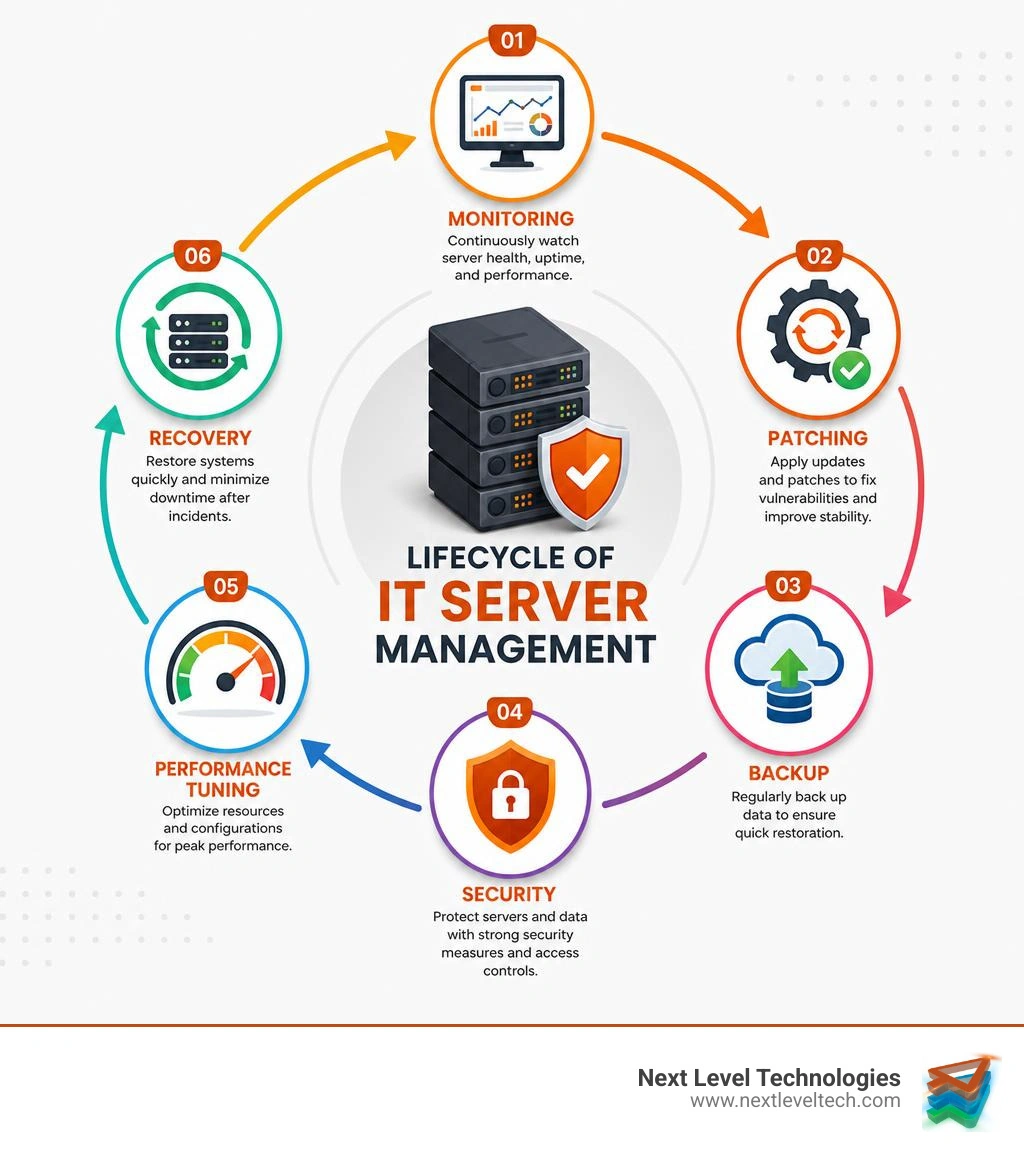
Common IT server management services vocab:
At its core, server management is the practice of monitoring, securing, and maintaining physical or virtual servers to ensure they operate at peak performance. It spans the entire server lifecycle - from initial hardware provisioning and configuration to daily performance tuning, software updates, and eventual decommissioning.
When we look at the lifecycle of a server, proper setup is only the beginning. Without continuous oversight, hardware configuration errors can lead to poor resource utilization, leaving expensive CPU and memory capacity sitting idle or, conversely, causing systems to choke under sudden traffic spikes.
Effective server administration requires a deep understanding of virtualization and cloud migration. Virtualization allows us to run multiple virtual machines (VMs) on a single physical host, maximizing hardware efficiency. However, it also adds a layer of complexity. If you are planning a cloud migration or managing a hybrid setup, you need structured processes to prevent performance degradation and security gaps. For a broader view of how these elements connect, check out our IT Infrastructure Management Complete Guide.
Outsourcing these tasks to experts who specialize in Managed IT Services ensures that your infrastructure is optimized by professionals who live and breathe server health. This is especially true for businesses in Ohio and West Virginia. Leveraging regional expertise allows organizations to bridge technical skill gaps, utilize deep technical experience, and ensure their systems remain highly available.
In May 2026, business moves faster than ever. We no longer live in a world where a couple of hours of system downtime can be brushed off. If your primary database server goes offline, your entire workflow stops. Employees can't access files, customers can't complete transactions, and your reputation takes an immediate hit.
The financial consequences of unmanaged servers are stark:
By securing dependable IT support for small businesses, you protect your bottom line from these costly interruptions. Working with established local partners like Next Level Technologies helps businesses in West Virginia and Ohio maintain continuous uptime and keep their operations running smoothly.
The cybersecurity landscape of May 2026 is highly sophisticated. Cybercriminals routinely deploy automated scanners to identify unpatched servers within hours of a vulnerability being disclosed. If your operating system updates, firewalls, and security policies are not managed systematically, your server is a sitting duck for ransomware infections and data breaches.
Beyond basic security, regulatory compliance has become a major challenge for modern businesses. If you operate in healthcare, finance, or professional services, you are bound by strict frameworks:
Meeting these standards requires extensive cybersecurity training for the IT staff managing your servers. It is not enough to simply install an antivirus tool; you must establish a multi-layered defense. This includes server hardening, continuous intrusion detection, and routine vulnerability scanning. For additional vendor-neutral guidance on building a risk-based security program, the NIST Cybersecurity Framework is a widely used reference for organizations strengthening their controls. For comprehensive protection, implementing advanced Cybersecurity solutions is essential.
If you are looking for local compliance-backed support in the Midwest, partnering with regional specialists who have extensive cybersecurity training and technical experience ensures that your servers are configured to satisfy both local regulations and federal compliance audits.

When you partner with an enterprise-grade provider for IT server management services, you aren't just paying for someone to reboot a server when it crashes. You are investing in a comprehensive suite of management disciplines designed to keep your technology stack healthy.
To understand how these pieces fit together under a unified management framework, explore our IT Service Management Tools Ultimate Guide.
The foundation of modern server care is continuous telemetry. Experienced technicians monitor key performance indicators (KPIs) around the clock to detect anomalies before they cause a crash:
One of the biggest hurdles in server monitoring is "alert fatigue." If a monitoring system sends an email every time a CPU briefly hits 85%, IT teams quickly learn to ignore the notifications. Professional server management mitigates this by using customized threshold templates and predictive analytics.
This proactive maintenance relies heavily on having deep technical experience in hardware and networking. To learn more about the physical and logical components that power these systems, read our Computer Hardware Networking Complete Guide.
A server is only as good as its backup strategy. Hardware components fail, files get corrupted, and natural disasters happen. A robust server management plan integrates automated, secure backups directly into daily operations.
We strictly adhere to the industry-standard 3-2-1 backup rule:
Additionally, we define clear metrics for recovery:
To make sure your business is prepared for any scenario, utilize our Disaster Recovery Plan Checklist and implement reliable Backup and Recovery Solutions to protect your critical assets.
Modern businesses rarely rely on a single physical box in a closet. Most operate in complex, distributed environments that combine:
Managing this hybrid sprawl requires specialized tools and deep technical experience. For example, migrating legacy workloads from expensive public clouds to cost-effective hypervisor environments (often called "cloud exiting") can reduce ongoing hosting expenses by up to 60-80%. However, managing these virtual clusters, configuring private networks, and setting up encrypted VPN tunnels requires professional oversight.
To understand how to design and secure these multi-environment setups, consult our guide on IT Infrastructure for Small Business.
The difference between proactive and reactive server management is the difference between changing your car's oil regularly versus waiting for the engine to seize on the highway.
Proactive server management focuses on preventing issues before they turn into outages. It uses continuous 24/7 monitoring, performance telemetry, and anomaly detection to spot early warning signs. Patches are scheduled, tested, and applied during low-impact windows. Security work is ongoing too, with regular vulnerability scanning, server hardening, and maintenance that supports high availability, predictable costs, and minimal downtime.
Reactive server management waits until something breaks. Alerts may only trigger after a service goes offline, and patches are often rushed after a breach or urgent problem. Security reviews tend to happen after an incident, such as ransomware or data loss. That approach can lead to unplanned outages, higher emergency IT costs, and more risk for the business.
By shifting to a proactive model, we use automation to handle routine patch management, monitor system logs for warning signs, and perform routine tune-ups. This approach dramatically reduces the risk of cascading failures. If you want to see how proactive monitoring fits into a broader technology strategy, explore our Managed IT Services overview.
Outsourcing your server management to a dedicated provider is one of the most effective ways to optimize your operations.
For a comprehensive look at how outsourcing can transform your daily operations, read our Small Business IT Support Guide.
Yes, absolutely. A professional server management provider acts as a strategic partner to align your infrastructure with strict regulatory frameworks. This is achieved through:
To learn more about tracking and securing these compliant assets, review our guide on IT Asset Management.
While the core goals of maintenance and security remain the same, the execution differs across environments:
Managing these diverse environments successfully requires a team with extensive technical experience in hybrid setups.
24/7 monitoring relies on predictive analytics and real-time anomaly detection rather than simple "up or down" checks. For example, if a server's memory usage steadily climbs over several days, predictive alerts flag a potential memory leak long before the system runs out of RAM and crashes.
Similarly, if disk write speeds degrade or bad sectors begin to accumulate on a hard drive, monitoring systems alert our technical team to schedule a drive replacement during a planned maintenance window. Combined with automated patching and rapid response from highly trained cybersecurity experts, potential disasters are mitigated silently in the background.
Managing servers is a complex, continuous responsibility that directly impacts your business’s security, compliance, and bottom line. Leaving your server infrastructure to chance — or treating it as a part-time job for your internal team — opens the door to costly downtime, operational inefficiencies, and devastating cyber threats.

At Next Level Technologies, we help mid-sized businesses in Columbus, Ohio and Charleston, West Virginia eliminate the headache of server management. Our local, highly trained IT professionals combine decades of technical experience with extensive cybersecurity training to deliver enterprise-grade server support, secure hybrid cloud migrations, and robust disaster recovery solutions.
Whether you are looking to secure a complex healthcare database, optimize your virtualized environments, or move to a predictable flat-rate IT model, we are here to support your success.
Partner with Next Level Technologies for managed IT services and IT support today to keep your servers secure, optimized, and always ready for business.
Upgrade your healthcare claims management for maximum accuracy with Next Level Technologies, serving Columbus, Ohio and Charleston, WV.
October 10, 2026
Discover how a healthcare management services organization boosts practice efficiency, cuts overhead, and protects clinical autonomy.
October 3, 2026
