The Ultimate Guide to IT Performance Optimization
June 16, 2026


Compare cloud backup services with this guide to backup cloud database service architecture, security, and disaster recovery.
September 12, 2026

Compare cloud based backup services with our ultimate checklist covering encryption, recovery, and compliance for your business.
September 5, 2026

Protect your business with expert Phishing protection Columbus services from Next Level Technologies, based in Columbus, Ohio and Charleston, WV.
August 27, 2026
June 16, 2026
IT performance optimization is the process of tuning your systems, software, and infrastructure to run faster, use fewer resources, and stay reliable under pressure.
If you're looking for a quick answer, here's what IT performance optimization actually involves:
These aren't one-time fixes. They're an ongoing discipline.
The stakes are real. Amazon famously found that a 100ms delay in page load time caused a 1% drop in revenue. For mid-sized businesses in Columbus, OH and Charleston, WV, slow systems translate directly into lost productivity, frustrated employees, and customers who don't come back.
Most performance problems don't announce themselves. They build quietly — through outdated drivers, bloated databases, aging hardware, and technical shortcuts that made sense at the time. By the time users complain, the damage is already happening.
This guide walks through every layer of IT performance optimization: from code and databases all the way up to cloud infrastructure and continuous monitoring. Whether you manage your own IT or work with a provider, you'll find practical strategies to make your systems measurably faster and more reliable.
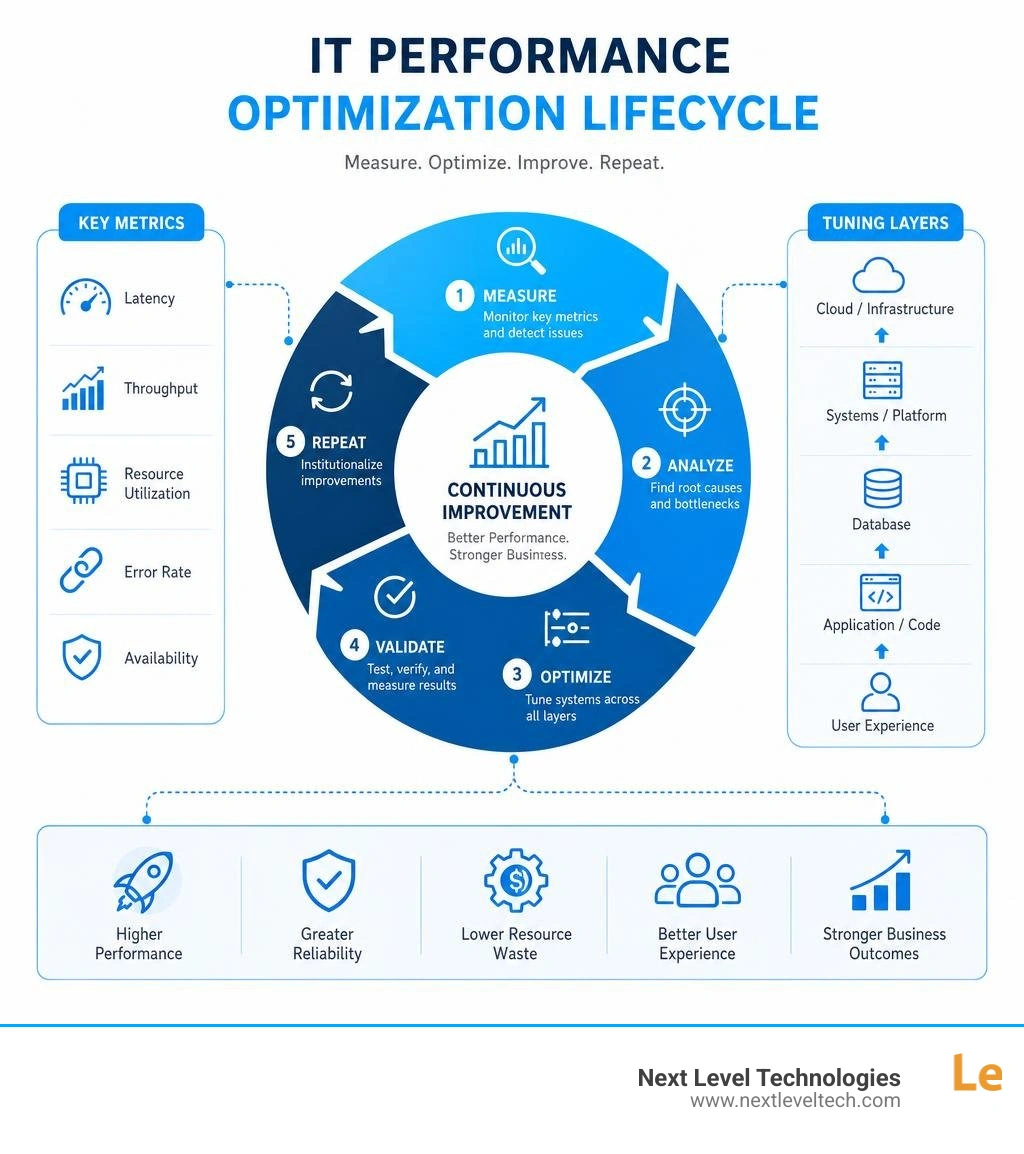
Learn more about it performance optimization:
At its core, IT performance optimization is the practice of refining your entire technology stack to achieve maximum system efficiency. It is not just about making a single application load a fraction of a second faster; it is about aligning your software, databases, networks, and physical hardware so they execute tasks with minimal resource utilization and lowest possible operational costs.
In the modern digital landscape of June 2026, technology is the engine of business. If that engine is sluggish, your entire operation slows down. When systems run efficiently, they consume less cloud compute power, require less physical hardware, and demand less manual intervention from your IT team. This directly translates to lower utility and cloud bills, freeing up budget for strategic growth.
Furthermore, user experience (UX) is tied directly to system performance. Whether it is an internal employee attempting to access a patient record in a healthcare clinic in Charleston, WV, or a client trying to submit a document to a professional services firm in Columbus, OH, system speed dictates satisfaction. Slow systems act as a hidden tax on your daily operations, eroding employee morale and driving clients to competitors who offer friction-free digital experiences.
To build a reliable foundation, organizations must look at their systems holistically. For a deeper dive into managing these environments, explore our IT Infrastructure Management Complete Guide. Additionally, industry frameworks like the Well-Architected Framework: Performance optimization pillar | Cloud Architecture Center | Google Cloud Documentation provide excellent structures for analyzing how cloud resources can be configured to deliver predictable, high-speed performance under heavy workloads.
To optimize anything, you must first be able to measure it. In performance engineering, we rely on several foundational metrics to evaluate system health:
To learn more about analyzing these metrics and understanding the relationships between system capacity and load, refer to the Performance Engineering Study Path — Profiling, Latency & Throughput | Semicolony .
The financial impact of poor performance is staggering. Aside from Amazon's famous 100ms revenue rule, real-world studies show that a 1-second delay in page response can result in a 7% reduction in conversions, and a 2.2-second improvement can yield a 15.4% increase in conversions.
For local businesses, performance issues act as a major productivity tax. The Microsoft Work Trend Index indicates that the average knowledge worker loses roughly 30 minutes daily to tool friction—such as waiting for slow applications to respond or rebooting frozen devices. Over a week, that is 2.5 hours lost per employee. If you run a professional services firm or a medical practice with dozens of staff members, that lost time represents thousands of dollars in wasted overhead every month.
By partnering with an experienced team for Proactive IT Support, you can identify these performance drains before they impact your bottom line.
Achieving true optimization requires looking at your entire technology stack. Tuning a web server will not help if your database is poorly indexed, and writing incredibly clean code will not save an application running on over-committed, under-provisioned hardware.
To help businesses navigate these complexities, we look at full-stack tuning as a combination of software refinement, database structure, and hardware alignment. For a comprehensive look at managing the software side of this equation, check out our IT Application Management Complete Guide.
Software optimization begins with the code itself. The choice of algorithm dictates how resource usage scales as your business grows. For example, replacing a poorly designed algorithm with a time complexity of O(N^2) with an O(N log N) alternative can reduce processing times from hours to seconds when handling large datasets.
To find where your code is struggling, developers use code profiling tools like JProfiler, async-profiler, or Intel VTune. Profiling provides a clear map of CPU cycles and memory allocations, allowing engineers to target the exact lines of code causing bottlenecks rather than guessing.
Memory management is another critical area. In languages with automatic memory management, inefficient code can trigger frequent garbage collection cycles, which temporarily freeze application execution. By optimizing memory usage, reusing objects, and configuring compiler optimization flags, developers can significantly reduce execution times and binary sizes.
Databases are the most common bottleneck in modern business applications. As your business accumulates data, queries that once ran instantly begin to slow down, causing application lag.
To resolve this, we focus on several key database tuning techniques:
EXPLAIN ANALYZE or enabling tracking features like pg_stat_statements allows us to see exactly how a database executes a query. We can then rewrite inefficient SQL statements to retrieve data more direct paths.For specialized advice on frontend and backend optimization strategies, you can read the Performance Engineering Playbook: From TTFB to TTI | Alex Mayhew .
At the infrastructure level, optimization is about maximizing resource utilization while controlling costs. Many organizations over-provision their hardware or cloud instances "just in case," leading to massive waste.
One of the most effective ways to optimize physical infrastructure is through server consolidation. Rather than running separate physical servers for every minor workload, logical consolidation uses virtualization to run multiple independent operating system instances on a single high-performance physical server. This maximizes CPU and RAM utilization, reduces physical space requirements, and cuts energy bills.
In cloud environments, load balancing and autoscaling are essential. Load balancers distribute incoming traffic evenly across multiple servers, ensuring no single resource is overwhelmed. Autoscaling dynamically adjusts your cloud compute capacity based on real-time demand—scaling up during peak business hours and scaling down at night to eliminate waste.
To learn more about aligning performance with cost-efficiency, read our guides on IT Cost Reduction Strategies and IT Cost Management Software.

A system is never "permanently optimized." As user behaviors shift, data volumes grow, and new software updates are deployed, performance naturally degrades. Organizations must build a performance culture where efficiency is treated as an ongoing requirement throughout the technology lifecycle.
Different types of business workloads require completely different optimization approaches:
Because of these differences, optimization must always be "architecture-aware," meaning your software design must align with the specific hardware it runs on. To learn more about customized software optimization, review the guide on System Performance Optimization - SCS Solutions .
To keep systems running at peak performance without constant manual oversight, organizations should automate their optimization workflows.
This starts by embedding performance testing directly into your CI/CD (Continuous Integration/Continuous Delivery) pipelines. Before any code is deployed to production, automated testing tools like k6, JMeter, or Selenium should simulate heavy traffic loads to ensure the update does not introduce performance regressions.
Additionally, continuous monitoring and alerting systems should track your core metrics in real time. Rather than waiting for a server to crash, automated diagnostics can detect abnormal resource spikes and trigger self-healing protocols—such as automatically restarting a memory-leaking service or allocating additional temporary resources.
To implement these strategies effectively, organizations can follow the structured recommendations in the Architecture strategies for continuous performance optimization - Microsoft Azure Well-Architected Framework | Microsoft Learn and evaluate their progress using the Performance Efficiency Maturity Model - Microsoft Azure Well-Architected Framework | Microsoft Learn .
Addressing technical debt is also crucial for long-term health. Technical debt refers to the accumulated inefficiencies or shortcuts taken during software development to meet tight deadlines. Over time, this debt acts as a drag on performance. Regularly dedicating time to code refactoring and database maintenance prevents this degradation from spiraling out of control.
Performance optimization is rarely straightforward; it is a delicate balancing act of trade-offs. Every choice you make to speed up one part of a system can introduce complexity, cost, or security risks somewhere else.
One of the greatest traps in performance engineering is over-optimization. Developers can spend weeks rewriting code to shave microseconds off a process that only runs once a day, resulting in diminishing returns. Over-optimized code is often incredibly complex, highly fragile, and extremely difficult to maintain or debug.
Furthermore, some advanced optimization techniques rely on specific hardware instructions. While this "hardware dependency" can yield massive speed boosts, it limits the portability of your software. If you must migrate your application to a different cloud provider or run it on diverse user devices, those hardware-specific optimizations may break entirely.
Organizations must also balance performance with security and cost. For example, in highly regulated fields like healthcare, maintaining HIPAA compliance requires strict encryption of data both at rest and in transit. Encryption introduces processing overhead, which slightly increases latency. Trying to optimize away this latency by weakening encryption protocols is a massive risk. True optimization must work within the boundaries of your security and compliance requirements.
Modern IT architectures have introduced new performance challenges and opportunities:
To explore localized optimization solutions for businesses in Ohio and West Virginia, you can read more about Website Performance Optimization | WV & OH .
Latency is the time delay for a single request to travel from its source to its destination and return a response (measured in milliseconds). Throughput is the total volume of requests or data the system can process over a given time frame (such as requests per second).
Think of a highway: latency is how long it takes a single car to drive from Columbus to Charleston, while throughput is how many cars can pass a specific point on the highway every minute. A system can have high throughput but still suffer from high latency if requests are processed in large, slow-moving batches.
Technical debt consists of the shortcuts, outdated libraries, and unoptimized code left in a system to launch features quickly. As data volumes and user traffic grow, these unoptimized components begin to buckle.
Without regular code refactoring, database index rebuilding, and software updates, technical debt causes gradual performance degradation, making the system increasingly fragile and expensive to maintain.
Without an index, a database must perform a "full table scan" to find a specific record, reading every single row from start to finish. As your database grows to millions of rows, this process takes longer and longer.
An index acts like the index at the back of a textbook. It creates a highly organized, searchable pointer system that allows the database to locate and retrieve the exact data requested instantly, bypassing 99% of the database table and drastically reducing query execution times.
Achieving peak IT performance is not a luxury—it is an absolute necessity for modern business survival. From reducing employee tool friction to cutting cloud overhead and ensuring fast customer experiences, it performance optimization directly impacts your bottom line.
At Next Level Technologies, we have spent over 20 years helping small and mid-sized businesses across Columbus, OH and Charleston, WV eliminate downtime, strengthen security, and optimize their technology environments. Our local, highly experienced teams undergo extensive technical and cybersecurity training to ensure we deliver enterprise-grade support tailored to your unique needs.
Whether you are a healthcare clinic requiring HIPAA-compliant cloud systems, a professional services firm looking to streamline your databases, or a non-profit seeking to consolidate your servers, we are here to help. We provide proactive managed IT, robust disaster recovery, and Hardware as a Service with fast response times and predictable monthly costs.
Stop letting slow systems tax your productivity and hold your business back. Partner with us for Managed IT Services and IT Support today, and let's take your technology to the next level.
Compare cloud backup services with this guide to backup cloud database service architecture, security, and disaster recovery.
September 12, 2026
Compare cloud based backup services with our ultimate checklist covering encryption, recovery, and compliance for your business.
September 5, 2026

