The Ultimate Guide to IT Lifecycle Management Software
July 17, 2026


Upgrade your healthcare claims management for maximum accuracy with Next Level Technologies, serving Columbus, Ohio and Charleston, WV.
October 10, 2026

Discover how a healthcare management services organization boosts practice efficiency, cuts overhead, and protects clinical autonomy.
October 3, 2026

Master denial management in medical billing with proven strategies to reduce denials, boost appeals success, and protect revenue cycle performance.
September 25, 2026
July 17, 2026
IT lifecycle management software gives organizations a systematic way to track, manage, and optimize every technology asset — from the moment it's purchased to the day it's retired.
If you're looking for a quick answer:
What does IT lifecycle management software do?
| Capability | What It Means for Your Business |
|---|---|
| Asset tracking | Know exactly what you own, where it is, and who's using it |
| Procurement management | Control spending with approval workflows and vendor contracts |
| Deployment and configuration | Standardize how assets are set up and assigned |
| Monitoring and optimization | Catch underused licenses, aging hardware, and compliance gaps |
| Secure retirement | Dispose of devices safely with full audit records |
Most mid-sized businesses don't lose control of their IT overnight. With over 20 years of technical experience, our local teams in Columbus and Charleston have seen it happen gradually — a few untracked laptops here, some forgotten SaaS subscriptions there, a server running past its end-of-support date. Before long, you're carrying security risks you can't see and paying for assets you're not using.
The cost is real. Research shows that 29% of cloud spend is still wasted across typical organizations. One company recovered $90,000 in unused software licenses after implementing lifecycle automation. Another reclaimed over 400 hours previously spent on manual access reviews.
This isn't just an enterprise problem. Healthcare organizations, professional services firms, and nonprofits — exactly the kinds of businesses Next Level Technologies supports across Columbus, OH and Charleston, WV — face the same risks, often with smaller IT teams and stricter compliance requirements.
Good lifecycle management isn't about more tools. It's about having the right visibility, at the right time, to make smarter decisions.
it lifecycle management software vocabulary:
IT Lifecycle Management (ITLM) is the holistic process of managing an organization's IT infrastructure and assets from "cradle to grave." It isn't just about making sure your keyboard works; it’s about the strategic planning, development, delivery, and support of every piece of technology that makes your business run.
In our experience serving the Columbus and Charleston business communities, our team, with over 20 years of technical experience, sees ITLM as the backbone of operational resilience. It encompasses hardware assets like servers and laptops, software assets including enterprise applications, and increasingly, cloud resources and SaaS subscriptions. By understanding service dependencies—how a specific server supports a specific billing application—we can prevent a small hardware failure from becoming a total business shutdown.
At its core, it lifecycle management software is a specialized platform designed to automate and oversee the various stages of an asset's life. Instead of relying on a "Frankenstein" of spreadsheets, this software provides a centralized location for:
The world of IT acronyms is crowded, and it's easy to get confused. While they overlap, they serve different masters:
| Feature | ITLM | ALM | PLM | SaaS Lifecycle |
|---|---|---|---|---|
| Primary Focus | Infrastructure/Hardware | Software Development | Physical Products | User Identity/Access |
| Key Stage | Retirement/Disposal | Coding/Testing | Design/Manufacturing | Offboarding |
| Main Goal | Uptime & Cost Control | Code Quality | Production Efficiency | Security & Licenses |
In May 2026, the "office" is no longer just a physical building in downtown Columbus or Charleston. It’s a hybrid web of on-premise servers and cloud-based tools. This has led to "identity sprawl," where 75% of organizations now manage two or more identity providers.
With 86% of enterprise buyers planning to maintain or increase SaaS budgets, the risk of "shadow IT"—software bought by departments without IT’s knowledge—is skyrocketing. Effective it lifecycle management software shines a light on these hidden costs, ensuring you aren't paying for 50 licenses when you only have 30 employees. For more insights, check out our guide on IT Asset Management.
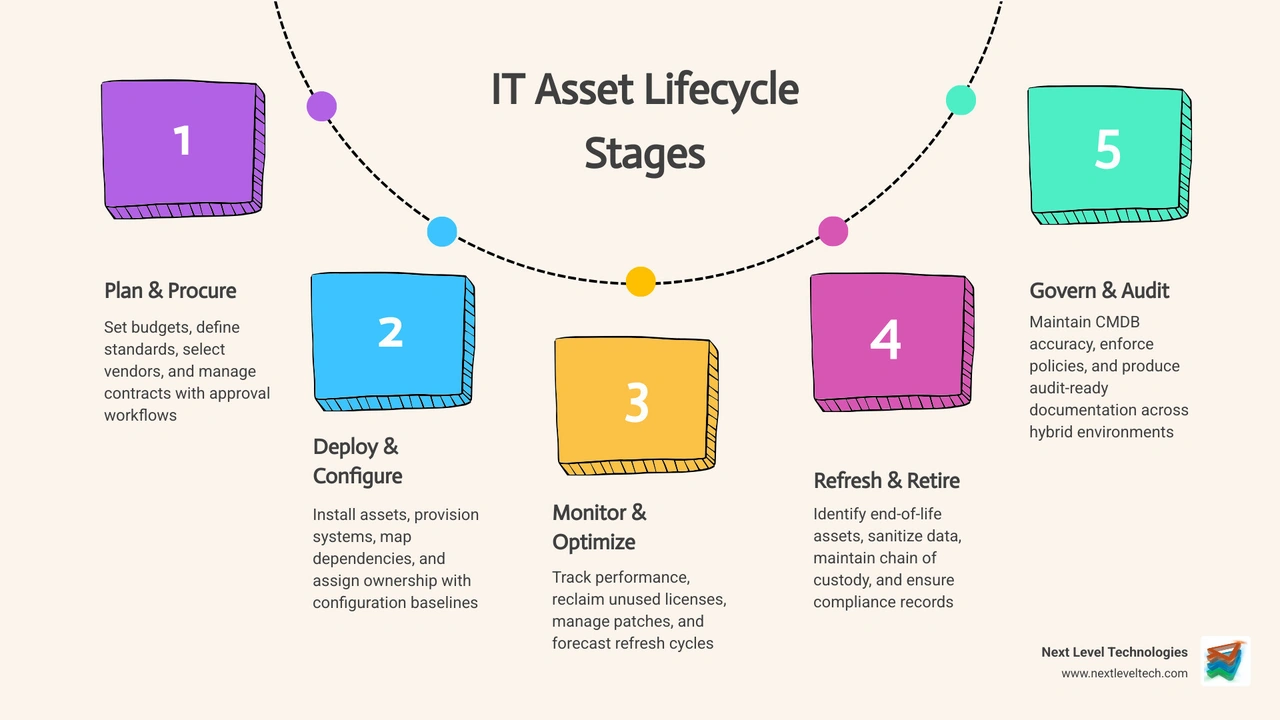
Managing an asset is a marathon, not a sprint. To maintain business continuity, you need a process that covers every mile.
Everything starts with a plan. Before a single dollar is spent, we help our clients define standards. Do all your accountants need the same laptop model? What are the warranty requirements? Modern it lifecycle management software automates the approval workflow, turning a request into a purchase order while automatically linking the vendor contract and licensing terms. This ensures you never miss a renewal or pay for a repair that’s still under warranty.
Once the hardware arrives, it enters the deployment phase. This isn't just plugging it in; it’s about configuration baselines. We ensure every device is provisioned with the necessary security software and mapped to its owner. By mapping dependencies, the software knows that "Laptop A" belongs to the "HR Manager" and needs access to "Payroll App B."
This is the longest phase. During this time, the software uses automated discovery to perform regular "heartbeat" checks. It tracks performance, links assets to incident tickets (helping identify "lemon" hardware), and monitors utilization. If a software license hasn't been touched in 90 days, the system flags it for reclamation. You can learn more about this in our article on IT Asset Inventory Management.
Eventually, every asset reaches its end-of-life (EOL). In regulated industries like healthcare, you can't just throw a hard drive in the trash. You need a secure "chain of custody." This stage involves data sanitization, such as drive wiping aligned with NIST standards, and e-waste recycling. The software keeps a permanent record of the disposal, which is vital for HIPAA or financial audits. Our staff, backed by extensive cybersecurity training and deep technical experience, ensures that every asset is tracked and retired according to the highest security standards, providing a secure chain of custody for all your hardware.
The "why" behind it lifecycle management software usually comes down to three things: saving money, staying secure, and sleeping better at night.
An untracked asset is a security hole. When an employee leaves, "orphaned accounts" often remain active, providing a backdoor for hackers. Automated lifecycle management ensures that when a "Leaver" event is triggered in HR, access is revoked across all 25+ SaaS apps instantly. This creates a timestamped audit trail—essential for businesses in Charleston and Columbus that must prove compliance with state and federal regulations.
Cloud waste is a silent budget killer. With 29% of cloud spend typically wasted, the ability to see underused assets is transformative. We’ve seen organizations recover tens of thousands of dollars by simply identifying licenses that were assigned but never activated. Furthermore, tracking warranties prevents "double-paying" for repairs that should be free.
When a server goes down, every second counts. If your service desk software is linked to your it lifecycle management software, the technician can immediately see the asset's history, its configuration, and what other services depend on it. This reduces the Mean Time to Repair (MTTR) and ensures that your disaster recovery plan is actually aligned with your current hardware. Read more about Enterprise IT Asset Management.
If you're evaluating platforms, don't get distracted by shiny interfaces. Focus on these core capabilities:
The software must be able to find assets automatically. In a hybrid estate, this means scanning your local network in Columbus, your remote workers' laptops, and your cloud instances in AWS or Azure. Our technicians, who undergo extensive cybersecurity training, ensure that asset discovery is not just about inventory, but about securing the perimeter. It should "normalize" this data—recognizing that "Microsoft Word" and "MS Word 2026" are the same product—to give you a single source of truth.
You shouldn't have to check the software to see if a warranty is expiring. It should tell you. Look for tools that integrate with your HR system (to trigger onboarding/offboarding), your ERP (for financial tracking), and your endpoint management tools. Our technicians leverage their deep technical experience to ensure these integrations are seamless and secure. Automation should handle the boring stuff, like sending a reminder to a manager to approve a new tablet request.
Executive leadership doesn't want to see a list of 500 serial numbers; they want to see a five-year refresh plan. Your it lifecycle management software should provide dashboards that show cost trends, renewal forecasts, and "red-flag" reports for aging equipment that's likely to fail soon.
Depending on your security needs, you might need a SaaS-based tool or an on-premise solution. Some of our clients with high security requirements even require support for "dark sites" (environments not connected to the internet). Ensure the tool offers role-based access control so that only authorized personnel can see sensitive asset data. For more on this, see Cloud Based IT Asset Management.
Choosing software is like buying a truck—you need to know what you’re hauling.
The biggest mistake? "Garbage in, garbage out." If your initial data is messy, your automation will be too. Next Level Technologies provides the technical experience to help you choose and implement the right solution for your specific needs. We recommend a phased rollout: start with your most expensive hardware, then move to software licenses, and finally to SaaS user lifecycles. Always secure an executive sponsor who understands that ITLM is a business strategy, not just an IT task. For a deeper dive, check our IT Asset Management Application Guide.
The future of ITLM is intelligent. We are moving away from reactive tracking and toward predictive management.
AI is now being used for "smart routing" of tickets and predictive maintenance—alerting you that a hard drive is showing signs of failure before it crashes. In the DevOps world, "Infrastructure as Code" allows ITLM tools to automatically document and track virtual servers as they are spun up and down in real-time.
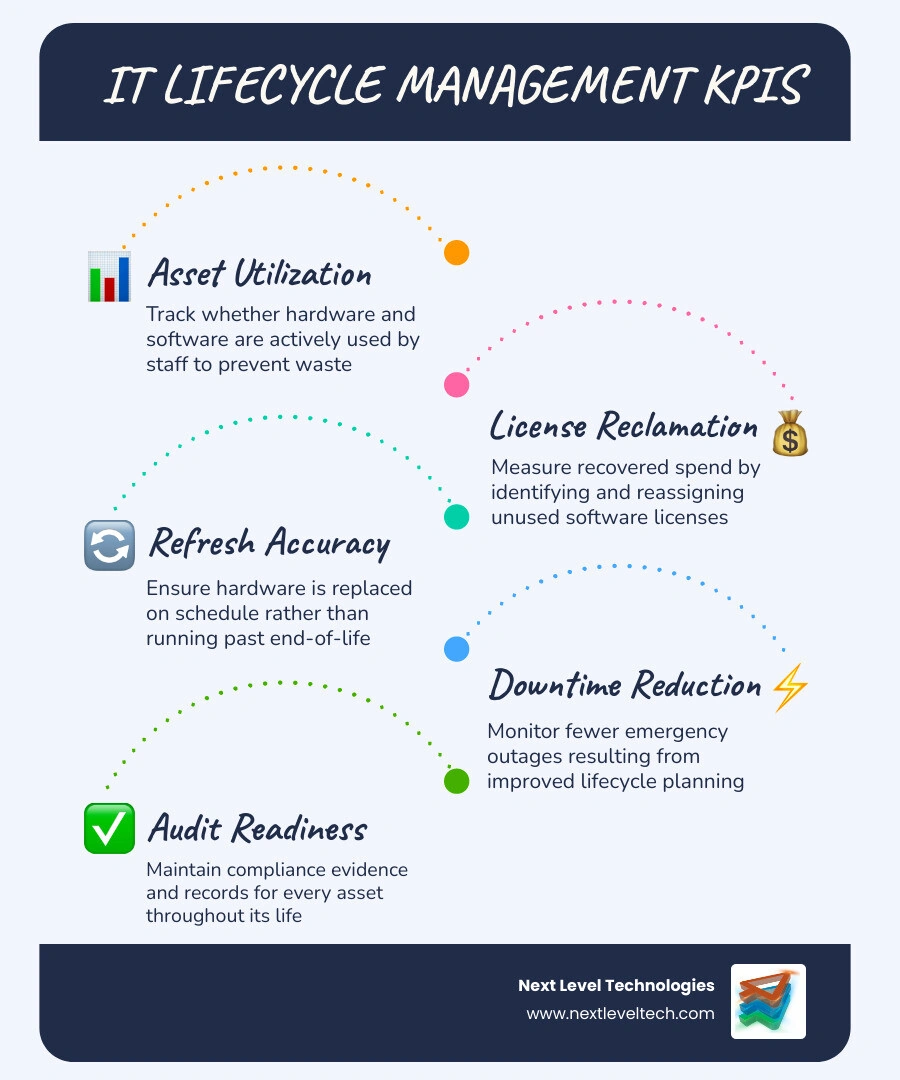
To know if your investment is working, track these metrics:
Absolutely not. In fact, SMBs often benefit more because they have less room for budget errors. A managed service provider can help bridge the gap by providing the expertise and tools without the enterprise price tag.
By ensuring every device has the latest patches, removing access for former employees, and providing a "paper trail" for every asset, ITLM is the foundation of a proactive security posture.
Infrastructure management deals with physical health and depreciation of hardware. SaaS user lifecycle management deals with "digital identities"—ensuring the right people have the right access to the right cloud tools at the right time.
At Next Level Technologies, we believe that technology should be an engine for growth, not a source of stress. Whether you are in Columbus, OH or Charleston, WV, managing your IT lifecycle is the first step toward a more secure, efficient, and predictable business.
Our local teams bring 20+ years of experience and extensive cybersecurity training to help you navigate these complexities. From Hardware as a Service to proactive managed IT, we ensure your technology is always an asset, never a liability.
Ready to take control of your IT estate?
Upgrade your healthcare claims management for maximum accuracy with Next Level Technologies, serving Columbus, Ohio and Charleston, WV.
October 10, 2026
Discover how a healthcare management services organization boosts practice efficiency, cuts overhead, and protects clinical autonomy.
October 3, 2026


