The Easiest Way to Find Columbus Remote IT Support
August 20, 2026


Discover how a healthcare management services organization boosts practice efficiency, cuts overhead, and protects clinical autonomy.
October 3, 2026

Master denial management in medical billing with proven strategies to reduce denials, boost appeals success, and protect revenue cycle performance.
September 25, 2026

Compare the best healthcare learning management platforms for providers with Next Level Technologies, serving Columbus, Ohio and Charleston, WV.
September 19, 2026
August 20, 2026
Navigating technical glitches shouldn't feel like a high-stakes puzzle. Whether you are running a boutique consulting firm in German Village or managing a healthcare clinic near Polaris, Columbus remote IT support provides immediate access to skilled engineers who can resolve complex tech headaches over an encrypted connection. Instead of unplugging cables and dragging heavy desktop towers across town, business teams can initiate a remote session and get back to work in minutes.
Remote technical assistance covers a wide spectrum of daily business and personal computing needs. Core services include:
By leveraging Remote IT Support for Small Businesses and specialized remote computer repair solutions in Columbus, OH, organizations gain peace of mind knowing certified technicians are monitoring their digital assets around the clock.
In an interconnected corporate environment, a single software glitch can halt an entire department's workflow. Fortunately, most digital roadblocks do not require physical hardware replacement and can be solved remotely.
Our staff relies on extensive cybersecurity training and decades of technical experience to remediate common issues, such as:
Traditional brick-and-mortar computer repair shops in the Columbus area often carry long diagnostic turnarounds. Taking your computer into a physical storefront frequently means leaving your critical business computer on a shelf for three to five business days—all while paying steep baseline diagnostic fees that can top $250 just for simple malware removal.
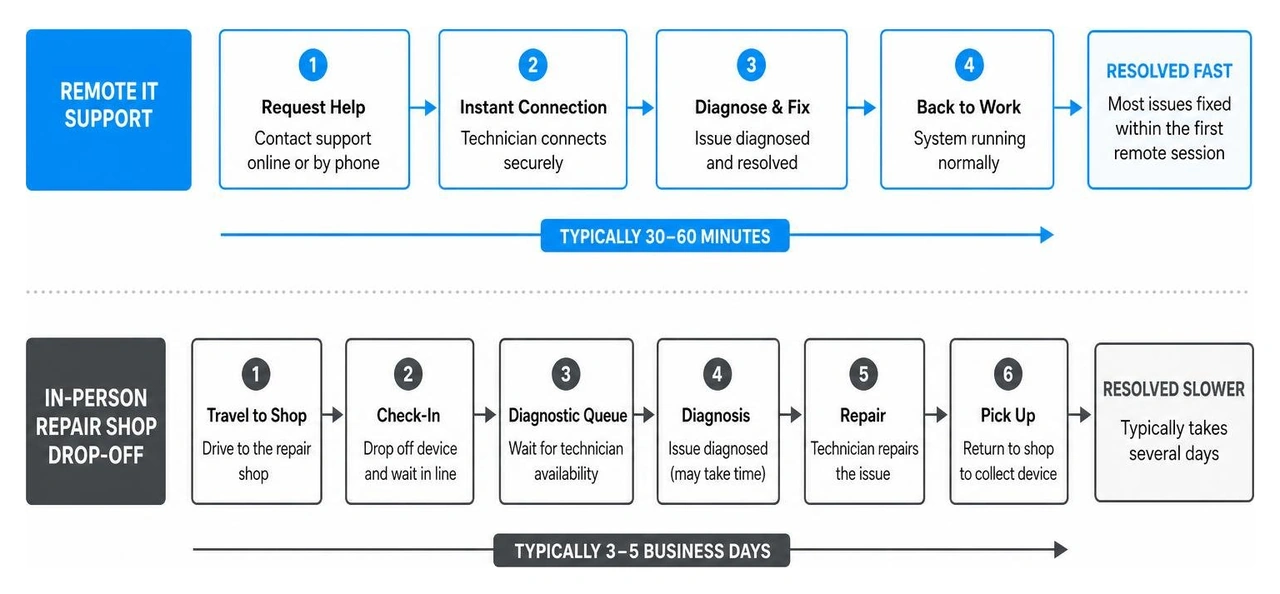
In contrast, remote IT support transforms the repair process. Sessions begin almost instantly, cutting out travel time through suburban traffic on I-270 or 315. Most software-based issues, network errors, and virus infections are fully resolved during the initial 60-minute remote session.
By eliminating physical shop overhead, remote service providers deliver transparent, predictable pricing while keeping your confidential data secure under your direct supervision.
As Central Ohio solidifies its position as the Midwest's premier technology and commerce hub, the demand for high-speed Columbus remote IT support has surged. The Greater Columbus metropolitan area boasts over 2.1 million residents, making it Ohio's largest and fastest-growing region.
While legacy industrial sectors in other cities rely on traditional physical infrastructure, Columbus's economy thrives on information technology, financial services, logistics, and digital healthcare.
Comparing regional markets underscores why local demand is skyrocketing. While Cleveland and Cincinnati maintain established corporate footprints, Columbus leads the state in regional population expansion and startup capital investments. To keep pace with this momentum, companies need flexible, scalable IT management outlined in our IT Support Columbus Complete Guide.
The concentration of enterprise giants and higher education institutions in Central Ohio creates a unique tech ecosystem. Fortune 500 leaders like Nationwide Insurance, Cardinal Health, and Huntington Bank support vast hybrid workforces across Franklin and Delaware counties. These employees require secure home-office network connections, multi-factor authentication (MFA) enforcement, and instant helpdesk resolution.
Simultaneously, The Ohio State University enrolls more than 68,000 students alongside thousands of faculty members and research personnel. This massive academic community creates constant demand for fast laptop troubleshooting, software licensing support, and secure campus Wi-Fi connectivity.
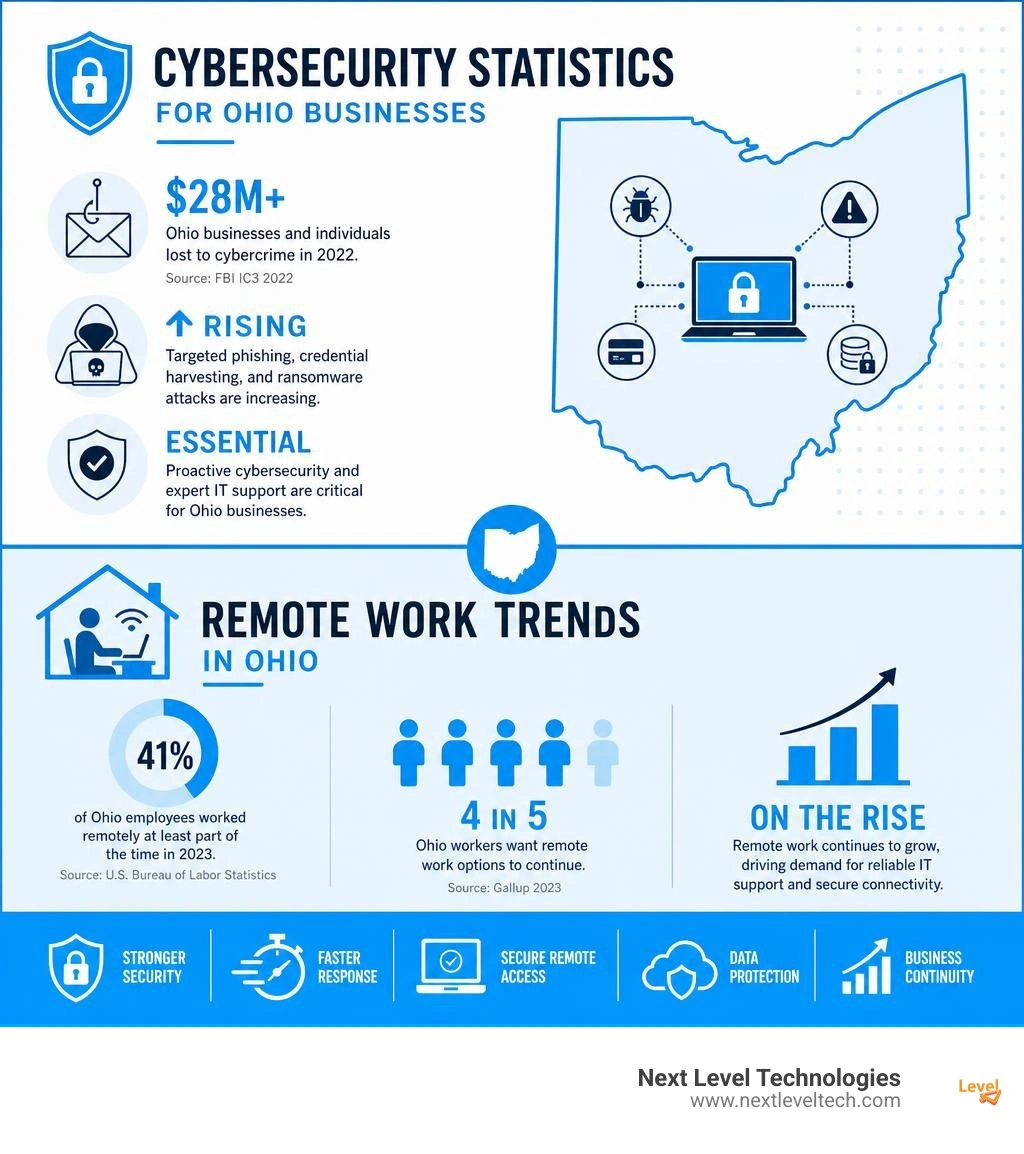
This concentration of enterprise activity also attracts sophisticated cyber threats. The FBI’s Internet Crime Complaint Center (IC3) reported that Ohio businesses and individuals suffered over $28 million in cybercrime losses in 2022 alone. With targeted phishing campaigns, credential harvesting, and ransomware on the rise, having access to an experienced IT team with rigorous cybersecurity credentials is essential.
Selecting the right IT partner means finding a cost structure that fits your business goals. Central Ohio organizations typically choose between three main pricing models:
Because Central Ohio is a thriving commercial hub, the local job market for remote technology professionals is expanding rapidly. Regional enterprises, healthcare networks, and cloud providers actively recruit skilled helpdesk technicians, cloud administrators, and cybersecurity specialists.
Job seekers can explore active listings across platforms like 350 Remote IT Support jobs in Columbus and Best Remote Jobs in Columbus. Individuals located near our secondary office can also check regional avenues like Remote Jobs in Charleston.
Breaking into or advancing within the remote IT support sector requires a blend of technical expertise and clear communication skills. Modern technicians don't just fix computers—they guide users through stressful technical challenges with clarity and patience.
Key technical qualifications and home-office prerequisites include:
Salaries for remote IT support professionals in the Central Ohio area reflect experience, technical certifications, and specialized cybersecurity expertise:
Preparing for a remote support session is simple and straightforward. Taking a few proactive steps ensures your technician can connect quickly, diagnose the issue, and secure your systems without unnecessary delays.
When working with an established partner, you maintain total control over the session. You can observe every mouse movement on your screen in real time and disconnect the remote bridge at any point with a single click. Reviewing Business Computer Support Columbus resources can help your team establish smart data privacy habits.
Before launching your scheduled support session, follow this step-by-step checklist:
As Ohio's fastest-growing metropolitan area, Greater Columbus exhibits significantly higher relative demand for remote IT support. Driven by 2.1 million residents, a massive university presence, and a thriving enterprise sector across finance, insurance, and healthcare, Columbus organizations rely heavily on fast, cloud-first remote IT management.
Users should secure a stable internet connection (ideally hardwired Ethernet), close sensitive financial or personal documents, document specific error codes, and download an encrypted remote connection client provided by their IT partner.
Entry-level helpdesk positions start around $15.50 to $22.00 per hour. Experienced support specialists earn between $38.00 and $40.00 per hour ($65,000 to $75,000 annually), while enterprise systems engineers and cybersecurity managers earn $120,000 to over $140,000 per year.
Finding reliable Columbus remote IT support doesn't have to be complicated. Whether you need immediate help desk assistance, robust cloud integration, or proactive network management, remote support provides a fast, secure, and cost-effective way to keep your technology running smoothly.
At Next Level Technologies, we help Central Ohio organizations eliminate downtime, protect sensitive data, and scale with confidence. Next Level Technologies has a main location in Columbus, Ohio and a second location in Charleston, WV. Our seasoned team leverages extensive technical experience and rigorous cybersecurity training to deliver dependable IT solutions tailored to your business needs.
Ready to simplify your business technology and secure your systems? Explore our comprehensive Managed IT Services and IT Support plans today to schedule a consultation with our local Columbus engineers.
Discover how a healthcare management services organization boosts practice efficiency, cuts overhead, and protects clinical autonomy.
October 3, 2026
Master denial management in medical billing with proven strategies to reduce denials, boost appeals success, and protect revenue cycle performance.
September 25, 2026

