IT Infrastructure Management: Keeping Your Tech Ticking
March 27, 2026


Compare the best healthcare learning management platforms for providers with Next Level Technologies, serving Columbus, Ohio and Charleston, WV.
September 19, 2026

Compare cloud backup services with this guide to backup cloud database service architecture, security, and disaster recovery.
September 12, 2026
Compare cloud based backup services with our ultimate checklist covering encryption, recovery, and compliance for your business.
September 5, 2026
March 27, 2026
IT infrastructure management is the ongoing oversight of all the hardware, software, networks, data storage, and processes that keep your business technology running smoothly — in line with defined service-level agreements (SLAs).
Here's a quick breakdown:
In plain terms: if your team can't work because a server is down, a network is slow, or data is at risk — that's an IT infrastructure problem. Good infrastructure management prevents those problems before they start.
Most mid-sized businesses don't think about their IT infrastructure until something breaks. By then, the damage — lost productivity, compromised data, frustrated customers — is already done. According to research by ITIC, 91% of organizations report that downtime costs more than $300,000 per hour. That's not a small number.
Effective IT infrastructure management shifts you from reactive firefighting to proactive control.
I'm Steve Payerle, President of Next Level Technologies, and I've spent over 15 years helping businesses across Columbus, Ohio and Charleston, WV build resilient IT environments through comprehensive IT infrastructure management. I've seen what happens when infrastructure is neglected — and what's possible when it's managed right.
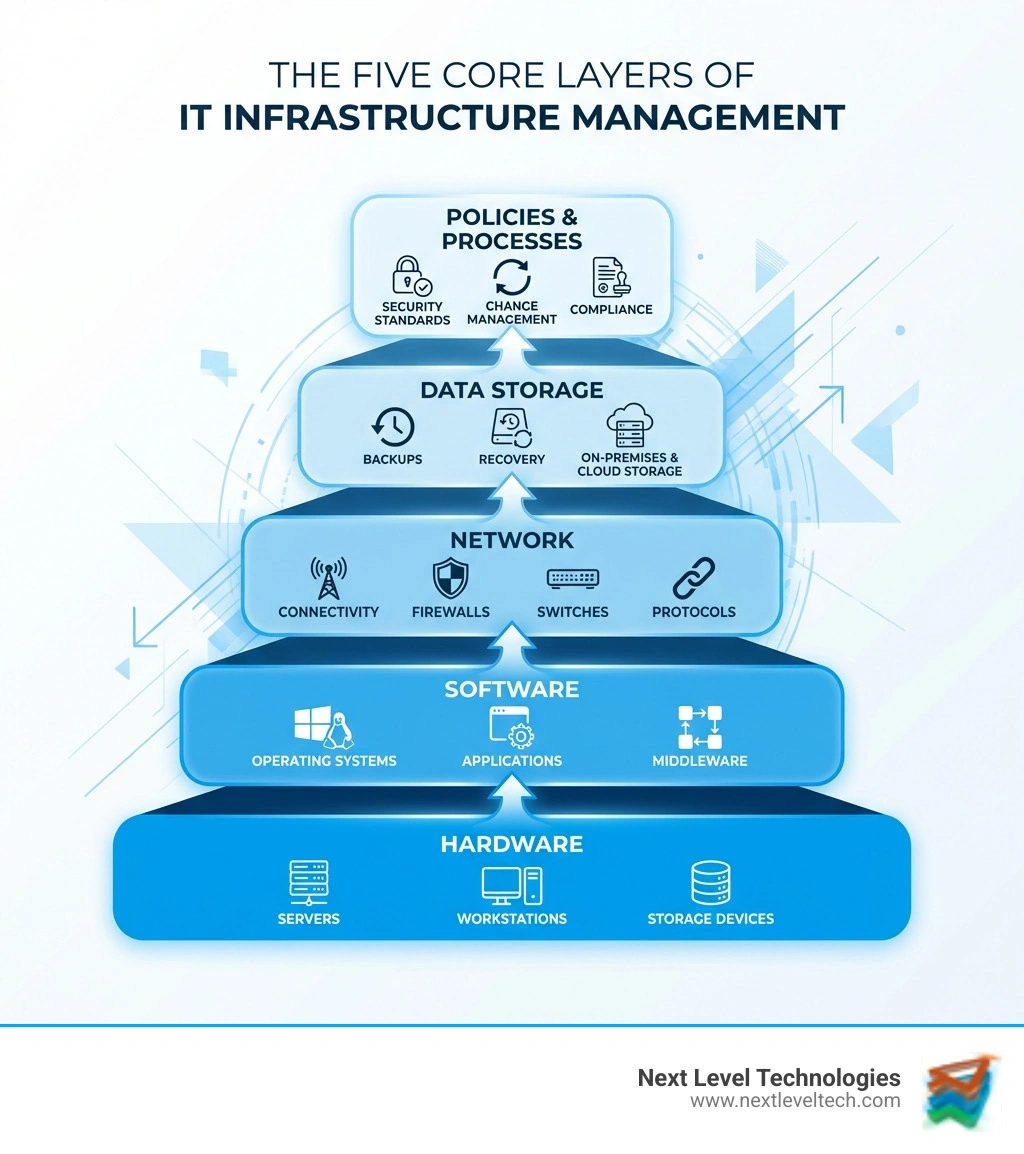
Glossary for it infrastructure management:

At its heart, it infrastructure management is the administration and governance of all the technology "stuff" that makes your business go. According to Techopedia's definition of IT infrastructure, this includes the composite hardware, software, network resources, and services required for the existence and operation of an enterprise IT environment.
For many of our clients in Columbus and Charleston, this starts with IT Infrastructure for Small Business. It isn't just about having a fast computer; it’s about the policies and processes that govern how that computer talks to the server, how data is stored securely, and how we meet our Service Level Agreements (SLAs) to ensure you have near-constant uptime.
Think of it like a city's utility system. You don't care how the water gets to the tap or how the electricity reaches the outlet—you just need it to work when you flip the switch. Infrastructure management is the work done by the "utility company" to ensure the pipes don't leak and the grid doesn't blow a fuse.
To manage such a massive ecosystem, we generally break it down into three primary categories:
On-premises: Best for high-security environments and local control. You get full ownership and customization, but upfront costs and maintenance needs are higher.
Cloud: Best for scalability and remote work. It offers lower upfront costs and flexibility, though it depends on reliable internet and ongoing monthly fees.
Hybrid: Best for businesses with mixed needs. It combines on-premises control with cloud flexibility, but it can be more complex to manage.
It’s easy to confuse these two, but they have different goals.
We often look at this through the lens of IT Service Management (ITSM). While infrastructure management ensures the server is physically healthy and updated, IT operations (within an ITSM framework) ensures that when a user submits a ticket because they can't log in, the process for fixing that issue is fast and efficient.
Modern it infrastructure management has moved far beyond just dusting off physical servers in a closet. Today, it’s a mix of physical and virtual worlds.
A major focus for us is IT Infrastructure and Security. We don't view security as an "add-on"—it’s baked into every component, from the data center cooling systems to the encryption on your mobile devices. This is where Enterprise IT Asset Management comes into play, ensuring we know exactly what devices are on your network and that they are all accounted for and secure.
In the old days, IT was "break-fix." Something broke, you called us, we fixed it. That’s too slow for today's market. Now, we use Managed IT Services to provide proactive monitoring.
By using AIOps (Artificial Intelligence for IT Operations) and real-time metrics, our systems can often predict a hardware failure before it happens. For example, if a hard drive starts showing signs of heat stress, our monitoring tools alert us immediately. We can swap it out before your team even notices a slowdown.
Hyperconverged Infrastructure (HCI) also plays a huge role here. By combining compute, storage, and networking into a single software-driven system, we reduce complexity and allow for "self-healing" capabilities that keep your business running even if a component fails.
Why go through all this trouble? The biggest driver is cost. We’ve already mentioned that downtime can cost $300,000 per hour, but effective management also helps with:
However, there are challenges. Many businesses struggle with Technical Debt—the cost of maintaining old, "clunky" systems that should have been replaced years ago. Managing the explosion of data is another hurdle; remember that 24% annual growth stat? If you aren't planning for that storage now, you'll run out of space faster than you think. Finally, compliance (like HIPAA or PCI DSS) adds a layer of complexity that requires expert oversight.
If you want to keep your tech ticking, you need a disciplined approach. At Next Level Technologies, we follow these core best practices:
An IT infrastructure manager is the architect and the guardian of your tech environment. Their responsibilities include:
Cloud computing has radically changed the game. It allows for on-demand resources, meaning you can scale your server power up or down in minutes. It shifts costs from CapEx (buying expensive servers upfront) to OpEx (paying a monthly fee for what you use).
However, it also introduces the Shared Responsibility Model. While the cloud provider (like AWS or Microsoft) secures the physical data center, you are still responsible for securing the data and applications you put inside it. This is why hybrid integration—blending on-premise security with cloud flexibility—is often the best move for businesses in Charleston and Columbus.
The landscape is shifting toward more decentralized and intelligent systems:
Effective it infrastructure management is what separates a business that is constantly fighting tech fires from one that uses technology as a strategic advantage. It’s the difference between a $300,000-per-hour outage and a seamless workday.
At Next Level Technologies, we bring years of technical experience and extensive cybersecurity training to every client we serve. Whether you are located in the heart of Columbus, Ohio, the growing business districts of Worthington, or the industrial hubs of Charleston, WV, we understand the unique local challenges you face.
Technology shouldn't be a headache. It should be the engine that drives your business forward. If you're ready to stop worrying about your servers and start focusing on your growth, let's talk about how our Managed IT Services can take your infrastructure to the next level.
Compare the best healthcare learning management platforms for providers with Next Level Technologies, serving Columbus, Ohio and Charleston, WV.
September 19, 2026
Compare cloud backup services with this guide to backup cloud database service architecture, security, and disaster recovery.
September 12, 2026
