Ultimate Checklist for Comparing Cloud Backup Services
September 5, 2026


Learn how Healthcare Management Administrators Inc optimizes self-funded plans, provider networks, and clinical quality for employers.
October 17, 2026

Upgrade your healthcare claims management for maximum accuracy with Next Level Technologies, serving Columbus, Ohio and Charleston, WV.
October 10, 2026

Discover how a healthcare management services organization boosts practice efficiency, cuts overhead, and protects clinical autonomy.
October 3, 2026
September 5, 2026
The best cloud based backup services combine automatic backups, strong encryption, enough capacity, clear recovery options, and support for your systems and compliance needs. For most mid-sized businesses, the right choice is not simply the lowest-cost plan. It is the provider that can restore the right data quickly after ransomware, accidental deletion, hardware failure, or a site-wide disaster.
Use this short checklist when comparing options:
A local drive can speed up routine restores, but it can be lost, stolen, damaged, or encrypted alongside the computer. Cloud backup adds the off-site copy needed for stronger disaster recovery. The most resilient approach follows the 3-2-1 rule: keep three copies of important data, on two types of media, with one copy stored off-site.
For organizations in Columbus, Ohio, and Charleston, West Virginia, Next Level Technologies helps turn this checklist into a practical backup and recovery plan. Our technical team applies extensive cybersecurity training to help businesses protect critical data, meet compliance needs, and test recovery before an emergency forces the issue.
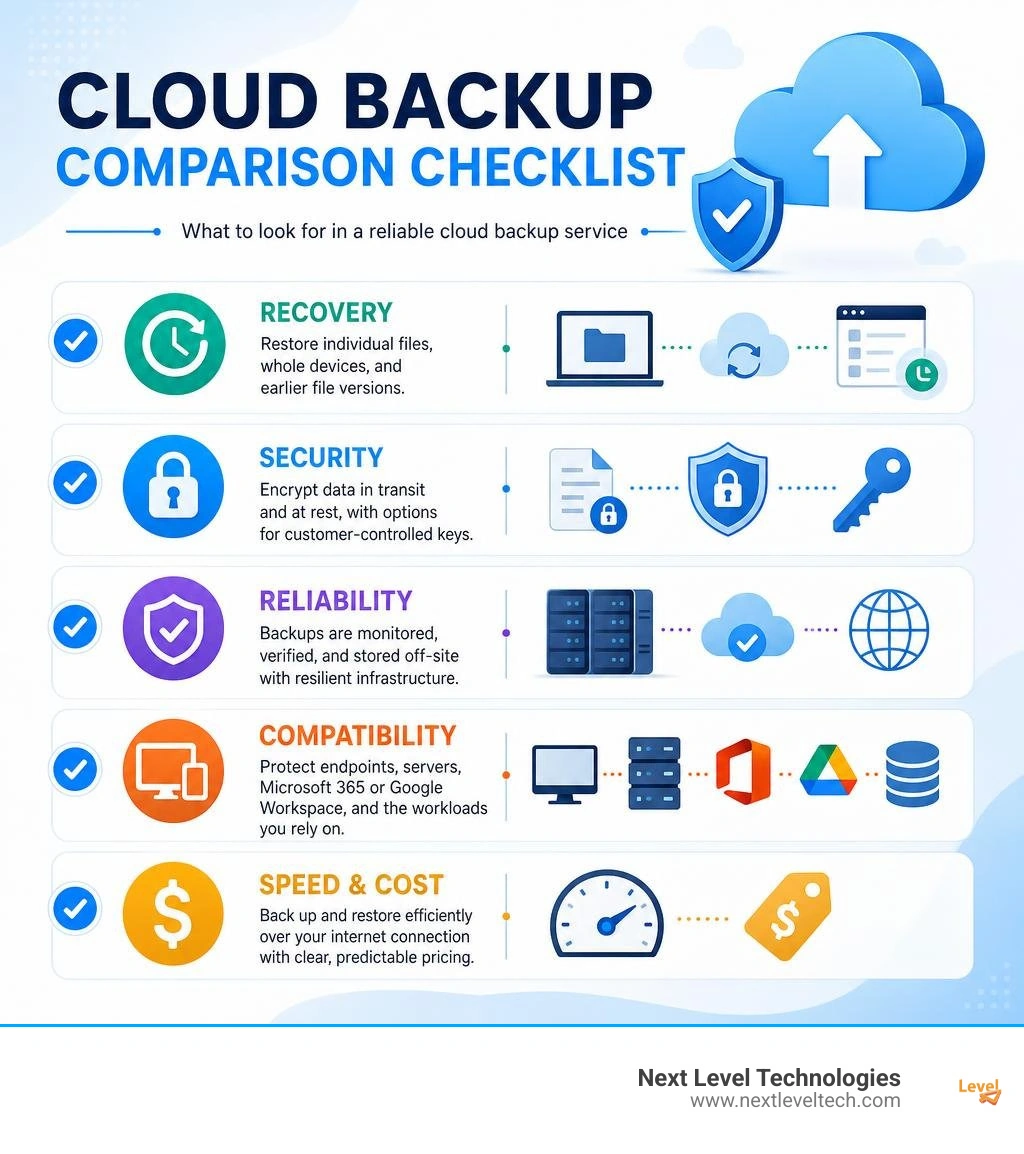
Basic cloud based backup services terms:
Selecting the right platform requires looking past marketing buzzwords and examining how a solution functions under stress. We regularly guide organizations through this evaluation process, drawing on decades of hands-on infrastructure engineering to pinpoint operational friction before contracts are signed.

A comprehensive evaluation starts with understanding total cost of ownership alongside automation. Modern online cloud backup solutions must operate silently in the background without hogging system resources or requiring manual intervention from employees. When evaluating platforms, we emphasize several core pillars.
Storage requirements grow continuously, making scalable capacity models essential. Backup providers typically structure pricing around tiered storage capacities, flat-rate endpoint subscriptions, or per-gigabyte consumption.
A common pitfall in enterprise backup planning is overlooking data egress fees. While uploading data to a repository is often free, traditional hyperscalers frequently charge steep fees when you retrieve that data during a restore. Independent platforms like Backblaze have disrupted this model by offering high-throughput storage with zero egress fees and predictable cost structures.
When evaluating capacity and bandwidth:
Data security during transmission and storage is non-negotiable. Leading cloud backup providers implement 256-bit AES encryption for data at rest and TLS/SSL encryption for data in transit.
For heightened security, evaluate whether a vendor supports zero-knowledge architecture and customer-managed encryption keys (Bring Your Own Key or BYOK). With private encryption keys, you define the passphrase, meaning not even the cloud provider's technicians can access your files. Platforms such as Proton Drive champion this zero-knowledge approach, while developer-centric tools like Cloudback utilize RSA Lockbox customer encryption.
The operational trade-off: if you lose a private key, the provider cannot reset it, and features such as mobile web previews may be restricted. Our staff's technical experience and extensive cybersecurity training help teams strike the exact balance between ironclad privacy and everyday usability.
A backup is only as valuable as its restoration speed. Modern solutions provide point-in-time recovery and algorithmic file prioritization, restoring actively used documents first so employees can resume work while background systems continue downloading.
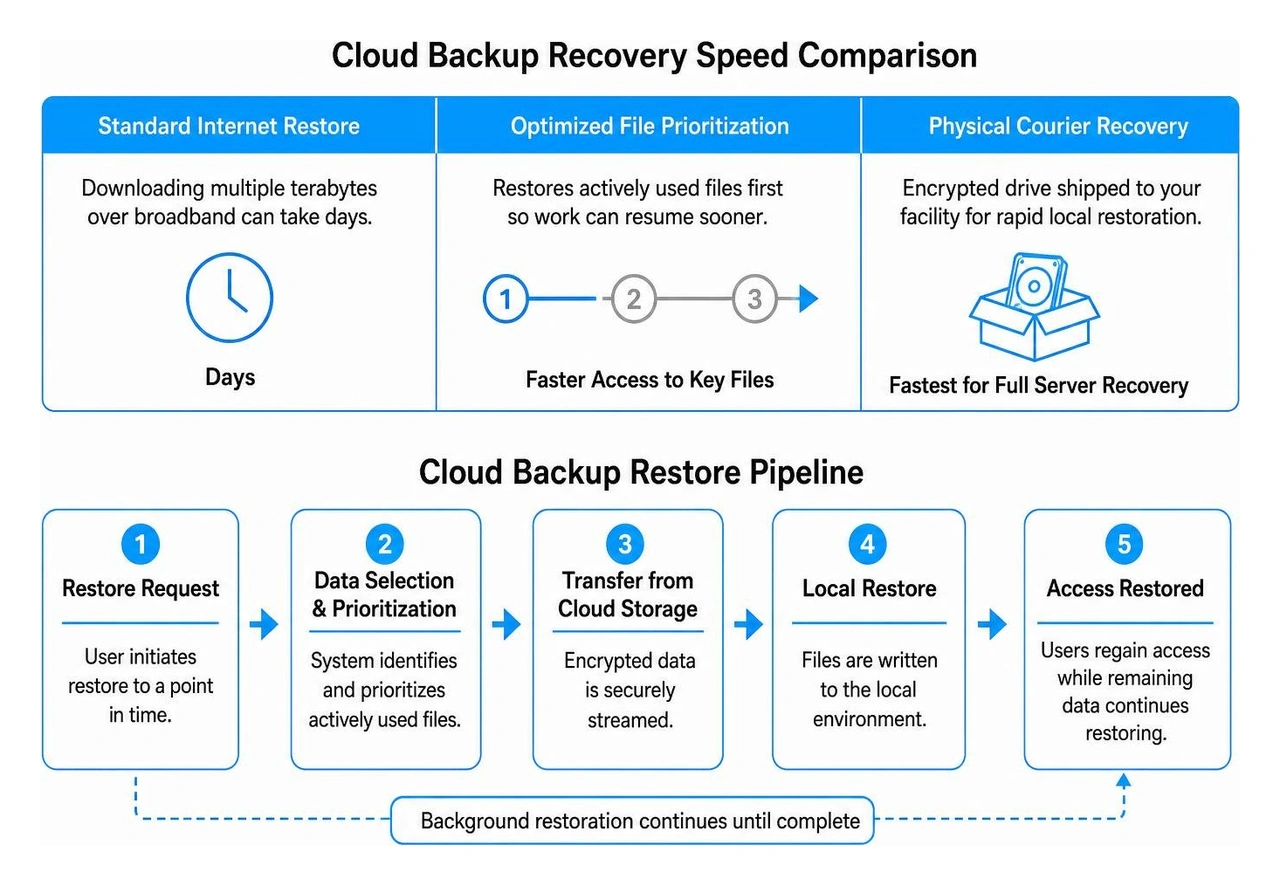
When an entire server fails, downloading multiple terabytes over standard broadband can take days. Providers like CrashPlan emphasize point-in-time rollbacks, while services like Carbonite and iDrive offer physical courier recovery services, shipping an encrypted hard drive loaded with your data directly to your facility for rapid local restoration.
Industry reviews, such as those found in PCWorld's online backup testing, consistently highlight courier recovery as an essential fallback when local internet connections bottleneck enterprise recovery.
Not all backup architectures function the same way. Understanding the technical distinctions between local mechanisms and off-site cloud platforms ensures your disaster recovery posture contains no blind spots.

Local backup relies on copying data to on-premises targets such as external hard drives or network-attached storage (NAS) devices. While local restores are virtually instantaneous, on-site storage remains vulnerable to office fires, equipment theft, hardware failure, and ransomware traversing the local area network.
Deploying dedicated endpoint backup solutions bridges this gap by marrying local agents with off-site cloud repositories. Cloud architectures isolate backup copies in geographically separated data centers, preventing a single site catastrophe from destroying operational history. For a deeper breakdown of enterprise deployment models, explore our cloud backup services business guide.
The foundational standard for data resilience is the Rule of Three, commonly called the 3-2-1 backup strategy:
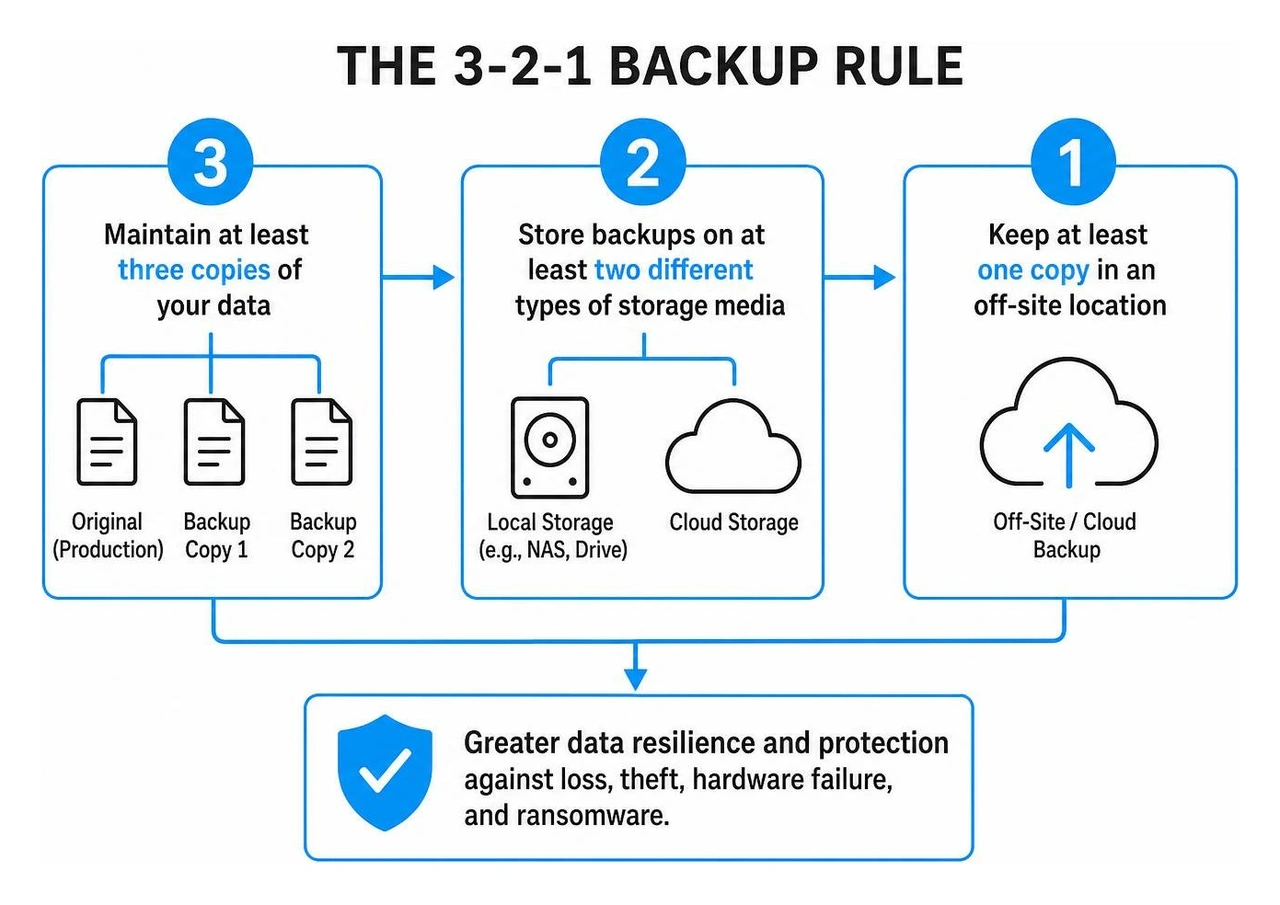
Utilizing structured cloud backup as a service fulfills the off-site mandate while adding immutability. An immutable backup cannot be altered, overwritten, or deleted by unauthorized users or ransomware strains, creating an air gap in the cloud that ensures business survival during cyber incidents.
Organizations operating in regulated sectors must ensure backup strategies meet strict regulatory compliance standards while accommodating modern cloud workloads.
Whether supporting healthcare practices or legal firms, deploying robust data backup solutions for small business paired with cloud based disaster recovery services establishes clear Recovery Time Objectives (RTO) and Recovery Point Objectives (RPO).
Many organizations assume SaaS providers back up their operational data automatically. However, major platforms operate under a Shared Responsibility Model: they guarantee application uptime and infrastructure resilience, but data integrity, accidental deletion, and internal malicious activity remain the customer's responsibility.
Backing up Microsoft 365 requires protecting Exchange Online, SharePoint, Teams, and files hosted in online cloud storage. For technical environments utilizing Azure, our Azure storage backup complete guide details how to automate enterprise retention policies.
Similarly, developer environments require specialized tooling. Generic backup tools often miss metadata, pull requests, and issue boards across platforms like GitHub, GitLab, and Azure DevOps. Specialized tools like Cloudback safeguard thousands of repositories using Bring Your Own Storage (BYOS) architectures, integrating directly with Infrastructure as Code (IaC) tools like Terraform.
For healthcare providers and financial institutions, compliance is mandatory. A non-compliant backup configuration can trigger severe regulatory penalties during an audit.
Key compliance and security controls to verify:
Our engineers leverage deep technical experience and extensive cybersecurity training to configure these controls, ensuring your backup architecture withstands both regulatory scrutiny and sophisticated ransomware threats.
Cloud storage (such as basic file-syncing drives) is designed for real-time collaboration, file sharing, and cross-device access. When you delete or corrupt a local file, that deletion or corruption synchronizes instantly to the cloud folder.
In contrast, cloud backup runs automated, background mirroring routines that capture entire file directories, system images, and historical versions over time. It creates isolated snapshots that remain untouched by local modifications, ensuring comprehensive recovery after a disaster. Learn more about selecting the right operational model with our guide on cloud backup for small business.
Bring Your Own Storage (BYOS) allows an organization to decouple backup management software from backend cloud capacity. Instead of paying marked-up storage fees to a proprietary vendor, you connect the backup software directly to low-cost cloud buckets you already own (such as AWS S3, Microsoft Azure, or Wasabi).
Some modern business backup tools even pool unused storage capacity from existing corporate subscriptions, dramatically reducing overall total cost of ownership while eliminating vendor lock-in.
Backups should be validated regularly through automated integrity verifications, with comprehensive disaster recovery drills executed at least quarterly. Simply verifying that a backup job succeeded is not enough; you must test the restoration process itself to validate Recovery Time Objectives (RTO).
For a complete framework on scheduling and executing retention routines, read our guide on how often should you back up company data.
Selecting the right cloud backup strategy protects your business against hardware failure, cyberattacks, and operational downtime. Rather than settling for generic storage, organizations need tailored, highly secure architectures that guarantee swift recovery when unexpected disruptions occur.
Next Level Technologies has a main location in Columbus, Ohio and a second location in Charleston, WV. Our staff's technical experience and extensive cybersecurity training empower businesses across Ohio and West Virginia to deploy enterprise-grade, compliant, and cost-effective data protection. To safeguard your critical systems and build total operational resilience, explore our comprehensive data backup and disaster recovery solutions today.
Learn how Healthcare Management Administrators Inc optimizes self-funded plans, provider networks, and clinical quality for employers.
October 17, 2026
Upgrade your healthcare claims management for maximum accuracy with Next Level Technologies, serving Columbus, Ohio and Charleston, WV.
October 10, 2026
