The Ultimate Guide to Azure Storage Backup and Recovery Options
August 18, 2026


Master denial management in medical billing with proven strategies to reduce denials, boost appeals success, and protect revenue cycle performance.
September 25, 2026

Compare the best healthcare learning management platforms for providers with Next Level Technologies, serving Columbus, Ohio and Charleston, WV.
September 19, 2026

Compare cloud backup services with this guide to backup cloud database service architecture, security, and disaster recovery.
September 12, 2026
August 18, 2026
Azure storage backup and recovery combines native Azure data protection tools, offsite backup copies, and clear restore plans to keep critical business data available after deletion, corruption, ransomware, or a regional outage.
At a high level, organizations need two layers of protection:
| Backup approach | Best for | Key outcome |
|---|---|---|
| Operational backup | Fast recovery from recent blob changes or deletions | Local recovery in the source storage account |
| Vaulted backup | Long-term retention and stronger isolation from production | Offsite copies held in an Azure Backup vault |
| Native storage protections | Everyday mistakes and unwanted changes | Soft delete, versioning, snapshots, immutability, and point-in-time restore |
The right strategy is not simply "turn on backup." It is about matching recovery options to the way your organization stores, changes, and relies on its data. A deleted blob, a lost container, a compromised account, and a regional service disruption each require different safeguards.
For mid-sized organizations, this can become complex quickly. Next Level Technologies brings technical experience and cybersecurity training to help businesses in Columbus, Ohio and Charleston, West Virginia build practical cloud backup and recovery plans that support uptime, security, and compliance.
This guide explains the Azure options, what each protects, where the limits are, and how to plan for recovery before an incident forces the issue.
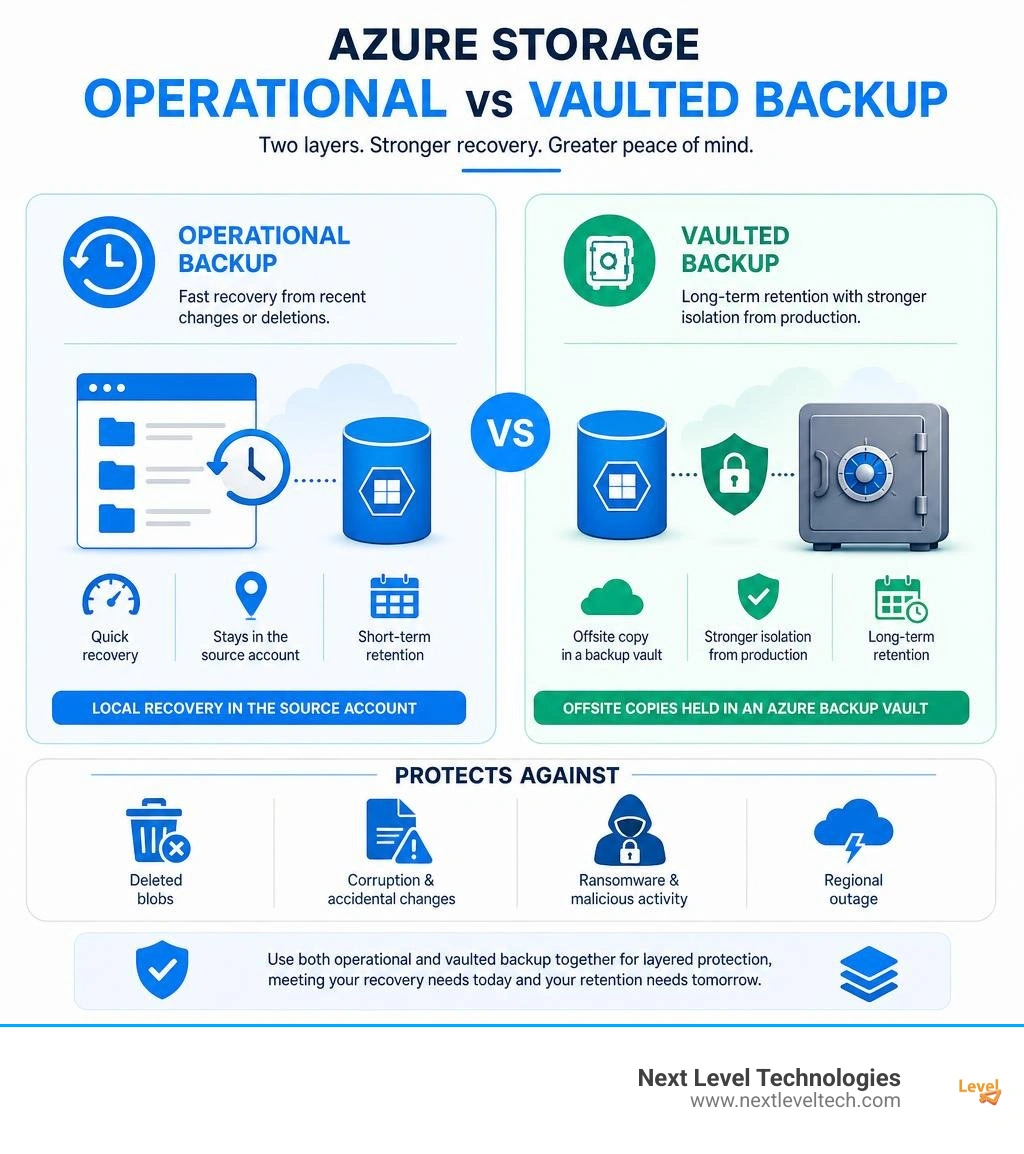
Simple guide to azure storage backup and recovery terms:
When designing a robust enterprise cloud data strategy, selecting the right backup tier is paramount. Azure offers two primary native architectures for protecting block blob data: operational backup and vaulted backup. Understanding how these two approaches work, along with how they differ in retention, management overhead, and restore destinations, allows cloud engineers to design comprehensive resiliency frameworks. For a broader look at cloud backup management, see our Cloud Backup Services Business Guide.
Our team's extensive cybersecurity training and hands-on cloud management experience have consistently shown us that relying on a single protection layer leaves dangerous blind spots. Modern cloud protection demands a multi-tiered defense.
Operational backup is a continuous, local data protection solution. Instead of copying data out of your primary storage account into an external repository, operational backup configures continuous snapshot tracking and metadata journaling directly within the source storage account.
Key operational mechanics include:
Because operational backup maintains data locally, point-in-time restores execute directly back into the original source storage account. This allows rapid recovery of modified, corrupted, or deleted block blobs. However, because data remains inside the source storage account, operational backup does not protect against catastrophic account deletion or compromised storage account keys. To explore more about core Azure Backup capabilities, review the official guide on What is Azure Backup?.
Vaulted backup provides an isolated, offsite data protection layer designed for long-term compliance retention and enhanced ransomware resilience. Unlike local operational snapshots, vaulted backup transfers data offsite into a dedicated, managed Backup vault separate from your production storage infrastructure.
Key features and technical restrictions of vaulted backup include:
Combining local operational backup for fast recovery with offsite vaulted backup for extended resilience forms the foundation of modern enterprise data governance. For complete instructions on managing these workflows, consult Microsoft's guide on blob-backup-configure-manage.
While scheduled backups form the baseline of disaster planning, native data protection settings inside Azure Storage provide real-time protection against accidental overwrites and cyber threats. Integrating native protection features directly into your cloud architecture minimizes data loss during daily operations. To learn more about overarching data strategy, check out our insights on Data Backup and Recovery.
Soft delete acts as a temporary safety net for deleted storage objects, while blob versioning records historical state changes every time an overwrite occurs.
Ransomware attacks frequently target cloud backups, attempting to delete or encrypt historical data before demanding a ransom. Azure Storage incorporates Write-Once-Read-Many (WORM) immutability settings alongside privileged access controls to prevent data tampering.
Configuring azure storage backup and recovery requires executing specific identity permissions and resource provider configurations before creating protection policies.
To successfully set up blob backup via the Azure Portal or automation tools, cloud administrators must satisfy specific identity and access management (IAM) prerequisites:
Microsoft.DataProtection resource provider is registered within your target Azure subscription.Storage Account Backup Contributor role assigned on the target storage accounts, resource groups, or entire subscription.To streamline backup deployment across multiple subscriptions, custom administrative tasks can leverage Microsoft's API reference detailed in update?view=rest-backup-2026-02-01. You can also explore managed cloud services with our guide to Cloud Backup as a Service.
Azure Backup billing is structured around distinct functional line items rather than a single flat fee. Organizations should carefully evaluate workload access patterns to optimize ongoing expenditures. Detailed structural rules can be reviewed at the official Azure Backup pricing page.
Key cost components include:
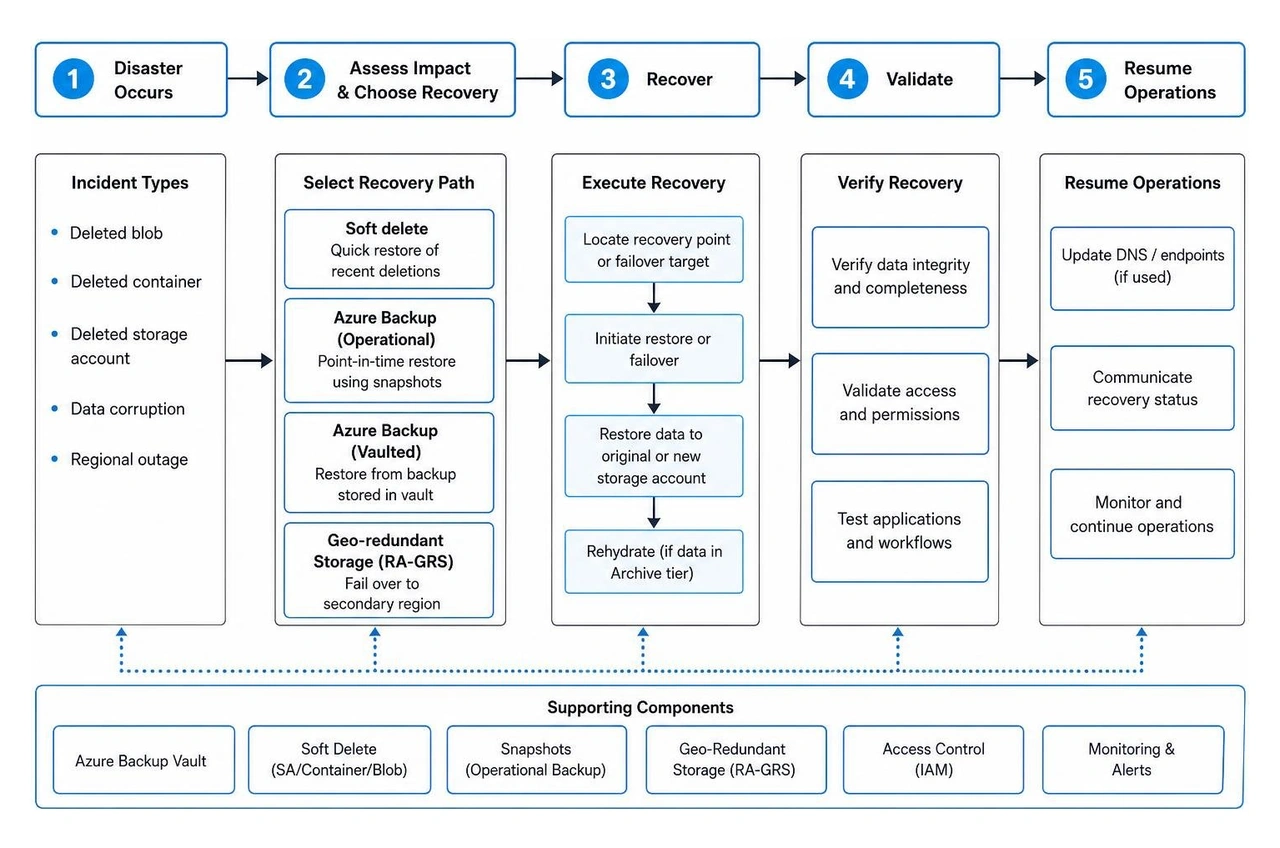
Understanding how to execute restores under pressure is the true test of any disaster recovery plan. Depending on whether an incident involves a single altered file, a deleted container, an accidentally deleted storage account, or an entire regional cloud outage, administrators must deploy distinct recovery techniques.
Azure provides self-service mechanisms alongside support-assisted recovery paths based on the scope of data loss:
Delete Container). Operational point-in-time restore only works on contained block blobs. Therefore, container soft delete MUST be enabled alongside operational backup to recover deleted containers.For detailed troubleshooting on recovery restrictions, consult the technical reference on data-protection-backup-recovery. To learn more about broader disaster recovery architectures, read our article on Cloud-Based Disaster Recovery Services.
When a primary Azure region experiences an extended outage, relying solely on local backups is insufficient. Enterprise resiliency requires multi-region data replication and clear customer-managed failover procedures.
Redundancy configuration options include:
During a catastrophic regional outage, organizations can initiate a customer-managed failover to shift primary endpoints to the secondary region.
Prerequisites and operational impacts for storage account failover:
Last Sync Time property of the storage account before triggering an unplanned failover. The Last Sync Time indicates the most recent timestamp where primary writes were successfully written to the secondary region. Any writes occurring after Last Sync Time will be permanently lost during an unplanned failover.For deeper architectural guidance on managing regional disruptions, see Microsoft's documentation on storage-disaster-recovery-guidance and step-by-step failover commands at storage-initiate-account-failover.
Operational backup keeps data locally inside your source storage account for up to 360 days using continuous snapshot tracking, blob versioning, and change feeds. Restores occur directly back into the original storage account.
Vaulted backup transfers managed data offsite into an isolated Backup vault for long-term retention up to 10 years. Vaulted restores currently write data to a separate target storage account to ensure air-gapped protection against primary tenant compromise.
An Azure Resource Manager (ARM) storage account can be recovered within 14 days of deletion.
Recovery requires that no new storage account has been registered with the same name, and the original Azure Resource Group must still exist or be recreated prior to running the portal recovery workflow.
No. Operational backup relies on block blob snapshots and cannot revert an explicit container deletion API call (Delete Container).
To protect against total container deletion, container soft delete must be enabled alongside operational backup. Combining container soft delete with operational and vaulted backups ensures protection at every resource level.
Next Level Technologies has a main location in Columbus, Ohio and a second location in Charleston, WV. Our local engineering teams deliver enterprise-grade managed IT services, advanced cloud architecture, and HIPAA-compliant cybersecurity governance tailored to mid-sized businesses, non-profits, healthcare providers, and professional services firms.
Configuring azure storage backup and recovery requires balancing operational speed, long-term retention, security immutability, and disaster failover mechanisms. Leveraging our staff's extensive technical experience and rigorous cybersecurity training, we help organizations eliminate downtime, maintain regulatory compliance, and guard critical cloud workloads against evolving ransomware threats.
Whether your organization requires a comprehensive cloud security assessment, customized disaster recovery planning, or fully managed cloud infrastructure, our expert teams are ready to partner with you. Explore our comprehensive Backup and Recovery Solutions Business Guide or reach out to our team today to discover how our tailored Data Backup Services can help your business scale with complete confidence.
Master denial management in medical billing with proven strategies to reduce denials, boost appeals success, and protect revenue cycle performance.
September 25, 2026
Compare the best healthcare learning management platforms for providers with Next Level Technologies, serving Columbus, Ohio and Charleston, WV.
September 19, 2026

