A Comprehensive Guide to Compare Cloud Backup Services
September 12, 2026


Explore health service administration careers, leadership skills, degrees, salaries, and job outlook for modern healthcare executives.
October 24, 2026

Learn how Healthcare Management Administrators Inc optimizes self-funded plans, provider networks, and clinical quality for employers.
October 17, 2026

Upgrade your healthcare claims management for maximum accuracy with Next Level Technologies, serving Columbus, Ohio and Charleston, WV.
October 10, 2026
September 12, 2026
A backup cloud database service creates protected copies of your database on a schedule, keeps them for a defined period, and lets you restore data after deletion, corruption, ransomware, failed updates, or a larger outage.
For most organizations, the practical starting point is simple:
A good service does more than save a copy. It should support point-in-time recovery where available, encrypt backup data, limit access with role-based permissions, check backup integrity, alert your team when jobs fail, and preserve a final backup when an instance is deleted.
This matters because a database can be healthy one moment and unusable the next. A bad deployment, accidental command, damaged data set, or regional service disruption can quickly become a business interruption. Manual exports still have a place for migrations and selective data work, but they are not a reliable replacement for automated, monitored recovery.
At Next Level Technologies, our teams in Columbus, Ohio and Charleston, WV combine deep technical experience and extensive cybersecurity training to help organizations build backup and disaster recovery plans that fit their systems, risks, and recovery goals.
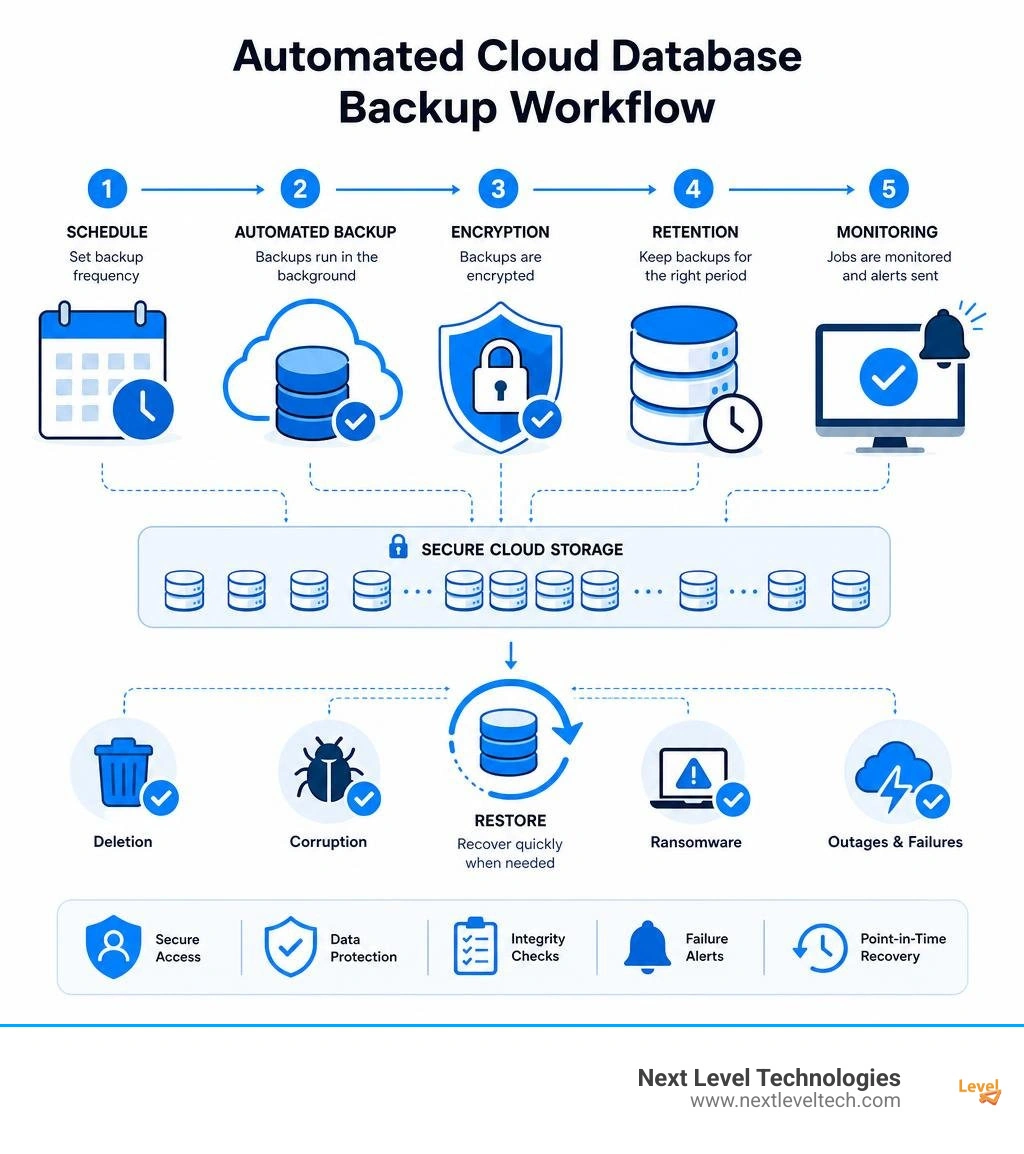
Key backup cloud database service vocabulary:
Modern cloud database backup architectures have moved far beyond traditional scripts dumping tables to local disks. Today, managed platforms rely on decoupled snapshot engines, write-ahead log (WAL) archiving, and continuous replication streams to deliver resilient data protection. Under the hood, these engines capture block-level differential changes directly from the underlying storage volume, ensuring high data durability without placing heavy overhead on active database processes.

When evaluating how these systems protect business operations, understanding the storage tiering strategy is essential. Most architectures stream initial full snapshots to primary high-availability object storage, followed by a continuous series of incremental block updates. By integrating cloud backup as a service, organizations separate production workloads from backup storage layers. This isolation prevents local cluster corruption or catastrophic host failures from destroying your recovery points, ensuring that operational resilience remains intact across any application layer.
Cloud database backup solutions organize capture operations into three primary mechanisms:
Cloud database platforms often distinguish between standard and enhanced backup architectures to meet varying enterprise compliance and security demands. Standard backup setups typically store backup snapshots within the same account boundary or project workspace as the primary database instance. While convenient for rapid setup and basic development workloads, standard architectures share administrative boundaries with the source database, leaving backups vulnerable if account-level credentials are compromised.
In contrast, enhanced backup architectures isolate recovery data into dedicated, centralized management projects or vault accounts. This physical and logical separation enforces immutable retention rules, prevents accidental or rogue deletions, and restricts access using strict Customer-Managed Encryption Keys (CMEK). Enhanced architectures allow central security teams to govern retention lifecycles across hundreds of distributed clusters without granting broad database permissions to everyday operations staff.
Scheduling backups requires balancing data protection targets against production workload demands. Although modern snapshot engines utilize copy-on-write mechanisms at the storage layer, initiating a snapshot still demands brief coordination locks and background I/O throughput. If scheduled during peak application usage, resource contention can cause elevated query latency and depleted input/output operations per second (IOPS).
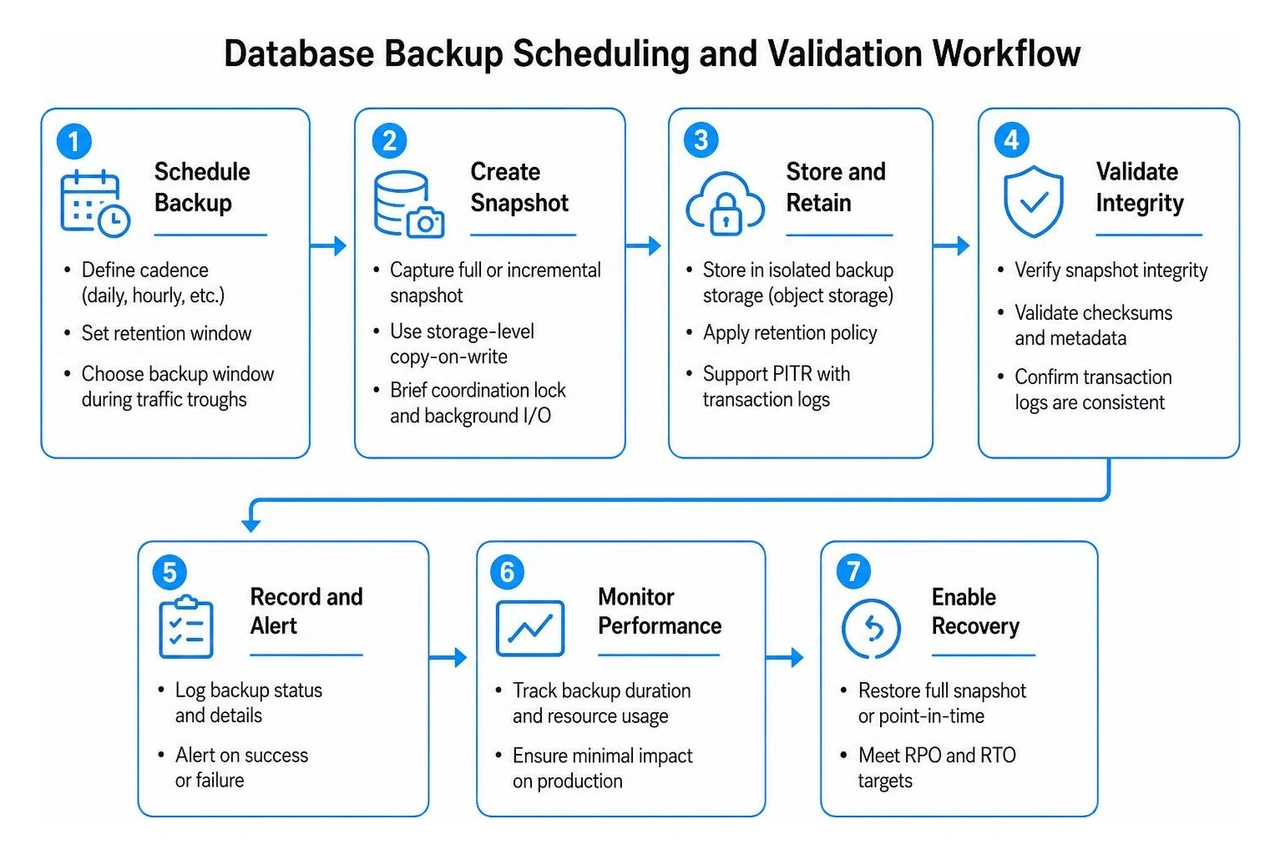
To minimize performance impact, organizations configure automated backup windows during historical troughs in transaction traffic. Aligning database retention with comprehensive infrastructure frameworks—such as our azure storage backup complete guide—ensures backup jobs do not saturate shared network links or compute quotas needed by core business applications.
Determining the right backup cadence depends directly on your target Recovery Point Objective (RPO) and Recovery Time Objective (RTO). RPO defines the maximum acceptable data loss measured in time, while RTO dictates how quickly systems must return to operational status after an incident.
A backup that cannot be restored is essentially useless. High-grade cloud database services implement automated validation routines immediately following each backup job. These routines calculate cryptographic block-level checksums, verifying that stored bits match the source data without silent bit-rot or storage corruption.
When a snapshot job encounters network timeouts or storage throttling, the service triggers automated retry policies with exponential backoff. Telemetry pipelines dispatch instant alerts to security operations teams via webhooks, messaging queues, or email notifications. This continuous automated validation ensures backup integrity before an actual emergency forces a high-stakes restore operation.
Database administrators frequently confuse native physical backups with manual logical exports, but the two approaches serve entirely different purposes in an enterprise data strategy. A complete cloud backup services business guide highlights why modern operations require native snapshots rather than relying on manual file dumps.
Physical cloud backups capture block-level storage snapshots, database engine memory pages, and transaction write-ahead logs. This preserves transaction consistency across complex multi-table relationships and distributed nodes without interrupting active database connections. Logical exports, by comparison, query the database engine to extract raw schema text and data values into SQL, CSV, or JSON formats, requiring extensive compute processing to serialize every row.
The difference in performance and recovery velocity between these two methods is significant:
While manual logical exports are inadequate as a primary disaster recovery mechanism, they remain valuable for specific engineering workflows:
Protecting database backups requires the same rigorous defense-in-depth posture applied to primary production systems. Because backups represent a complete, consolidated copy of an organization's most sensitive assets, they are frequent targets for ransomware operators and data exfiltration threats. Implementing robust data backup and recovery protocols ensures data remains shielded against unauthorized access at every stage of its lifecycle.
Cloud database platforms enforce AES-256 encryption at rest by default for all snapshots and write-ahead logs, paired with TLS 1.3 encryption for data in transit across internal networks. Access controls are governed through fine-grained Identity and Access Management (IAM) permissions, enforcing least-privilege policies to ensure that only authorized service principals can initiate restore jobs or adjust retention windows.
To maintain strict regulatory compliance under frameworks like HIPAA and SOC 2, organizations often utilize Customer-Managed Encryption Keys (CMEK) via cloud key management services (such as AWS KMS, Google Cloud KMS, or Azure Key Vault).
Retention policies must balance regulatory compliance mandates with storage efficiency. Cloud database services allow administrators to define automated lifecycle rules, retaining daily snapshots for 30 days, weekly backups for several quarters, or monthly archives up to 10 years for compliance audits. For example, systems like Database Vault provide structured retention periods up to 30 days, while Cloud SQL enhanced backups support compliance archives extending up to 10 years.
A major risk in cloud infrastructure is orphaned backups or accidental data destruction during instance deprovisioning. When an engineer tears down an environment via automated Infrastructure-as-Code (IaC) scripts, a properly configured backup service intercepts the deletion event, creates an independent final snapshot, and decouples existing historical backups from the parent instance ID. This safeguards historical recovery points even if the primary cluster is permanently removed.
A truly resilient infrastructure plan accounts for broad geographic outages, datacenter network splits, and severe regional disasters. Geographic redundancy ensures that even if an entire cloud availability zone or region goes dark, your data remains fully recoverable in an alternate geographic location. Establishing structured cloud-based disaster recovery services guarantees that operational recovery plans remain actionable under real-world disaster conditions.
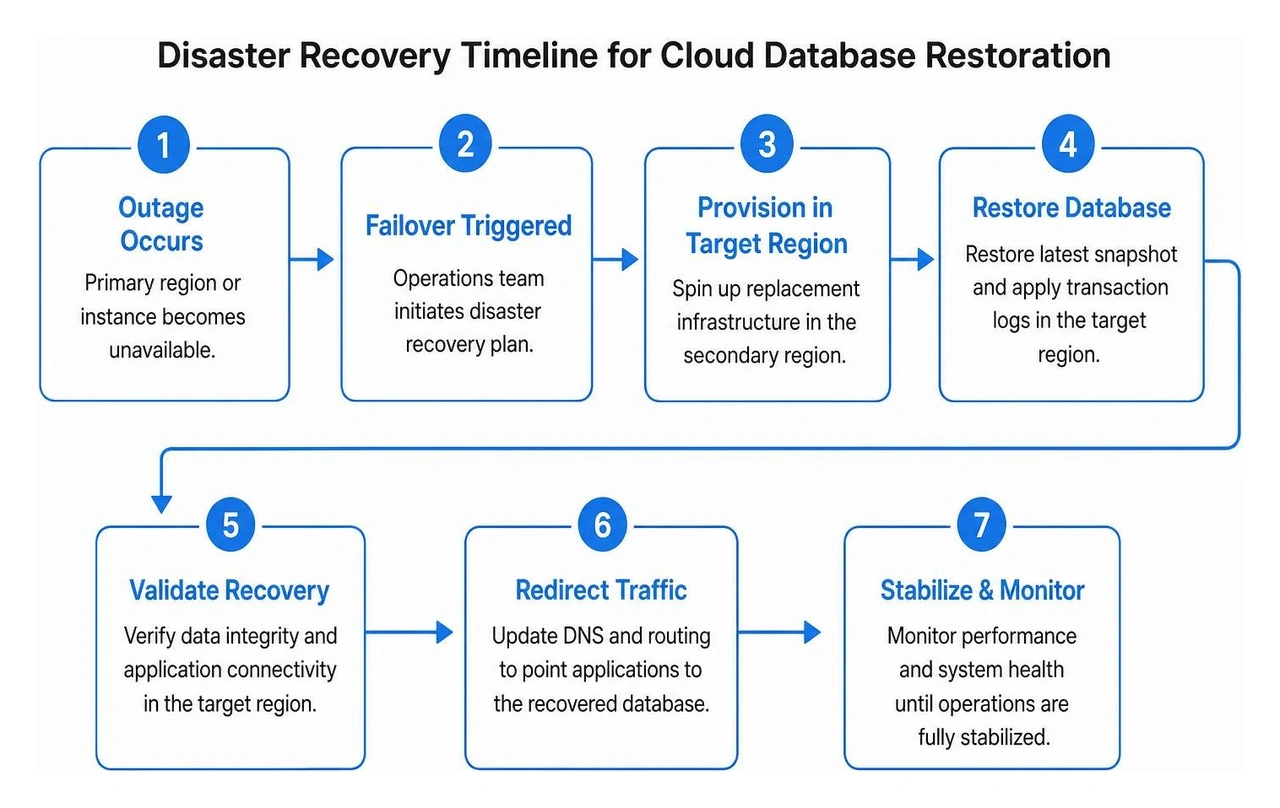
Cross-region replication strategies continuously synchronize database snapshots and transaction logs to secondary target regions hundreds of miles away from the primary cluster. This geographic separation protects mission-critical workloads against physical power disruptions, natural catastrophes, and provider-level control plane failures.
Executing cross-region disaster recovery demands clear pre-planning and orchestration. When spinning up replacement infrastructure during an outage, the recovery workflow requires specialized provisioning steps:
Restoring a database snapshot onto a new cluster is only half the battle. Once the storage volume boots, administrators must perform critical post-restore tasks before redirecting live user traffic:
Standard backups store snapshot data within the same cloud project, billing account, and administrative boundary as the live database instance. While easy to configure, standard backups share access permissions with the parent environment.
Enhanced backups isolate snapshots into dedicated, centralized management projects protected by immutable retention rules and Customer-Managed Encryption Keys (CMEK). This separation ensures that even if a developer account or source environment is compromised, the centralized backups cannot be altered, deleted, or held for ransom.
In an unmanaged or default environment, deleting a database instance can immediately purge all associated automated snapshots.
In a properly configured enterprise backup service, deleting an instance triggers an automated final backup routine. The service then decouples all existing historical snapshots from the deleted instance resource ID, transferring them into independent, persistent storage archives. These retained backups can be used at any future point to provision a brand-new database instance containing the archived data.
Cloud backup engines use copy-on-write storage virtualization and continuous log archiving rather than running intensive read queries across active tables. When a backup initiates, the storage subsystem freezes a pointer to the existing data blocks; any subsequent data modifications are written to new storage blocks while the backup engine reads the preserved original blocks in the background.
Combined with automated cryptographic checksums and background transaction log replaying, this allows the service to capture point-in-time snapshots with zero database downtime, no table locks, and negligible performance overhead on live application queries.
Building a dependable database backup strategy is fundamental to modern business continuity. Whether guarding against accidental data deletion, failed software deployments, malicious ransomware attacks, or regional cloud outages, having automated, verified, and encrypted recovery workflows ensures your organization can bounce back swiftly without devastating data loss.
At Next Level Technologies, we help small and mid-sized businesses build, secure, and monitor enterprise-grade cloud environments. With over 20 years of hands-on experience, our staff relies on extensive cybersecurity training and technical expertise to design robust infrastructure tailored to your exact operational requirements. Operating from our primary location in Columbus, Ohio, alongside our second office in Charleston, WV, our local teams deliver proactive managed IT, HIPAA-compliant security, and resilient disaster recovery solutions.
Ready to protect your mission-critical data with an unshakeable recovery plan? Discover how to design a comprehensive data backup strategy with Next Level Technologies today.
Explore health service administration careers, leadership skills, degrees, salaries, and job outlook for modern healthcare executives.
October 24, 2026
Learn how Healthcare Management Administrators Inc optimizes self-funded plans, provider networks, and clinical quality for employers.
October 17, 2026

