The Complete Guide to IT Service Desk Support
June 9, 2026


Learn how Healthcare Management Administrators Inc optimizes self-funded plans, provider networks, and clinical quality for employers.
October 17, 2026

Upgrade your healthcare claims management for maximum accuracy with Next Level Technologies, serving Columbus, Ohio and Charleston, WV.
October 10, 2026

Discover how a healthcare management services organization boosts practice efficiency, cuts overhead, and protects clinical autonomy.
October 3, 2026
June 9, 2026
IT service desk support is the central function that keeps your business technology running — connecting employees with the technical help they need, fast.
Here's a quick overview of what IT service desk support does:
When technology breaks down, work stops. It's that simple.
For mid-sized businesses in Columbus, Ohio and Charleston, WV, even a few hours of downtime can mean missed deadlines, frustrated staff, and real revenue loss. That's why having a reliable, well-structured IT service desk isn't a luxury — it's a core business requirement.
Modern IT service desks have come a long way from the traditional "call the tech guy" model of the 1980s. Today, AI-powered tools can resolve up to 50% of IT issues before they ever reach a human agent. Organizations with mature service desk operations report up to a 93% first-contact resolution rate and a 98% customer satisfaction score.
But raw technology isn't enough. The best service desks combine smart tools with deeply trained people — technicians who understand not just how to fix a problem, but how to protect your business while doing it. Cybersecurity awareness is especially critical, since the service desk is often the first line of defense against threats like phishing and unauthorized access.
This guide breaks down everything you need to know — from how IT service desks are structured, to which metrics matter most, to how to choose the right solution for your organization.
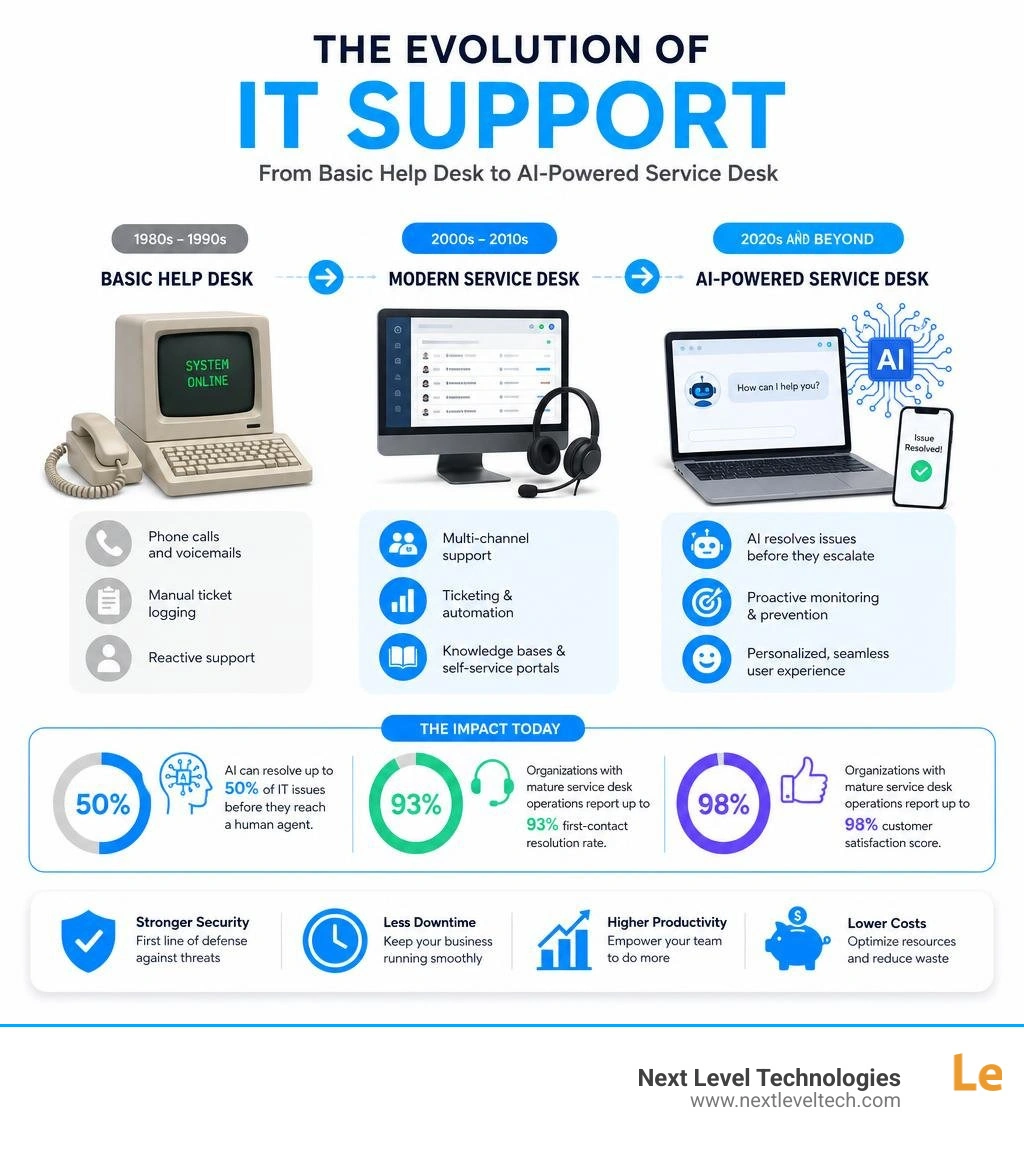
IT service desk support word guide:
At its core, an IT service desk is the primary interface between an organization's IT department and its end users. Whether an employee needs a password reset, access to a new cloud application, or help recovering from a system crash, the service desk is where they turn.
Unlike the simple reactive support models of the past, a modern IT service desk operates within the ITIL (Information Technology Infrastructure Library) framework. This framework ensures that the service desk does not just react to problems, but actively aligns technology with business objectives.
The primary functions of an IT service desk include:
By centralizing these functions, organizations can maintain operational consistency and ensure that technical issues are resolved systematically. For a deeper dive into how this fits into your broader business strategy, check out our IT Support for Business Ultimate Guide and explore our dedicated IT Service Desk Services.
It is common to hear the terms "help desk" and "service desk" used interchangeably, but in professional IT, they represent very different levels of service.
┌──────────────────────────────────────────────────────────┐│ ITSM (IT Service Management) ││ (The overarching strategy, policies, and frameworks) ││ ││ ┌──────────────────────────────────────────────┐ ││ │ IT Service Desk │ ││ │ (Strategic, lifecycle-focused, SPOC) │ ││ │ │ ││ │ ┌──────────────────────────────────┐ │ ││ │ │ Help Desk │ │ ││ │ │ (Tactical, reactive, break-fix) │ │ ││ │ └──────────────────────────────────┘ │ ││ └──────────────────────────────────────────────┘ │└──────────────────────────────────────────────────────────┘Historically, the help desk emerged in the late 1980s as a tactical, reactive "break-fix" solution. Its primary goal was simply to get technology working again when it broke. It was highly focused on the immediate technical issue rather than the user's broader experience or the business's strategic goals.
The service desk, on the other hand, evolved from the ITIL framework as a more comprehensive, user-centric solution. It is strategic, focusing on the entire lifecycle of IT services. A service desk does not just fix a laptop; it manages how that laptop fits into the broader corporate network, ensures compliance with security standards, and tracks the asset's lifecycle.
Finally, IT Service Management (ITSM) is the complete overarching discipline. ITSM covers all the processes, policies, and procedures used to design, deliver, manage, and improve IT services. The service desk is the highly visible, operational hub of a broader ITSM strategy.
To explore these structural differences in greater detail, read our breakdown of Help Desk vs Service Desk vs ITSM and see how they impact your day-to-day operations.
As we navigate June 2026, the capabilities of a modern IT service desk have expanded far beyond simple email and phone queues. Today's businesses require highly integrated, intelligent platforms to keep pace with hybrid workforces and sophisticated cyber threats.
A state-of-the-art service desk relies on several essential features:
By utilizing industry-standard AI-powered IT Service Desk Solutions | DXC Technology, modern service desks can drastically reduce operational overhead while delivering a frictionless experience to employees.
Artificial intelligence has transformed how we approach technical support. By combining machine learning, natural language processing (NLP), and generative AI, modern service desks can work smarter and faster.
Implementing AI within your IT support workflows yields massive, measurable returns:
These capabilities allow us to decrease total IT incidents by up to 40% and achieve a staggering 58% reduction in cost per contact.
Modern employees are highly tech-savvy and often prefer resolving simple issues on their own rather than waiting on hold or starting a chat queue.
Research shows that 49% of organizations now provide self-service options for basic IT requests. When implemented correctly, self-service transforms the dynamics of your IT department:
To see a great example of self-service in action within an educational environment, you can look at the Support | Information Technology portal, which highlights how centralized knowledge bases keep massive user bases moving.
To manage resources efficiently and ensure that complex problems get the right level of attention, professional IT service desks use a structured, multi-tiered support model. This prevents highly paid network engineers from getting bogged down with simple password resets, while ensuring that critical security incidents are immediately escalated to the correct specialists.
| Support Tier | Primary Focus | Common Tasks | Staff Profile |
|---|---|---|---|
| Tier 1 (L1) | First Contact, Triage & Basic Troubleshooting | Password resets, software installs, ticket routing, basic device setup | Customer-focused technicians with strong soft skills and broad IT training |
| Tier 2 (L2) | Advanced Troubleshooting & Endpoint Management | OS reinstalls, network connectivity issues, advanced software bugs, hardware diagnostics | Experienced technical specialists with deep system knowledge |
| Tier 3 (L3) | Expert-Level Engineering & Infrastructure | Server failures, database corruption, major network outages, cybersecurity incident response | Senior network engineers, systems architects, and certified cybersecurity experts |
This tiered workflow ensures that tickets move logically through the support chain, maximizing efficiency and minimizing downtime. To learn how this structure integrates with your business's disaster recovery and business continuity plans, explore our IT Incident Management Complete Guide.
Tier 1 is the front line of your IT service desk. When an employee calls, emails, or opens a chat, they connect with a Tier 1 technician.
The primary goals of Tier 1 support are to gather detailed information, resolve simple issues immediately, and properly categorize and route more complex problems. Standard tasks include handling password resets, basic software installations, and printer mapping.
Because Tier 1 is the face of IT, these technicians must possess exceptional communication skills and empathy. However, they also require rigorous technical training and cybersecurity awareness. For example, a simple password reset request could actually be a social engineering attempt by a hacker. Our Tier 1 staff undergo extensive training to verify user identities and spot potential security threats before granting access.
When Tier 1 is optimized, businesses can achieve up to a 93% first-contact resolution (FCR) rate for standard user requests, keeping employee downtime to an absolute minimum.
When an issue is too complex for Tier 1—such as a persistent database error, a localized network switch failure, or an anomaly in an endpoint security log—it is escalated to Tier 2 or Tier 3.
At Next Level Technologies, our Tier 2 and Tier 3 teams are local, highly certified engineers with deep technical experience. They hold advanced certifications and undergo continuous, extensive training to protect your business infrastructure and maintain compliance with stringent regulations like HIPAA.
You cannot manage what you do not measure. To ensure that your IT service desk is delivering real value and keeping your business productive, you must track specific Key Performance Indicators (KPIs).
The most critical metrics for evaluating service desk performance include:
For local organizations looking to understand how structured IT support centers operate, academic institutions like the IT Support Center (ITSC) - Columbus State Community College demonstrate how these metrics are applied in high-volume, real-world environments.
Building and managing an in-house IT service desk is a massive undertaking, and many mid-sized businesses run into significant hurdles:
When internal resources are stretched thin, it can compromise your business's ability to recover from unexpected disruptions. To learn how to protect your organization from these risks, read our guide on IT Service Continuity Management.
Finding the right IT service desk support model depends heavily on your business size, industry, and existing internal resources.
┌─────────────────────────────────────────────────────────┐ │ HOW TO CHOOSE YOUR SUPPORT MODEL │ └─────────────────────────────────────────────────────────┘ │ Do you have an internal IT team? │ ┌────────────────┴────────────────┐ YES NO │ │ Do they have time for You need a fully strategic projects? [Managed IT Service Provider] │ - Unlimited remote/onsite ┌──────┴──────┐ - 24/7 proactive monitoring YES NO - Predictable monthly costs │ │ Keep model You need [Co-Managed IT] as-is - Offload Tier 1 tickets - Free up internal staffFor some businesses, partnering with a Managed IT Service Provider to completely outsource the service desk is the most cost-effective path. This model provides 24/7/365 coverage, access to enterprise-grade tools, and a full team of certified engineers for a predictable monthly fee.
For organizations that already have an internal IT director or a small tech team, a co-managed IT model is often the perfect fit. In this setup, we handle the high-volume Tier 1 tickets (like password resets and basic troubleshooting) while your internal team focuses on strategic business projects.
When evaluating external support partners in Ohio and West Virginia, look for:
While you may see listings for 247 Remote It Support jobs in Columbus, Ohio Metropolitan Area, building an entire department from scratch is incredibly costly. Partnering with an established local provider gives you instant access to mature, enterprise-grade support.
An IT help desk is primarily tactical and reactive, focusing on "break-fix" troubleshooting for immediate user problems. An IT service desk is strategic and proactive, designed around the ITIL framework to manage the entire lifecycle of IT services, align technology with business goals, and improve overall operational efficiency.
A professional service desk reduces downtime through proactive monitoring, automated ticket routing, and structured escalation workflows. By identifying and resolving network anomalies or hardware vulnerabilities before they cause an outage, we can achieve up to an 80% reduction in IT issue resolution times.
Yes. Modern IT service desks are built for distributed workforces. Using cloud-based ticketing systems, secure remote desktop tools, multi-platform support (for Windows, macOS, and mobile devices), and secure VPN configurations, we can support your employees whether they are working in our Columbus or Charleston offices, at home, or traveling.
At Next Level Technologies, we believe that IT support should be a catalyst for your business growth, not a source of daily frustration.
With over 20 years of technical experience serving businesses across Columbus, Ohio and Charleston, WV, we provide enterprise-grade technology solutions tailored to your unique needs. Our local, highly certified engineers possess deep technical expertise and undergo extensive, continuous cybersecurity training to keep your business secure, compliant, and highly productive.
Whether you need a fully outsourced IT service desk, specialized HIPAA-compliant cybersecurity, or a co-managed partnership to support your existing internal team, we are here to help you eliminate downtime and scale with confidence.
Ready to take your business technology to the next level? Contact us today to schedule a consultation and experience the difference of proactive, local Managed IT Services and IT Support.
Learn how Healthcare Management Administrators Inc optimizes self-funded plans, provider networks, and clinical quality for employers.
October 17, 2026
Upgrade your healthcare claims management for maximum accuracy with Next Level Technologies, serving Columbus, Ohio and Charleston, WV.
October 10, 2026


