The Definitive Guide to IT Support Services
July 9, 2026


Discover how a healthcare management services organization boosts practice efficiency, cuts overhead, and protects clinical autonomy.
October 3, 2026

Master denial management in medical billing with proven strategies to reduce denials, boost appeals success, and protect revenue cycle performance.
September 25, 2026

Compare the best healthcare learning management platforms for providers with Next Level Technologies, serving Columbus, Ohio and Charleston, WV.
September 19, 2026
July 9, 2026
An IT support center is a dedicated team — either in-house, outsourced, or a hybrid of both — that handles technology problems for the people inside your organization, so those people can stay focused on their actual jobs.
Quick answer for businesses evaluating IT support:
When technology breaks down, work stops. It's that simple.
For mid-sized businesses, every minute of downtime has a real cost — missed deadlines, frustrated employees, and in regulated industries like healthcare, potential compliance risks. Yet many organizations are still patching things together with an overloaded internal IT person or a slow-to-respond vendor.
That's exactly the gap a modern IT support center fills.
Think of it as your organization's technology backbone — a structured, staffed operation that catches problems fast, solves them faster, and keeps your team moving. Leading support operations answer calls in under 10 seconds on average and maintain customer satisfaction scores above 9.4 out of 10. That's not a luxury — for growing businesses, it's a baseline expectation.
At Next Level Technologies, our teams in Columbus and Charleston bring not just technical depth but extensive cybersecurity training to every client engagement — because today, IT support and security aren't separate problems. They're the same problem.
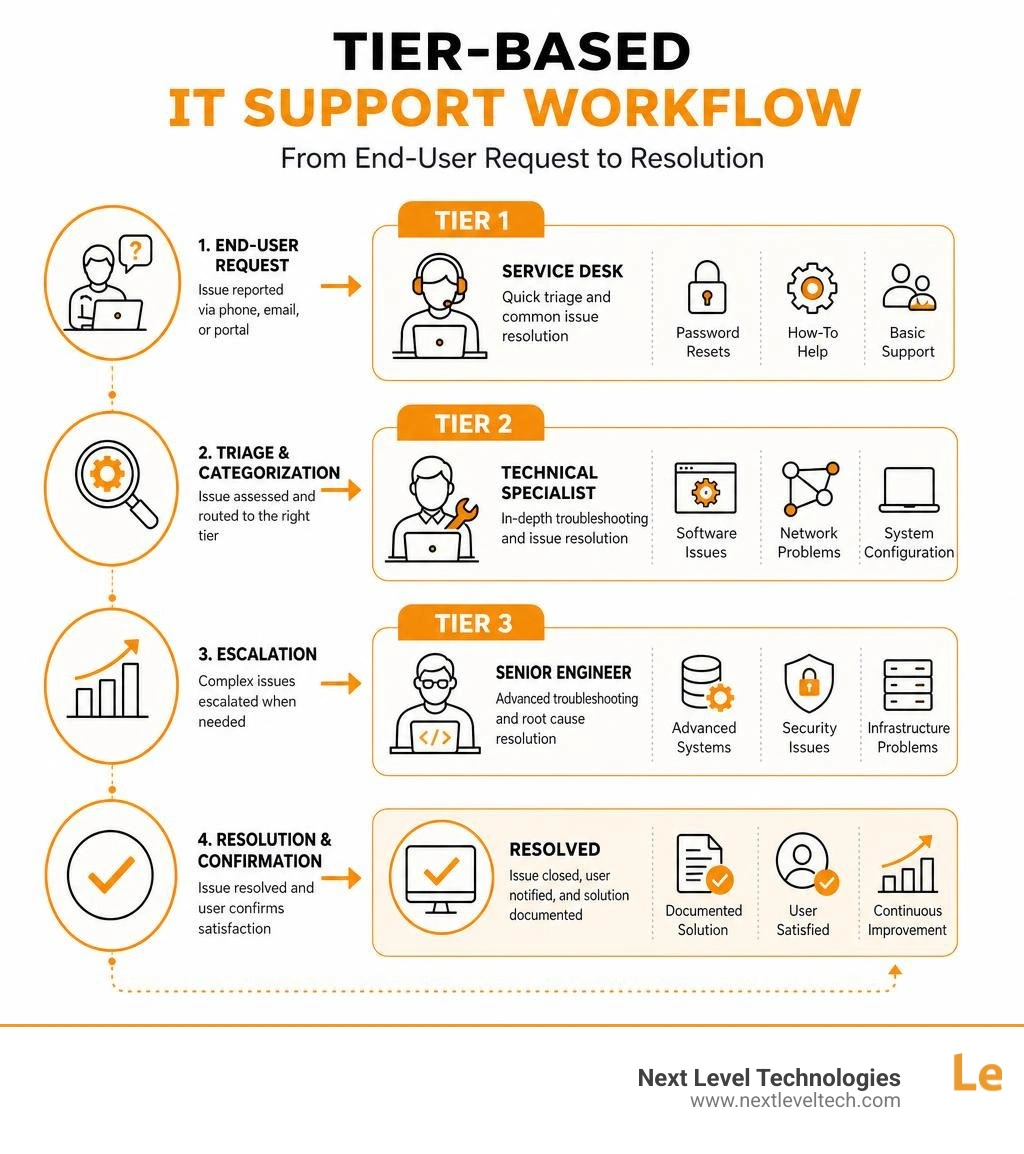
Essential it support center terms:
When we talk about a modern it support center, we are describing a highly coordinated system designed to act as a single point of contact for all technology-related friction. It is much more than a group of people answering phones; it is an integrated ecosystem of technicians, automated monitoring tools, and structured workflows built to keep your business running smoothly.
Historically, companies viewed technical assistance as a purely reactive "break-fix" function. If a computer stopped working, you called someone to fix it. Today, a premium IT Support operation takes a proactive stance, identifying and mitigating system vulnerabilities before they escalate into costly business interruptions.
A fully realized support center provides a comprehensive suite of services that address both the daily frustrations of end-users and the long-term infrastructure needs of the business. These core offerings typically include:
For a real-world look at how large-scale institutions organize these functions, you can examine the structured frameworks utilized by major academic institutions, such as the IT Client Services (ITCS) | Information Technology model or the central hub at Support | Information Technology . These organizations demonstrate how centralizing support under a single, structured service desk ensures that no ticket falls through the cracks.
Understanding the distinctions between various support models is crucial for making an informed hiring decision. Many business leaders use the terms "help desk," "service desk," and "IT support center" interchangeably, but they represent very different operational philosophies.
By leveraging a co-managed IT or staff augmentation model, businesses can offload Tier 1 support and overflow call volume to our dedicated advisors. This frees up internal resources to focus on core business objectives while ensuring that basic user requests are resolved in minutes. To learn more about how these modern frameworks operate, explore our comprehensive guide on Help Desk ITSM.
An exceptional it support center is defined by its operational discipline. It is not enough to solve technical problems; they must be solved with speed, accuracy, and a high level of professional care. This requires a combination of highly trained people, rigid adherence to key performance metrics, and a modern approach to digital security.
To explore how these operational standards are changing to meet modern demands, read our detailed IT Service Desk Support Guide 2026.
The caliber of any support center rests entirely on the expertise of its advisors. At Next Level Technologies, we believe that basic technical literacy is no longer sufficient. Our advisors undergo continuous, rigorous training and hold industry-recognized certifications, including:
This extensive training allows our advisors to confidently support over 200 common business applications, manage mobile device fleets, and execute seamless cloud migrations with minimal disruption. Whether your team is using specialized business software or standard off-the-shelf applications, our certified advisors possess the diagnostic fluency to pinpoint and resolve issues on the first contact.
How do you measure the effectiveness of an it support center? It comes down to cold, hard data. High-performing centers track a variety of Key Performance Indicators (KPIs) to ensure consistent service delivery:
By maintaining strict visibility over these metrics, we ensure our clients in Columbus and Charleston experience virtually zero friction when seeking assistance.
In the modern digital landscape, security cannot be an afterthought. Every time a technician remotely accesses an employee's computer, a potential security vulnerability is created if proper protocols are not followed.
Our support center integrates advanced cybersecurity protection directly into our daily workflows. When assisting clients—especially those in highly regulated sectors like healthcare—we enforce strict identity verification before resetting passwords or granting system access.
Furthermore, our systems are built from the ground up to support HIPAA compliance, protect data privacy, and conduct continuous vulnerability assessments. By combining proactive monitoring with rapid incident response, we ensure that your day-to-day IT support actually strengthens your overall security posture rather than weakening it.
Outsourcing or co-managing your technology support is not just about fixing broken computers; it is a strategic business decision that directly impacts your bottom line, employee morale, and operational scalability.
By offloading the daily burden of technical troubleshooting, businesses can experience a dramatic surge in overall productivity. When employees do not have to spend hours searching internet forums or waiting on an unresponsive IT vendor to resolve a software glitch, they can focus entirely on driving revenue and serving clients.
To understand the broader financial and operational benefits of this approach, read our article on IT Support for Small Businesses.
Selecting a technology partner is a critical decision. To find an it support center that aligns with your organizational goals, look for the following characteristics:
For organizations seeking to understand how local institutions handle structured support entry points, reviewing resources like the IT Support Center (ITSC) - Columbus State Community College portal can provide excellent insights into user-friendly ticket submission and self-service knowledge bases.
While reliable technology is vital for every modern business, certain industries face unique operational and regulatory challenges that make a dedicated support center essential:
Navigating IT support can raise many questions. Here are some of the most common inquiries we receive from business leaders.
Remote support allows technicians to diagnose and resolve software errors, network configurations, and login issues instantly using secure screen-sharing tools. This represents the fastest way to get help, resolving over 90% of daily technical issues. Onsite support involves a technician physically visiting your office to handle hardware failures, physical cabling, or complex network deployments that cannot be resolved over the internet. A great partner provides a hybrid of both.
A structured support center plans migrations with meticulous detail to ensure minimal disruption to your business operations. Our advisors handle everything from pre-migration compatibility testing to data migration and post-launch troubleshooting. We also provide user-focused training and immediate support during the "go-live" phase to help your team adapt quickly to new systems.
An it support center is a dynamic environment that offers excellent career paths for technical professionals. Common roles include:
These roles offer rapid skill development, hands-on experience with cutting-edge enterprise tools, and clear paths toward specialization in cybersecurity, network engineering, or cloud architecture.
In 2026, technology is no longer just a tool that supports your business—it is the engine that drives it.
Partnering with a dedicated it support center ensures that your organization remains secure, efficient, and ready to scale. At Next Level Technologies, we are proud to provide enterprise-grade managed IT services, advanced cybersecurity, and rapid-response IT support to businesses across Columbus, Ohio and Charleston, West Virginia.
Whether you need to secure patient data in a healthcare clinic, protect a professional services firm from rising cyber threats, or simply eliminate the daily tech frustrations of your team, our local advisors are here to help.
To learn more about the local technology landscape and find the best solutions for your organization, check out our IT Support Columbus Complete Guide.
Ready to eliminate downtime and strengthen your security with predictable monthly costs?
Partner with Next Level Technologies for Managed IT Services and IT Support
Discover how a healthcare management services organization boosts practice efficiency, cuts overhead, and protects clinical autonomy.
October 3, 2026
Master denial management in medical billing with proven strategies to reduce denials, boost appeals success, and protect revenue cycle performance.
September 25, 2026


