Everything You Need to Know About Onsite IT Support
July 4, 2026


Master denial management in medical billing with proven strategies to reduce denials, boost appeals success, and protect revenue cycle performance.
September 25, 2026

Compare the best healthcare learning management platforms for providers with Next Level Technologies, serving Columbus, Ohio and Charleston, WV.
September 19, 2026

Compare cloud backup services with this guide to backup cloud database service architecture, security, and disaster recovery.
September 12, 2026
July 4, 2026
An onsite IT support company sends certified technicians directly to your business location to fix problems that simply cannot be solved over a phone call or remote connection. If you need a quick answer, here's what you should know:
What onsite IT support companies do:
For mid-sized businesses in Columbus, OH and Charleston, WV, having a local team with deep technical experience — including extensive cybersecurity training — means problems get resolved fast, often the same day.
Here's the reality: downtime is expensive. When a server goes down or a network fails, your team stops working. Remote support can handle a lot, but some problems require hands on the hardware. That's where onsite IT support earns its value.
Studies show onsite support can reduce downtime by up to 50% compared to remote-only models — and top providers resolve 85% of tickets the same day they're submitted.
Whether you're a healthcare organization needing HIPAA-compliant infrastructure, a professional services firm protecting sensitive client data, or a non-profit stretching every dollar, the right onsite IT partner keeps your operations running and your technology secure.
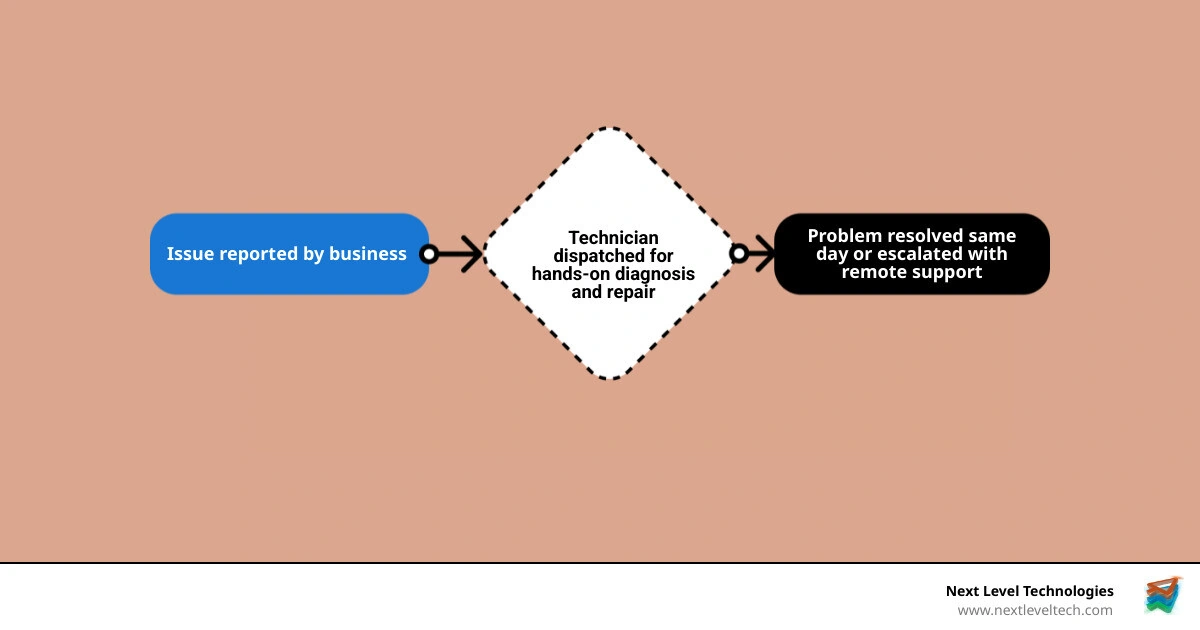
Terms related to onsite it support company:
Onsite IT support means we send a technician to your location in Columbus or Charleston to work on the issue in person. Remote support means we connect securely to a device, server, or cloud platform from elsewhere to troubleshoot and resolve problems without traveling onsite.
Both matter. They are not enemies. They are more like coffee and sleep: each does an important job, and your business usually needs both.
Here is the practical difference:
| Support type | Best for | Main limitation |
|---|---|---|
| Onsite support | Hardware repair, cabling, office setups, firewall installs, hands-on troubleshooting, site surveys | Requires travel and scheduling |
| Remote support | Password resets, software fixes, patching, Microsoft 365 issues, monitoring, quick triage | Cannot physically touch equipment |
| Hybrid support | Most modern businesses | Requires a provider that can do both well |
A remote technician can restart services, review logs, apply updates, and fix many user issues fast. In fact, more than 90% of common support requests may be solvable remotely in the right environment. But if a switch has failed, a cable run is bad, a workstation will not power on, or a server room needs hands-on work, remote support hits a wall quickly.
That is where onsite support protects business continuity. Someone has to be there to inspect, test, replace, reconnect, label, mount, and verify. Technology does not magically plug itself back in. We wish it did.
The biggest reason businesses invest in onsite support is simple: faster recovery when something physical breaks.
Research across the industry shows:
Why does onsite support work so well for urgent issues?
For example, if your internet keeps dropping, the issue may not be your ISP at all. It could be a failing switch, bad patch cable, power problem, poor wireless design, or damaged wall jack. Remote support can narrow the possibilities. Onsite support confirms the cause and fixes it.
This is especially important for healthcare and professional services environments where delays affect patient care, client deadlines, and compliance obligations.
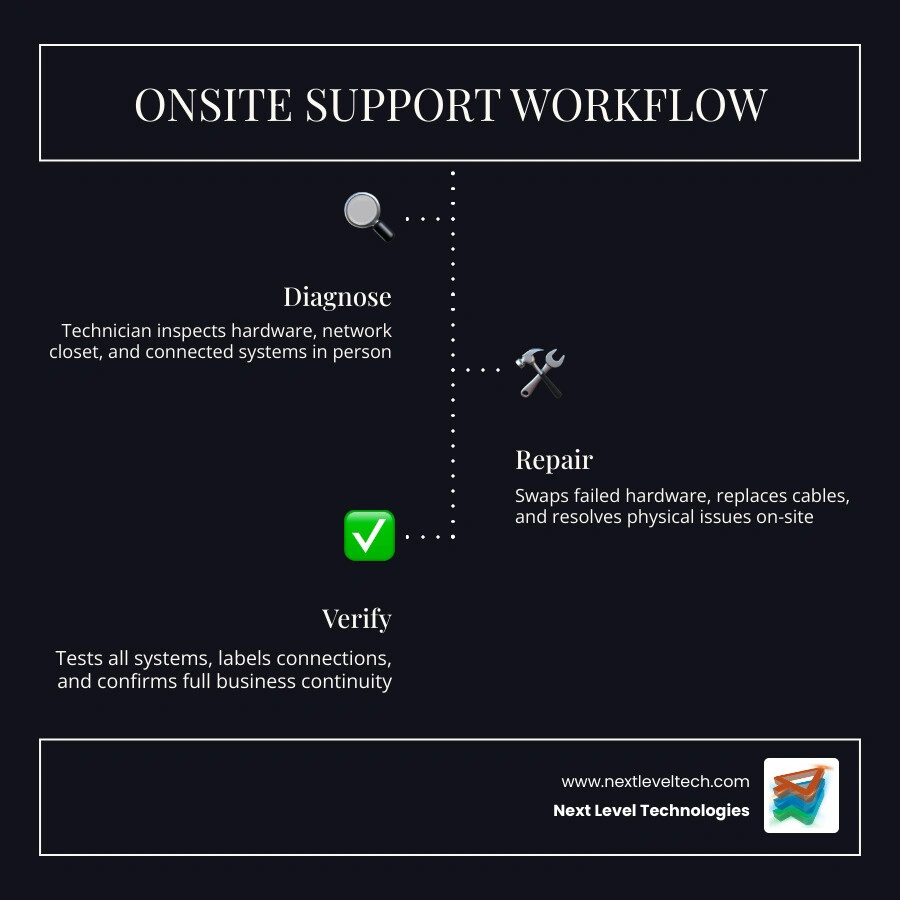
In 2026, the smartest support model is usually hybrid.
That means:
We use this approach because it matches how businesses actually operate. Some issues need immediate remote action. Others need boots on the ground. A hybrid model gives you both.
If you want a broader look at local support options, our IT Support Columbus Complete Guide and IT Support Charleston WV Complete Guide explain how regional support works for growing businesses.
If your business relies on computers, internet access, phones, cloud apps, Wi-Fi, printers, security tools, or shared files, you need reliable support. Which is to say: yes, you need reliable support.
An onsite partner helps because we do more than respond to emergencies. We also help you stay ahead of them.
The main benefits include:

For small and mid-sized businesses, building all this internally is difficult. A single in-house IT person may be excellent, but no one person can be everywhere, know everything, and handle every emergency alone. Even superheroes need backup.
That is why many organizations pair internal staff with a managed services provider, or fully outsource day-to-day support while keeping leadership focused on business operations.
If you're evaluating support options for a smaller organization, our guides on IT Support for Small Businesses and IT Support for Business Ultimate Guide are useful next reads.
Not every provider is a fit for every business. Industry knowledge matters.
For healthcare organizations, onsite support should include:
For professional services firms, look for:
For non-profits, look for:
At Next Level Technologies, we focus on small and mid-sized organizations in Columbus, Ohio and Charleston, WV that need enterprise-grade support without enterprise-level complexity. Our 20+ years of experience, proactive service model, and extensive cybersecurity training help us support regulated and mission-driven organizations with confidence.
You may also want to review our broader articles on Comprehensive IT Support and IT Support IT Complete Guide.
One of the most overlooked advantages of onsite support is prevention.
Proactive visits can include:
This kind of preventive maintenance helps you catch trouble before users notice it. A worn battery backup, overheating switch, failing drive, or messy cabling setup may not look urgent today. It becomes urgent at exactly the wrong time tomorrow.
Routine onsite maintenance also helps systems last longer. Proper airflow, cable management, firmware updates, secure mounting, and documented infrastructure all reduce avoidable wear and chaos.
Some IT work simply cannot be done remotely, no matter how talented the technician is.
Typical tasks that require onsite support include:
If you are comparing providers, this is where experience really shows. A technician needs to understand not just devices, but physical layout, power, cabling standards, wireless coverage, and security risk.
Network issues are a common reason businesses need onsite support.
A physical technician may be needed for:
Bad cabling creates mystery problems that waste hours. Slow connections, dropped calls, poor Wi-Fi, random disconnects, and unstable printers often trace back to infrastructure issues hidden behind walls, ceilings, or racks.
A proper site survey helps avoid this. It lets us assess building layout, cabling paths, power availability, interference, and device placement before a problem becomes a project.
If your business is local to Central Ohio, our IT Support Columbus, Business Computer Support Columbus, and IT Support Worthington OH resources go deeper into local infrastructure support needs.
Security is not only a software issue. It is also physical.
Onsite IT support can strengthen security through:
This matters for compliance too. A remote scan may identify risks, but physical inspection often reveals the full story: unsecured cabinets, unlabeled network gear, exposed patching, or unauthorized devices connected onsite.
For organizations with compliance needs, physical verification supports stronger policies, better documentation, and cleaner audits.
A lot of businesses ask the same question: should we hire our own onsite IT team or outsource to a third-party provider?
The answer depends on your size, complexity, growth plans, and risk tolerance.
An internal team may make sense if you:
Outsourcing often makes more sense if you:
One of the biggest hidden challenges with internal teams is overhead. Hiring is only part of the cost. You also need management, tools, coverage during absences, continuing education, and enough depth to handle networking, endpoints, cloud systems, backup, and security.
That is why many businesses choose outsourced support, or at least a co-managed model.
If you are actively comparing firms, our article on IT Support Companies Near Me can help frame the evaluation.
When choosing an onsite provider, ask about technician qualifications. Relevant certifications mentioned across the research include:
Certifications are not everything, but they do help validate core knowledge. We also recommend looking for:
This is especially important in healthcare, legal, financial, and non-profit settings where mistakes are not just annoying. They can be expensive, disruptive, or reportable.
Some businesses do not need full outsourcing. They just need extra hands at the right time.
Staff augmentation can help with:
This flexible model gives you access to technical resources without committing to full-time hires for every skill set. It is a practical option when your internal team is strong but stretched thin.
Onsite support works best when it is part of a larger IT plan, not a random emergency-only service.
A mature managed IT strategy combines:
This is where we see the best long-term results. Remote tools catch problems early. Onsite technicians handle the physical work. Strategic planning reduces repeat incidents. Everyone wins, including the printer eventually.
Our pillar page on Managed IT Services and IT Support explains how these pieces fit together. You can also explore IT Support Columbus for a local view.
Security-first onsite support can improve:
Research shows many onsite service models now include vulnerability evaluation and immediate remediation as part of the visit. That is a smart direction, especially in 2026 as compliance and cyber insurance expectations continue to rise.
For our clients in Columbus and Charleston, that often means:
Hardware as a Service can pair naturally with onsite support.
In a HaaS model, businesses receive:
Why does this matter for onsite support?
Because standardized hardware is easier to deploy, maintain, replace, and secure. When your laptops, firewalls, switches, and workstations follow a plan, onsite visits are more efficient and less disruptive.
It also supports better budgeting and fewer surprise failures, which is always more fun than discovering your critical workstation is old enough to remember fax machine glory days.
Response times vary by provider, service agreement, and urgency. Industry research shows many providers offer same-day or next-business-day onsite support, with urgent issues addressed as quickly as possible after triage.
In practice, the best model is:
For businesses in Columbus, OH and Charleston, WV, local presence matters because it shortens travel time and improves coordination.
Onsite support generally costs more than remote-only support because it involves travel time, scheduling, and hands-on labor. But that does not mean it is more expensive overall.
If onsite work reduces downtime, prevents failed deployments, catches security risks early, and extends equipment life, it can produce better value than a cheaper remote-only model that cannot fully solve the issue.
It also often compares favorably with building a full in-house team, especially for small and mid-sized businesses that need broad expertise but do not need several full-time specialists.
Yes. This is one of the most common and valuable uses of onsite support.
We can help with:
Moves are high-risk technology events. Having experienced technicians onsite reduces mistakes, shortens disruption, and helps your team get back to work faster.
The right onsite IT support company does much more than show up when something breaks. It becomes part of your business continuity strategy.
For organizations in Columbus, Ohio and Charleston, WV, onsite support is often the difference between a brief disruption and a full-day mess. With 20+ years of experience, deep technical expertise, and extensive cybersecurity training, we help businesses resolve hardware issues, strengthen security, support compliance, and keep teams productive.
If you are looking for a partner that combines local onsite support with proactive managed services, cloud guidance, disaster recovery, and cybersecurity, Next Level Technologies is built for that role.
To learn more, explore:
If your business is ready to eliminate downtime and strengthen security, we are ready to help.
Master denial management in medical billing with proven strategies to reduce denials, boost appeals success, and protect revenue cycle performance.
September 25, 2026
Compare the best healthcare learning management platforms for providers with Next Level Technologies, serving Columbus, Ohio and Charleston, WV.
September 19, 2026
