Don't Lose Your Data: How to Back Up Your PC Like a Pro
January 23, 2026


Explore health service administration careers, leadership skills, degrees, salaries, and job outlook for modern healthcare executives.
October 24, 2026

Learn how Healthcare Management Administrators Inc optimizes self-funded plans, provider networks, and clinical quality for employers.
October 17, 2026

Upgrade your healthcare claims management for maximum accuracy with Next Level Technologies, serving Columbus, Ohio and Charleston, WV.
October 10, 2026
January 23, 2026
Data backup in computer systems is the process of creating copies of your digital files and storing them in a secure location so you can recover them if your original data is lost, corrupted, or destroyed. Here's what you need to know:
Most of us have experienced that sinking feeling when important data disappears. Maybe it's a crashed hard drive, an accidental deletion, or a ransomware attack. The statistics are sobering: 40% of companies without proper backup plans don't survive a disaster, and the average cost of downtime runs $5,600 per minute.
Yet at least one in five people has never backed up their data at all.
The good news? Protecting your digital assets doesn't have to be complicated or expensive. Whether you're safeguarding family photos or running a business that depends on customer data, the right backup strategy gives you peace of mind and a safety net against hardware failures, cyberattacks, and human error.
I'm Steve Payerle, President of Next Level Technologies, and I've spent over 15 years helping businesses in Columbus, Ohio and Charleston, WV implement robust data backup in computer systems that protect their operations. Our team combines extensive technical experience with specialized cybersecurity training to ensure your data stays safe and recoverable when you need it most.
Data backup in computer vocab explained:
Our lives and livelihoods are deeply intertwined with data. From cherishing personal memories to driving complex business operations, data is the lifeblood of nearly everything we do. This deep dependency makes robust data backup in computer systems not just a good idea, but an absolute necessity.
Consider the stark reality: Forty percent of companies that do not have proper backup or disaster recovery plans simply do not survive a disaster. When a business experiences downtime, the financial impact can be staggering, with the average cost reaching an alarming $5,600 per minute. Furthermore, a Gartner study found that only 6% of companies affected by a disaster that lacked disaster recovery plans managed to continue operating for more than two years.
The threats to our data are varied and constant. The most common culprits behind data loss are hardware/system failure (31%), human error (29%), and the insidious combination of viruses, malware, and ransomware (29%). These statistics paint a clear picture: data loss isn't a matter of "if," but "when."
For individuals, data backup in computer systems is about preserving the irreplaceable. Think about those precious family photos and videos, vital personal documents like tax records and wills, or your carefully curated digital music and movie collections. These are not just files; they are memories, legal necessities, and personal treasures.
Imagine losing years of digital photos due to a sudden hard drive crash, or accidentally deleting an important document with no way to retrieve it. Without a backup, these losses are often permanent, leaving behind a trail of frustration and regret. A reliable backup acts as your personal digital insurance policy, ensuring that your most cherished digital assets are safe, no matter what unforeseen event occurs.
For businesses, the stakes are even higher. Your data isn't just important; it's fundamental to your existence. This includes sensitive customer data, invaluable intellectual property, critical financial records, and the operational data that keeps your business running smoothly. Losing any of this can trigger a cascade of negative consequences, from regulatory fines and legal battles to irreparable damage to your reputation.
Downtime, as we've seen, is incredibly expensive. But beyond the immediate financial hit, data loss can cripple your ability to serve customers, innovate, and compete. Maintaining operational continuity is paramount, and a comprehensive data backup in computer strategy is the cornerstone of that continuity. It protects your brand, preserves customer trust, and ensures that even in the face of disaster, your business can rebound quickly. We understand that every business, regardless of size, needs a custom approach to safeguard its digital assets. That's why we emphasize effective Business Continuity: IT Solutions to keep you protected. For our small business clients in Columbus, Ohio and Charleston, WV, we offer specialized Data Backup Solutions for Small Business designed to fit your unique needs and budget.
Understanding the various methods for creating data backup in computer systems is crucial for building an effective strategy. It's not just about copying files; it's about copying them smartly, efficiently, and with a clear plan for recovery. This is why organizations around the world observe World Backup Day on March 31st, to remind everyone of the importance of this vital practice.
Effective backup strategies also incorporate automation and scheduling. Manual backups are prone to human error and inconsistency. By automating the process, you ensure that backups happen regularly, without fail, minimizing the window for potential data loss. We also implement robust data retention policies, which dictate how long backup copies are kept, balancing regulatory compliance with storage costs.
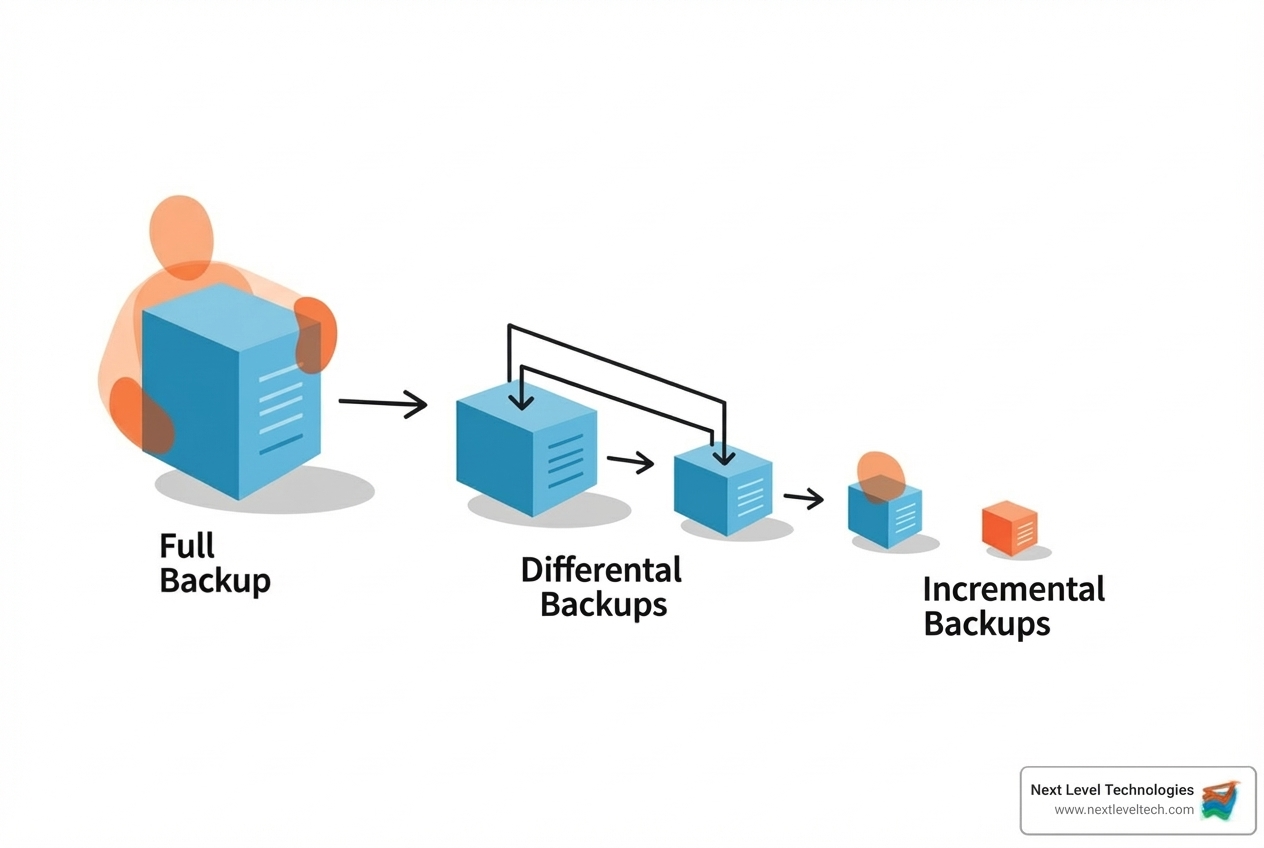
When we talk about primary backup methods, we're referring to different ways of copying your data, each with its own advantages and ideal use cases:
Choosing the right method, or a combination, depends on your specific needs, data change rate, and recovery objectives. Our team leverages advanced Data Backup Software to implement these strategies efficiently for our clients.
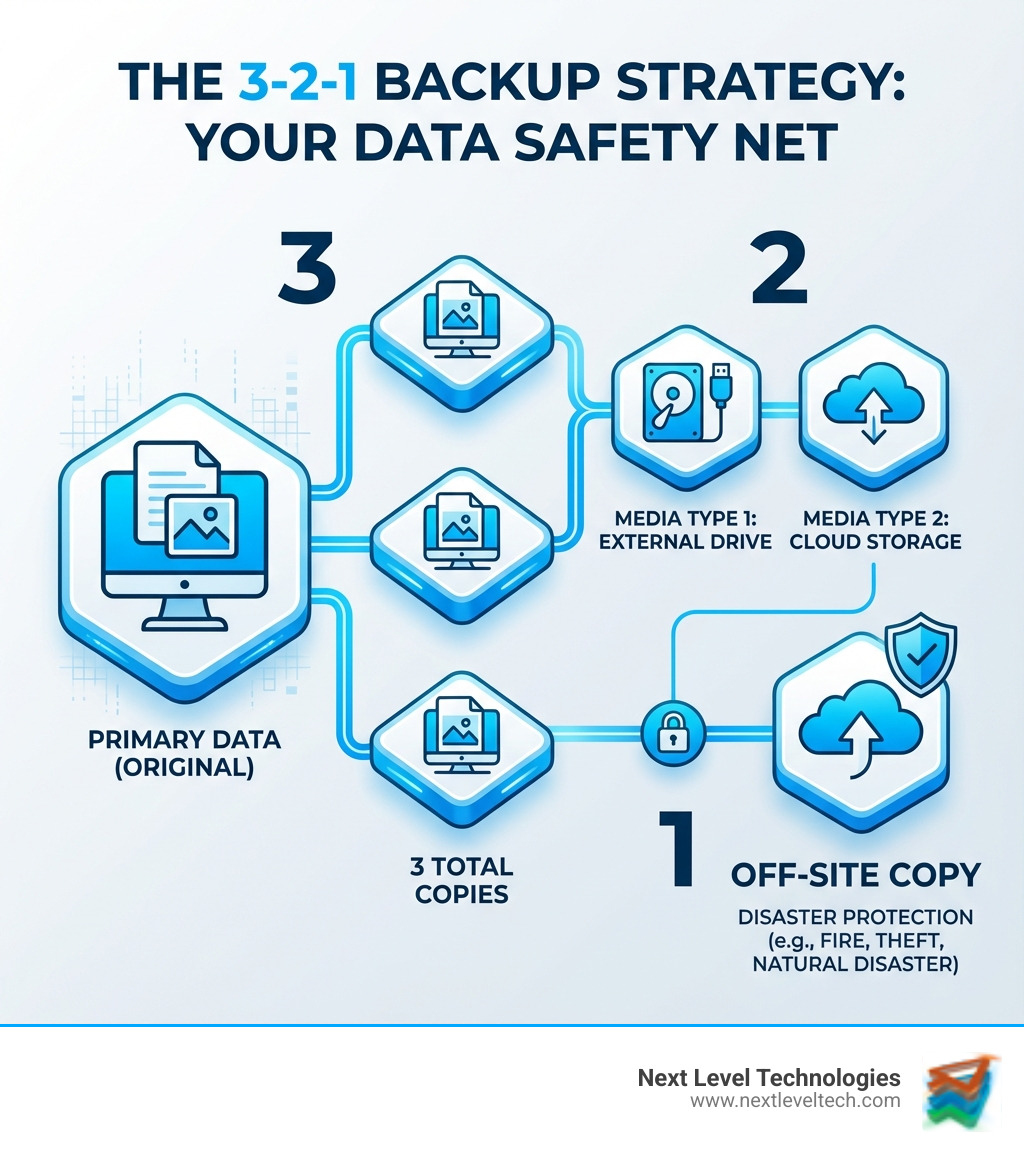
The 3-2-1 backup strategy is widely considered the gold standard for data protection, providing a robust framework to safeguard your data against almost any eventuality. It's a simple, yet incredibly powerful rule:
This strategy builds in redundancy and resilience, significantly increasing your chances of successful data recovery in the face of various threats. It's a cornerstone of effective IT Disaster Recovery Planning, ensuring that even if your primary systems and local backups are compromised, a recoverable copy remains safe and accessible.
Deciding on the right data backup in computer solution involves weighing various factors like cost, speed, security, and accessibility. There's no one-size-fits-all answer, as the best approach often depends on whether you're an individual user or a business, and the specific nature of your data.
Here's a comparison of the main types of backup solutions:
| Solution Type | Cost | Speed | Security | Accessibility |
|---|---|---|---|---|
| Local Backup | Generally lower upfront | Fastest backup/restore | Dependent on physical security | Limited to physical location |
| Cloud Backup | Ongoing subscription | Slower (internet dependent) | High (provider dependent) | Anywhere with internet |
| Hybrid Backup | Moderate to higher | Balanced | High | Balanced |
Scalability is another key consideration, especially for businesses with growing data needs. Cloud solutions offer virtually unlimited scalability, while local solutions are limited by the capacity of physical hardware. Internet dependency is a major factor for cloud backups; a slow or unreliable connection can significantly impact backup and recovery times. That's why many small businesses turn to specialized Cloud Backup for Small Business to strike the right balance.
Local backups involve storing data on physical media located near your computer or within your premises. These solutions offer fast access and are often the first line of defense against data loss.
We can help you steer these options and implement robust Hardware Backup Solutions custom to your specific infrastructure.
Cloud backup involves storing your data on remote servers managed by a third-party provider, accessed over the internet.
Our expertise in Online Cloud Backup solutions means we can design and implement a hybrid strategy that provides the ideal balance of speed, security, and cost-effectiveness for your business in Columbus, Ohio or Charleston, WV.
Having the right tools is only half the battle; implementing and securing your data backup in computer plan effectively is where the real work—and peace of mind—comes in. This involves careful planning, defining objectives, and adhering to best practices for data protection.

When developing a backup strategy, we prioritize data based on its criticality. This means identifying what data is absolutely essential for your operations or personal life. System images, application data, and personal files all have different backup needs and recovery priorities. Our team specializes in comprehensive Data Backup and Recovery services, ensuring all your critical data is protected.
Two critical metrics guide any robust backup strategy: Recovery Point Objective (RPO) and Recovery Time Objective (RTO). These aren't just technical terms; they're business decisions that directly impact how much data you can afford to lose and how quickly you need to be back up and running.
Defining RPO and RTO requires a thorough business impact analysis to understand the cost of downtime and data loss for different systems and data types. Setting realistic goals for these objectives is paramount to designing a backup strategy that truly meets your needs. This is a critical step that helps determine How Often Should You Back Up Company Data?.
A backup is only as good as its protection. Even if you have multiple copies, they're useless if compromised. Here are our best practices for securing your backed-up data backup in computer systems:
The ultimate test of any data backup in computer strategy is its ability to restore data effectively when needed. A backup that can't be restored is no backup at all!
For Windows users, familiarizing yourself with Backup and Restore in Windows is key, while Mac users can rely on restoring from a Time Machine backup. Android users have options to restore data on their devices, and Apple users can restore their iPhones from a backup. For our clients in Columbus, Ohio and Charleston, WV, we offer specialized Data Recovery Columbus Ohio services, ensuring that even in the worst-case scenario, your data can be retrieved.
We often hear similar questions from individuals and businesses about their data backup in computer needs. Here are some of the most common ones:
Prioritize irreplaceable data first: personal files (photos, documents), financial records, and critical business data. Then, consider application data and full system images for faster recovery.For individuals, this means family photos, videos, important personal documents (birth certificates, wills, tax returns), and any creative work. For businesses, this includes customer databases, intellectual property, financial ledgers, and critical operational software configurations. System images and application data are crucial for rapidly rebuilding an entire system, minimizing downtime after a major failure.
The biggest risks are not testing your backups, human error (accidental deletion), hardware failure of the backup media, and security breaches like ransomware that can encrypt both original and backup files. This is why a secure, multi-layered strategy is vital.Many people assume their backups are working until a disaster strikes and they find an issue. Human error, such as accidentally deleting a backup file or overwriting a backup, can also cause significant problems. Furthermore, the physical backup media itself can fail, or worse, become a target for cyberattacks. A ransomware attack, for instance, can encrypt your primary data and then spread to any connected backup drives or cloud accounts if they're not properly isolated or protected with immutable storage.
While file-sync services (like Dropbox, Google Drive, or OneDrive) are useful for sharing and access across devices, they are not true backup solutions. They sync changes, including deletions, across all devices. If you accidentally delete a file on your computer, that deletion often syncs to the cloud and your other devices, effectively deleting all copies. A dedicated backup and recovery solution from Next Level Technologies protects against accidental deletion and corruption by maintaining version histories and allowing you to recover older versions of files, even after they've been deleted from your active working folders.
When data is constantly under threat from hardware failures, human error, and malicious cyberattacks, a robust data backup in computer strategy is no longer optional—it's a critical component of personal and business resilience. By understanding the importance of backups, choosing the right methods and solutions, and implementing strong security practices, you can safeguard your digital future.
Don't wait for a disaster to find the gaps in your data protection. A proactive strategy ensures that your irreplaceable memories and vital business operations remain secure and recoverable.
At Next Level Technologies, we're more than just an IT service provider; we're your partner in data resilience. Our team brings extensive technical experience and specialized cybersecurity training to every client engagement, ensuring that your data backup in computer systems are not just functional, but truly professional-grade. Whether you're in Columbus, Ohio, Charleston, WV, or Worthington, OH, we're here to provide expert guidance and custom solutions custom to your unique needs.
Take the first step towards a secure data strategy with our managed IT services and IT support. Let us help you protect what matters most.
Explore health service administration careers, leadership skills, degrees, salaries, and job outlook for modern healthcare executives.
October 24, 2026
Learn how Healthcare Management Administrators Inc optimizes self-funded plans, provider networks, and clinical quality for employers.
October 17, 2026
