Master denial management in medical billing with proven strategies to reduce denials, boost appeals success, and protect revenue cycle performance.
September 25, 2026
From Laptops to Workstations: Choosing the Best Computer Equipment for Your Business
March 2, 2026
Written by
Why Choosing the Right Computer Equipment for Business Matters
Computer equipment for business is more than just a purchase—it's a strategic investment that directly impacts your team's productivity, your company's security, and your bottom line. Here's what you need to know:
Essential Business Computer Equipment:
Desktops - Cost-effective, powerful, easily upgradeable for stationary workstations
Laptops & 2-in-1s - Portable, flexible for hybrid work and remote teams
Workstations - High-performance systems for design, engineering, and data analysis
All-in-One PCs - Space-saving, sleek solutions for limited desk space
Infrastructure - Networking equipment, surge protectors, UPS systems
Key Decision Factors:
Business-grade vs. consumer-grade (durability, security, support)
Processing power and RAM based on your software requirements
Form factor matching employee roles and work environments
Security features like TPM modules and endpoint protection
Total Cost of Ownership including lifecycle and support costs
The right computer setup can make all the difference. As one CEO noted, "Technology defines the employee experience. I can't say enough about what our teams accomplish through the connected collaboration they enjoy with Microsoft solutions."
Many mid-sized businesses struggle with outdated technology that costs more to maintain than replace. Statistics show it costs 200% more to support a server that is 5 years old or older, and managers report that aging systems go down about 3 times more than new equipment. When your team can't complete day-to-day tasks due to system failures, you're losing money—not just in repair costs, but in lost productivity and missed opportunities.
The global market for business computers is projected to reach $350 billion by 2027, and businesses that upgrade their hardware every 3-4 years typically see a 15-20% increase in employee productivity. With over 70% of businesses now prioritizing cybersecurity when purchasing new equipment, the stakes have never been higher for making informed technology decisions.
I'm Steve Payerle, President of Next Level Technologies, and I've spent over 15 years helping businesses in Columbus, Ohio, and Charleston, West Virginia, select and deploy the right computer equipment for business that protects their operations and maximizes their technology investment. Our team's extensive cybersecurity training and technical experience means we understand exactly how to match the right equipment to your specific business needs, budget, and security requirements.
Business-Grade vs. Consumer-Grade: A Crucial Distinction
When we talk about computer equipment for business, one of the most critical distinctions we emphasize for our clients in Columbus, Worthington, and Charleston, WV, is the difference between business-grade and consumer-grade hardware. It's a bit like choosing between a family sedan and a commercial delivery truck – both get you from A to B, but one is built for rigorous, daily, professional demands, and the other is for personal use.
Why is this important for your business?
Business-grade computers are designed from the ground up to handle the "rigorous demands of a professional setting." This isn't just marketing speak; it translates into tangible benefits that directly impact your operations:
Durability and Build Quality: Unlike their consumer counterparts, business PCs are constructed with higher-quality components and more robust chassis. They're built to "last longer, endure more stress," and withstand the daily bumps and bruises of an office environment. This means less downtime and fewer repair costs for your team.
Improved Performance Components: Business-grade machines often feature "superior processing speeds" and are optimized for "robust multitasking capabilities." While a consumer PC might boast a fast processor, business models ensure that every component – from the CPU to the memory and storage – works harmoniously to deliver consistent, reliable performance under heavy workloads.
Advanced Security Features: This is where business-grade truly shines. With "over 70% of businesses consider cybersecurity a top priority when purchasing new computer equipment," integrated security features are non-negotiable. Business PCs come with hardware-level security like Trusted Platform Modules (TPM) for secure boot processes and encryption, as well as improved operating systems like Windows 11 Pro, which offers "phishing safeguards and passwordless security." These features are crucial for protecting sensitive business data from changing cyber threats.
Longer Lifecycle: Business equipment is designed for a longer operational lifespan, typically 3-5 years, compared to consumer models that might struggle after 2-3. This predictability in lifespan allows for better IT planning and budgeting.
Better Warranty and Support Options: Manufacturers like Dell, HP, and Lenovo offer specialized business support, including on-site service and advanced exchange programs. This means quicker resolutions to hardware issues, minimizing disruption to your workflow. Imagine a critical system goes down; with business-grade support, we can often have a technician dispatched within 1-2 business days after remote diagnosis.
Total Cost of Ownership (TCO): While the initial price tag of a business-grade computer might be higher, its extended lifespan, reduced downtime, lower repair costs, and improved security features often result in a significantly lower TCO over its lifetime. As we've seen, it can cost "200% more to support a server that is 5 years old or older." Investing upfront in quality computer equipment for business is a proactive step that saves money and headaches down the line.
At Next Level Technologies, our team's extensive cybersecurity training means we understand the nuances of these differences and can guide you toward solutions that not only perform well but also offer the robust protection your business needs.
Choosing the Right Computer Equipment for Business
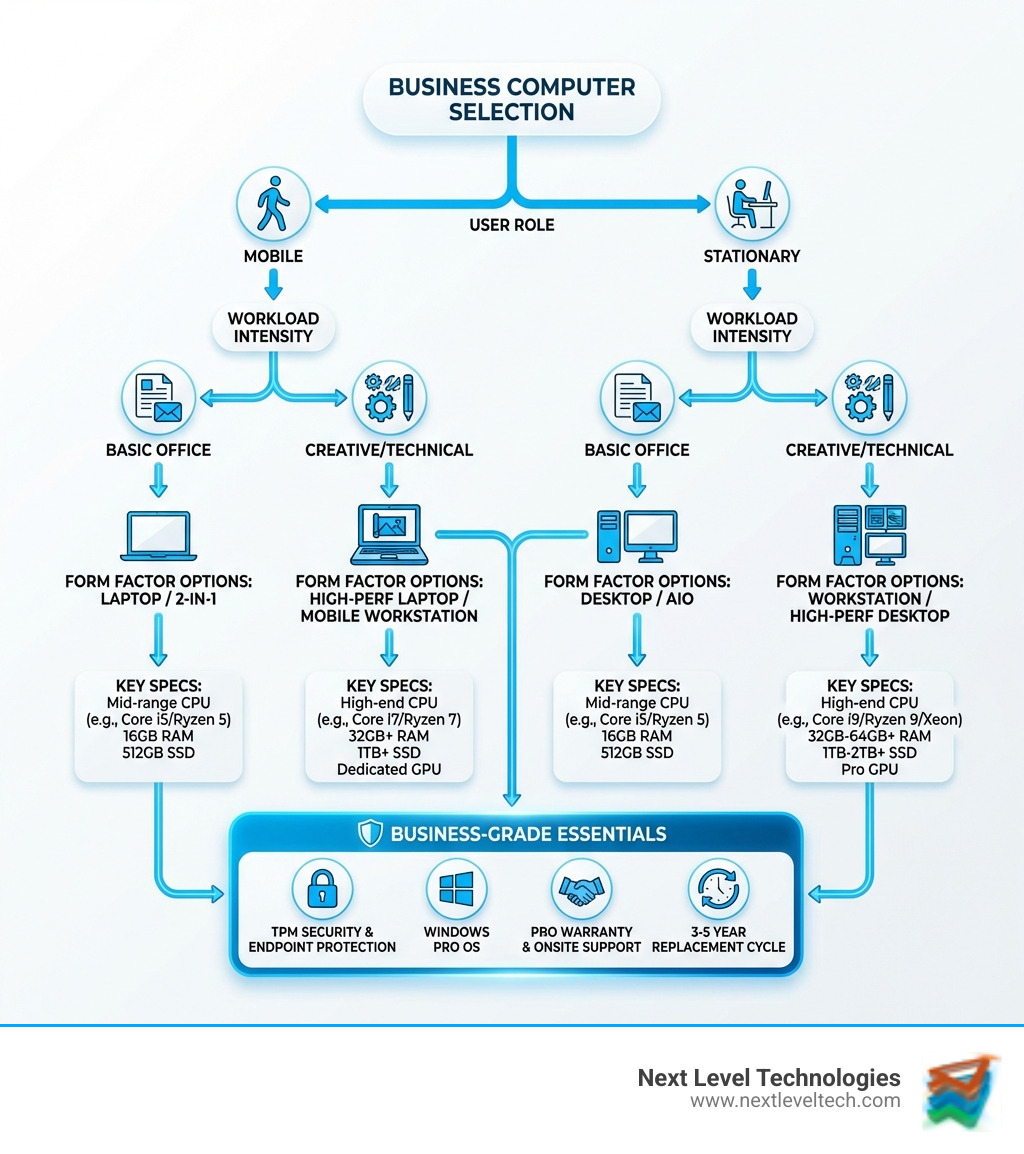
Choosing the perfect computer equipment for business isn't a one-size-fits-all endeavor. It's about understanding your specific needs, workflows, and budget. For our clients across Columbus, Worthington, and Charleston, WV, we help steer this complex landscape by focusing on form factors, workload requirements, user roles, and, of course, smart budgeting.
Desktops, Laptops, and All-in-Ones: Finding the Perfect Fit
The first major decision often revolves around the physical form factor of the computer. Each has its strengths, catering to different business environments and user preferences.
Desktop PCs: These are the traditional workhorses of the office. Our clients often choose desktops for stationary workstations where raw power, upgradeability, and cost-effectiveness are priorities. Desktops generally offer "more affordable computing power, processing speeds, and storage capacities than equivalent laptops." They're also easier to maintain and upgrade components like RAM and CPUs, allowing your hardware to "keep pace with hardware advances" for longer. Plus, a desktop setup allows for better ergonomics, enabling "monitors to be positioned at eye level" and peripherals to be arranged for comfort, which can significantly reduce strain during long work hours. You'll find them in various sizes, from mini-towers to compact small form factors, fitting neatly into any office space.
Laptops & 2-in-1s: In today's hybrid work world, laptops are indispensable. They offer unparalleled "portability" and flexibility, ideal for mobile professionals, remote teams, or employees who frequently move between different workspaces. Manufacturers like HP offer "EliteBook AI Laptops for premium style, portability, and AI power" and "ProBook AI Laptops for performance, manageability, and security for hybrid workforces." These devices are designed for productivity on the go, with features like "long battery life and fast charging capabilities." It's no wonder that "laptops and 2-in-1 devices accounting for over 60% of business computer sales."
All-in-One (AIO) computers: AIOs offer an neat, space-saving solution by combining the computer components directly into the monitor. They're perfect for businesses looking for a clean, clutter-free aesthetic, especially in reception areas or client-facing roles. With "power-efficient components, falling LCD prices, and ubiquity of touch functionality," modern AIOs like the HP OmniStudio X 31.5 or HP Envy 34 All-in-One provide a sleek, powerful, and often touch-enabled computing experience. They excel where desk space is limited but a larger screen is desired.
Specialized Computers for Unique Needs
Beyond the general categories, certain business functions demand specialized computer equipment for business.
Workstations: These are the heavy-lifters, designed for "specific professional workflows" that require immense processing power and graphics capabilities. Think CAD/CAM design, video editing, complex data analysis, or software development. Workstations, such as HP's ZBook Mobile and Z Desktop Workstations, are built to handle "demanding workloads and advanced workflows," often featuring dedicated GPUs and ECC RAM for stability. They are "engineered for expandability" and can run resource-intensive applications for hours without interruption, crucial for creative professionals and engineers. They're not just about raw power; they're about how well that power performs in specialized tasks.
Thin Clients: For businesses leveraging cloud computing or Virtual Desktop Infrastructure (VDI), thin clients offer a secure, manageable, and cost-effective solution. These minimalist devices rely on a central server for processing and storage, making them ideal for environments where data security and centralized management are paramount. HP offers "Thin Clients for secure and manageable cloud and VDI environments," minimizing local data storage and reducing the attack surface for cyber threats. They're simple to deploy and maintain, perfect for large organizations or those with standardized software needs.
Key Factors for Selecting Computer Equipment for Business
Regardless of the form factor, several core specifications will dictate the performance and suitability of your computer equipment for business.
Processing Power (CPU): The CPU is the "brain" of the computer. For basic office productivity (word processing, email), a modern Intel Core i3 or AMD Ryzen 3 is often sufficient. However, for "data analysis and financial modeling," we recommend processors running at "3.0-3.5 GHz or higher." For software development or graphic design, "mid-range processors running at 2.5 GHz or greater" will serve you well.
Memory (RAM): RAM dictates how many applications you can run simultaneously and how smoothly they operate. While "many systems with 8 GB of RAM can handle basic tasks," we strongly recommend "at least 16 GB of RAM for efficient and effective work without delays." For "intensive applications like Adobe software or multiple high-intensity tasks," 32GB or more is ideally recommended, especially for Windows PCs.
Storage (SSD vs. HDD): This is a no-brainer for business. Always opt for Solid State Drives (SSDs). "SSD storage generally offers quicker file access and faster boot times compared to traditional HDDs." They're also more durable and reliable, reducing the risk of data loss from physical shock.
Software Requirements: Before you even look at hardware, list all the software your business uses. Does your design team need specific CAD software? Does your accounting department rely on a particular financial suite? Matching hardware to your software's minimum and recommended specifications is paramount to productivity.
Graphics Capabilities (Integrated vs. Dedicated): For most office tasks, an integrated GPU (built into the CPU) is perfectly adequate. However, for graphic-intensive workloads like video editing, 3D modeling, or complex data visualization, a dedicated GPU (a separate graphics card) is essential for smooth performance.
Operating System (Windows Pro): For business use, Windows 11 Pro is the standard. It offers improved security features, remote management capabilities, and compatibility with a vast array of business software. For cloud-centric operations, HP Chromebook Enterprise devices offer a secure, streamlined alternative.
In today's digital landscape, the conversation around computer equipment for business extends far beyond initial purchase and performance. For businesses in Columbus, Worthington, and Charleston, WV, ensuring robust security, seamless manageability, and a well-planned hardware lifecycle are just as critical as the specs themselves. These elements form the bedrock of a resilient IT infrastructure.
Ensuring Hardware Security and Manageability
Cybersecurity isn't an afterthought; it's a fundamental requirement. Our team at Next Level Technologies, with our extensive cybersecurity training, helps businesses integrate security at every layer of their hardware infrastructure.
Hardware-Enforced Security: Business-grade PCs come with built-in protections that consumer devices often lack. Features like Trusted Platform Modules (TPM) provide a secure environment for cryptographic keys and boot processes, safeguarding your system from the moment it starts up. Solutions like HP Wolf Security for Business offer a "hardware-enforced, always-on, resilient defense," protecting against firmware attacks and advanced threats.
Endpoint Protection: Every computer, laptop, and server is a potential entry point for cyber threats. Robust endpoint protection software, combined with hardware security, creates a multi-layered defense. This is critical for safeguarding your data, identity, and devices against cyber threats, a top priority for over 70% of businesses.
Remote Management and Deployment: For businesses with multiple employees or remote teams, efficient IT management is key. Business-grade hardware from brands like HP and Dell includes "manageability features for easy remote configuration, updates, and repairs." Tools like Dell's SupportAssist for Business PCs offer "proactive and predictive capabilities," helping us monitor and address potential issues before they impact productivity. This allows our managed IT services team to keep your systems updated and secure without disrupting your daily operations.
Staff Cybersecurity Expertise: This is where Next Level Technologies truly shines. Our staff's deep technical experience and specialized cybersecurity training mean we don't just provide equipment; we provide the expertise to secure and manage it effectively. We implement best practices and proactively protect your business.
Cloud Integration (Microsoft 365): Modern business computing is intrinsically linked to the cloud. Services like Microsoft 365 for Business offer powerful tools like secure email, collaboration platforms (Microsoft Teams Essentials), and cloud storage (OneDrive for Business). Integrating your hardware seamlessly with these cloud services improves productivity while maintaining data security and compliance. Microsoft even offers AI chat features within Microsoft 365, further boosting efficiency.
Data Protection: Beyond endpoint security, robust data protection strategies are essential. This includes regular backups, encryption for data at rest and in transit, and secure storage solutions. Dell, for example, boasts the "world's broadest storage portfolio with comprehensive security features," highlighting the importance of secure storage in your overall IT strategy.
Planning for Upgrades and Replacements
Ignoring the lifecycle of your computer equipment for business is a recipe for disaster. Proactive planning for upgrades and replacements is crucial for maintaining productivity and avoiding costly downtime.
Hardware Refresh Cycle (3-5 years): As a general rule, we advise clients to plan for a hardware refresh every "3-5 years." This applies to everything from individual workstations to critical servers. Beyond this timeframe, the "costs to support a server that is 5 years old or older" can skyrocket by "200%," and older systems are "3 times more" prone to failure.
Impact of Outdated Devices: Outdated devices don't just slow down; they become security vulnerabilities. They struggle with modern software, lack the latest security features, and often experience more frequent breakdowns. This directly impacts employee productivity, which can see a "15-20% increase" when businesses upgrade their hardware every 3-4 years.
Budgeting for Replacements: Proactive budgeting for hardware replacement is essential. Instead of reactive, emergency purchases when a system fails, plan for these investments. Consider financing options like Dell Pay Pro, which allows businesses to own equipment after making equal monthly installments, or exploring certified refurbished devices for cost savings.
Leasing vs. Purchasing: This is a common question. Leasing can offer predictable monthly costs and allow for easier upgrades at the end of a term, while purchasing offers full ownership and potential tax benefits. We help our clients weigh these options based on their financial strategy.
Data Migration; Secure Disposal: When replacing hardware, secure data migration is paramount to ensure business continuity and data integrity. Equally important is the secure disposal of old equipment to prevent data breaches. Our managed IT services include guidance and assistance with these critical steps.
Essential Peripherals and Infrastructure
The most powerful computer is only as good as the tools surrounding it and the network it connects to. For businesses in Columbus, Worthington, and Charleston, WV, creating a complete "productivity ecosystem" with essential peripherals and a robust infrastructure is vital for employee comfort and business continuity.
Essential computer equipment for business productivity
Don't underestimate the impact of high-quality accessories on daily productivity. These elements improve user experience, reduce strain, and streamline workflows.
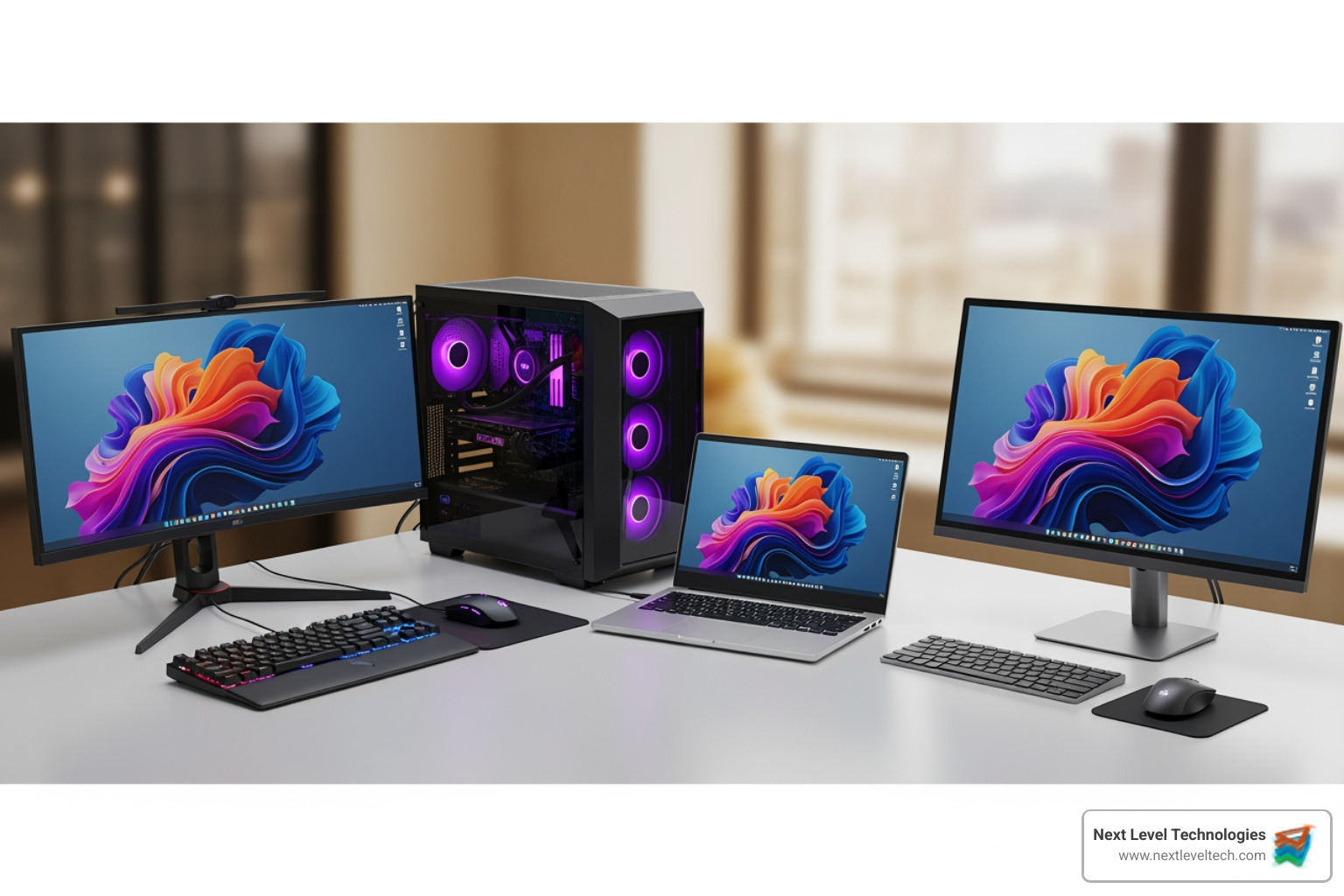
Monitors (dual-screen setups): More screen real estate means less toggling between applications, leading to increased efficiency. "Monitors at eye level" contribute to better ergonomics, and "curved monitors for easier viewing" can further improve comfort. For those frequently in video calls, HP Series 7 Pro Monitors even feature "built-in AI for conferencing."
Docking Stations: A docking station transforms a laptop into a full desktop workstation with a single connection. It provides multiple ports for monitors, peripherals, and network access, making it incredibly convenient for hybrid workers who frequently undock and redock their laptops.
Ergonomic Keyboards and Mice: These are not luxuries; they are investments in employee health and long-term productivity. "Ergonomic computer design is intended to help combat muscle aches, eye strain," and other issues that can arise from prolonged computer use. High-quality, comfortable input devices reduce fatigue and improve accuracy.
High-Quality Webcams and Headsets: With the prevalence of remote and hybrid work, clear communication is paramount. Laptops with "high-quality webcams, noise-canceling microphones" and dedicated headsets ensure professional-grade video conferencing, fostering seamless collaboration with clients and colleagues.
Here's a quick list of must-have accessories for a hybrid worker:
External Monitor (or two!)
Ergonomic Keyboard
Ergonomic Mouse
Docking Station
High-Quality USB Webcam
Noise-Canceling Headset
Laptop Stand
Network Connectivity and Power Protection
The best computer equipment for business is useless without reliable connectivity and protection from power fluctuations.
Wired vs. Wireless Networking: "Wireless networking is essential" for flexibility, especially with Wi-Fi 6 offering faster speeds and better capacity. However, for critical systems or high-bandwidth tasks, "using an Ethernet cable for some connections can give you an edge in terms of reliability, connection speed and usage cost." Our team can help design and implement robust network infrastructures, including routers, switches, and cabling, ensuring your operations in Columbus, Worthington, and Charleston, WV, are always connected.
Wi-Fi 6/6E: The latest Wi-Fi standards offer significantly faster speeds, lower latency, and better performance in crowded network environments, crucial for businesses relying heavily on wireless connectivity.
Surge Protectors: A simple, yet vital, piece of equipment. "Always use surge protection for all computing devices and peripherals" to safeguard them from voltage spikes that can cause irreparable damage.
Uninterruptible Power Supply (UPS): For critical workstations or servers, a UPS provides battery backup power during outages, allowing for a graceful shutdown or continued operation through short power interruptions. This "peace of mind provided by an uninterruptible power supply" is invaluable for preventing data loss and maintaining business continuity.
Frequently Asked Questions about Business Computers
We often hear similar questions from our clients when they're considering new computer equipment for business. Here are some of the most common, along with our expert advice:
How much RAM does a business computer need?
For general business tasks like word processing, emails, web browsing with multiple tabs, and light multitasking, 8 GB of RAM can suffice, but we strongly recommend a minimum of 16 GB of RAM for efficient and effective work without delays. For users who engage in heavy multitasking or use resource-intensive applications such as data analysis, graphic design software (like Adobe Creative Suite), or software development environments, 32 GB of RAM or more is ideally recommended to ensure smooth performance and prevent bottlenecks.
What is the typical lifespan of a business computer?
A well-maintained business computer typically has a lifespan of 3-5 years. While it might continue to function beyond this, its performance will likely degrade, and it will become more expensive to support. After 5 years, support costs can increase by 200%, and outdated systems tend to experience downtime three times more frequently than newer ones. Planning for replacement within this 3-5 year window helps maintain productivity, security, and overall efficiency.
Can I use a consumer laptop for my business?
While it might be tempting to save money with a consumer-grade laptop, we generally do not recommend it for dedicated business use. Business-grade computers offer superior durability, built with higher-quality components to withstand daily professional demands. They also include advanced security features like TPM modules and come with operating systems like Windows Pro, which provide improved security and manageability. Crucially, business models come with better warranty options and dedicated support channels, ensuring quicker resolution of issues and minimizing downtime. For critical business data and operational continuity, the investment in business-grade computer equipment for business is always worthwhile.
Conclusion
Choosing the right computer equipment for business is one of the most strategic decisions you'll make for your organization. It's about more than just buying electronics; it's about investing in the productivity of your team, the security of your data, and the long-term success of your operations. From understanding the crucial distinction between business-grade and consumer-grade hardware to selecting the perfect form factors for specific roles, every choice impacts your bottom line.
By carefully considering processing power, RAM, storage, and specialized needs like workstations or thin clients, you empower your employees with the tools they need to excel. Equally important are robust security measures, proactive hardware management, and a clear lifecycle plan for upgrades and replacements. Don't forget the essential peripherals and infrastructure—reliable monitors, docking stations, ergonomic accessories, and stable network connectivity are the unsung heroes of a productive workspace.
We know navigating these choices can be complex. That's why, for expert guidance on selecting, deploying, and managing the right technology for your teams in Columbus, Ohio, Worthington, Ohio, and Charleston, West Virginia, trust the experienced professionals at Next Level Technologies. Our staff's extensive cybersecurity training and technical experience ensure we provide solutions that are not just powerful, but secure and perfectly aligned with your business goals.